Language


 No results found

How to Install and Activate an eSIM on a Nokia Phone?
Nokia, a brand known for its quality and innovation, has taken a step forward by integrating eSIM technology into some of its latest models, including the Nokia X30 5G, the Nokia G60 5G, and the Nokia XR21. In this article, we’ll walk you through how to install and activate an eSIM, whether by scanning a QR code or manually entering activation details. Learn how to set up your Nokia eSIM quickly and easily. We’ve got all the details covered!
Before You Start Setting Up Your Nokia with eSIM:
- Make sure your Nokia device is compatible and unlocked.
- Connect to a stable Wi-Fi network to avoid interruptions.
- Have the QR code or activation codes sent to your email ready.
- If one method doesn’t work, try the other.
How to Install an eSIM on Nokia?
To install an eSIM on your Nokia device, there are two main methods: scanning a QR code or entering activation details manually. Below, you’ll find detailed steps for each method, allowing you to choose the one that best suits your needs. Let’s get started!
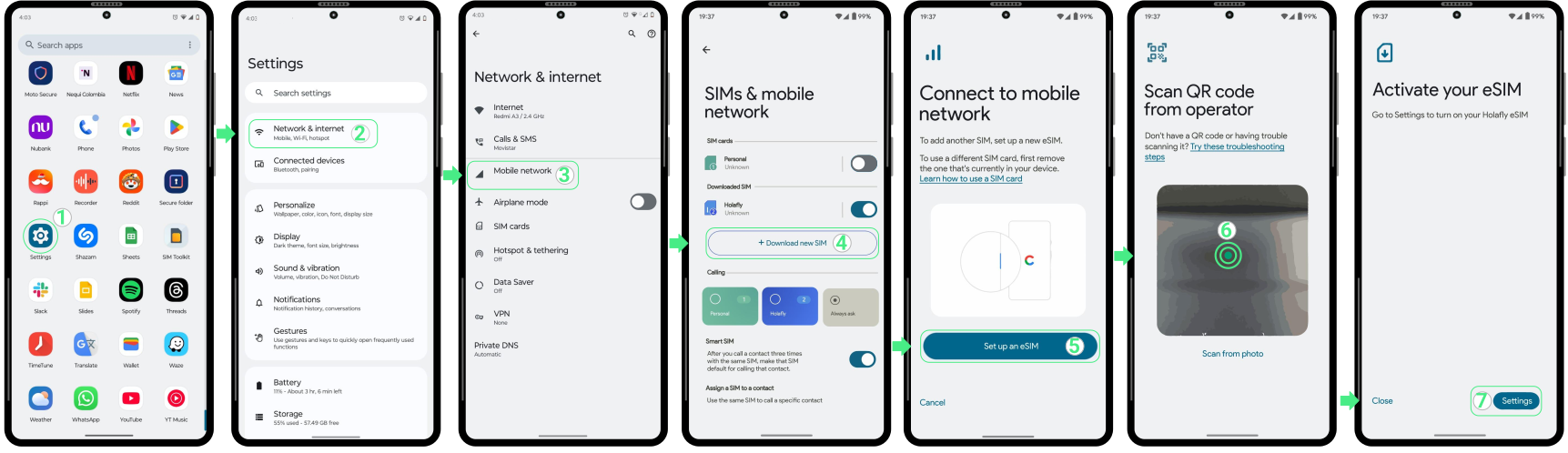
To install an eSIM on Nokia with a QR Code:
- Go to Settings → Select Network and Internet → Select Mobile network → Tap on Download new SIM → Select Set up an eSIM → Scan the QR code → Tap on Settings → Continue with the activation.
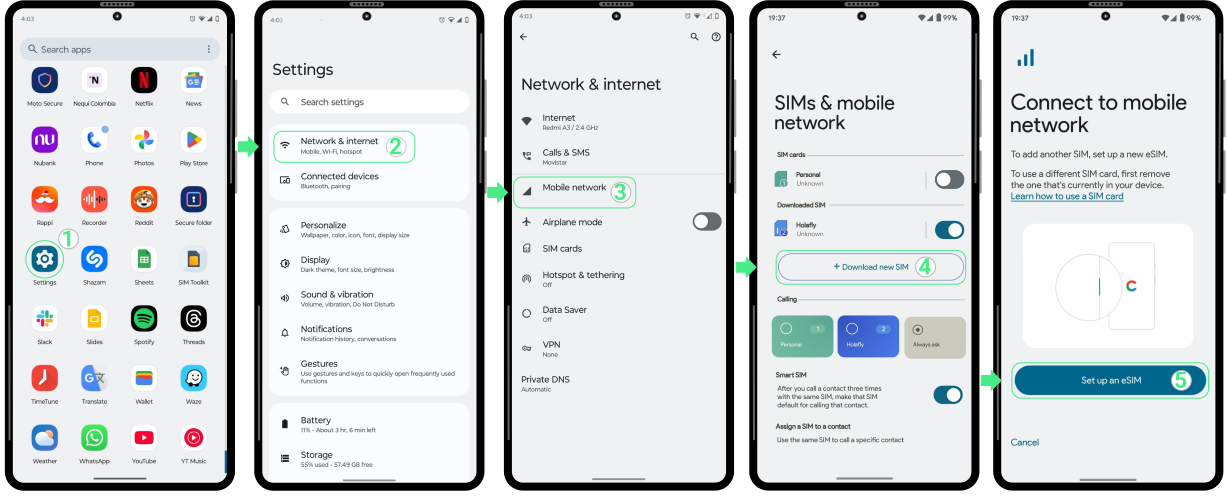
To install an eSIM on Nokia using manual codes:
- Go to Settings → Select Network and Internet → Select Mobile network → Tap on Download new SIM → Tap on Set up an eSIM.
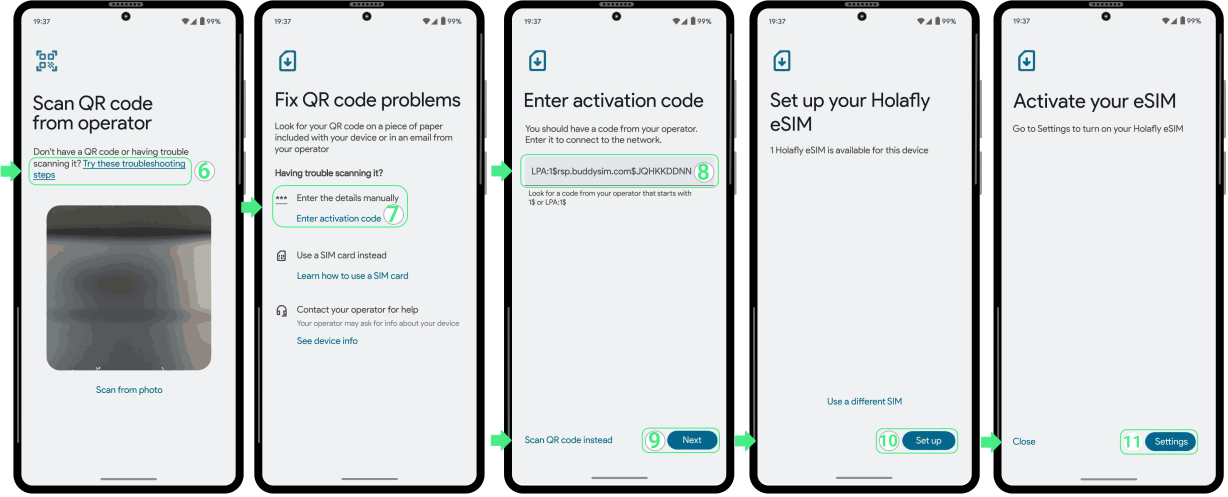
Tap on “Try these troubleshooting steps” → Select Enter activation code → Copy and paste the full activation code for Android (including LPA and the colon ':') that was sent to your email. This is not a link but a code that must be entered in the designated field → Select Next → Tap on Set up → Finally, select Settings.
How to Activate an eSIM on Nokia?
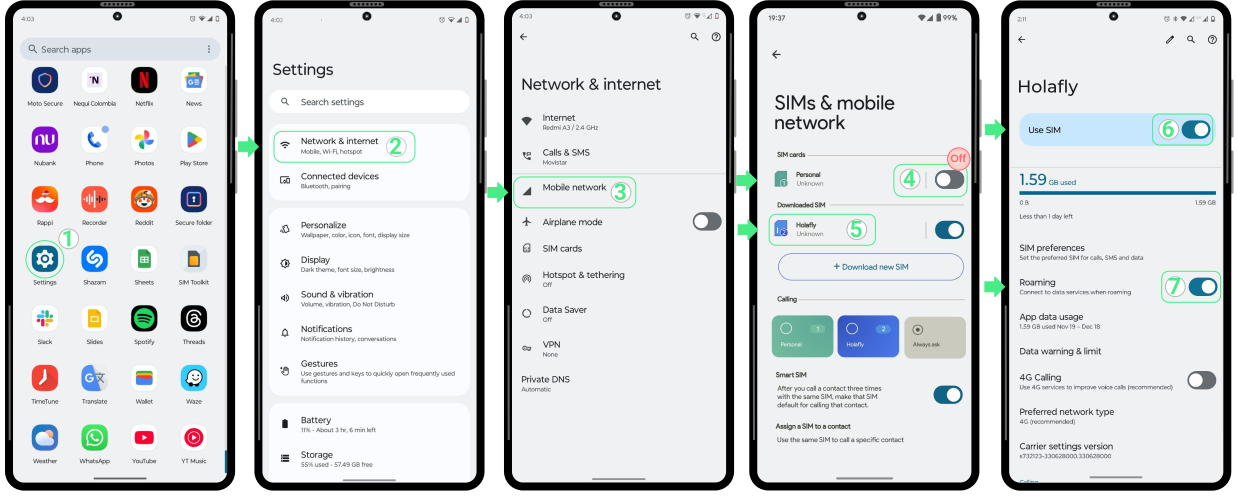
To activate your Holafly eSIM on your Nokia device, it’s important to wait until you reach your destination to ensure you don’t lose any days of your plan. If you activated the eSIM earlier, simply turn off both the eSIM and data roaming.
Here’s how to activate your eSIM once you’re ready:
- Go to Settings → Select Network & Internet → Select Mobile network → Turn off your Personal SIM → Then tap on your Holafly eSIM → Turn on the “Use SIM” and “Data roaming” switches.
To Keep in Mind:
- eSIM compatibility on Nokia devices may vary depending on the carrier and country of manufacture.
- Nokia devices can store up to 10 eSIMs. If you run out of space, you can remove one via settings.
- Remember that the manual code is not a link. You only need to copy and paste it into the designated space without leaving spaces and in its entirety.
- On Nokia phones that support both eSIM and Dual SIM, you can use a physical SIM and eSIM simultaneously, but only one can be active for mobile data at a time.

Troubleshooting Tips:
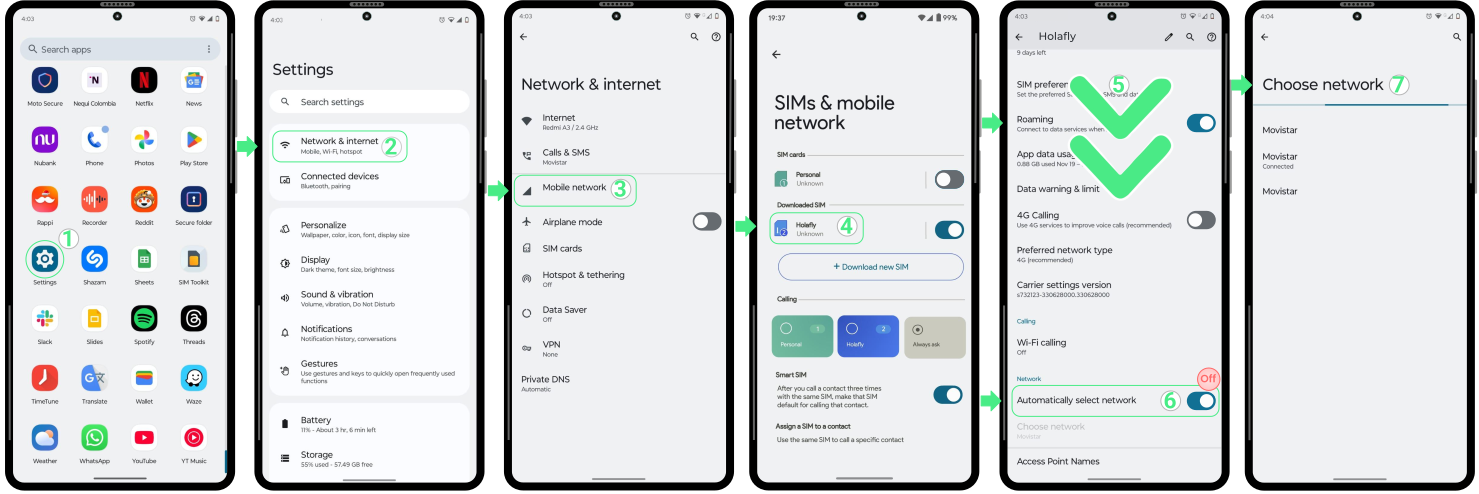
If your phone is not connecting to the network via eSIM after enabling data roaming, try manually connecting to an available network. Follow these steps:
- Go to Settings → Select Network & Internet → Select Mobile network → Choose your Holafly eSIM → Scroll down → Turn off the Automatically select network option → Select the network that appears on your screen and choose the one with the best signal and connection → Try browsing again.