Language

When Does My eSIM Activate, and When Does It Start?
Your data plan starts as soon as you activate the roaming data of your Holafly eSIM at your travel destination. Remember, installation and activation are different! So, when to activate your eSIM? You can install it before travel, but it’s best to activate it once you arrive at your destination. Let’s dive into the details.

To keep in mind
If you’re using an iPhone or iPad, note that iOS 16.4 and newer might combine installation and activation. So, wait to install it until you’re ready to activate your data plan to avoid automatic activation.

Troubleshooting Tips
How to know if my data plan is active
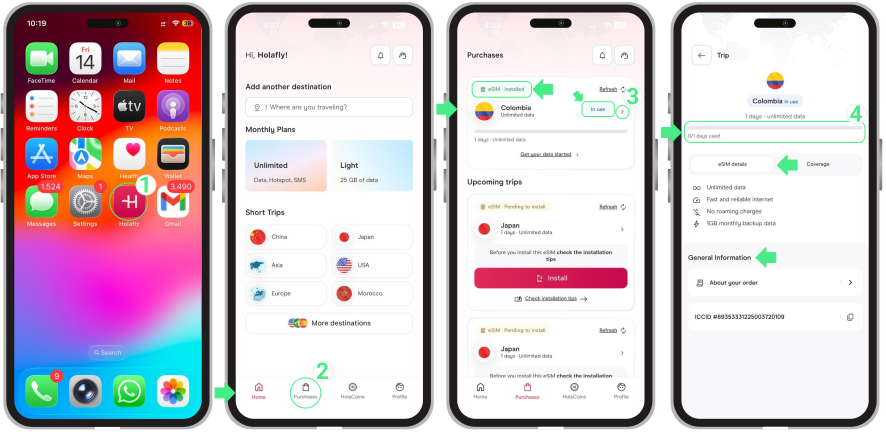
You can log in to your Holafly account through the app to see detailed information about all your eSIMs and their current status. To check if your data plan is active, follow these steps:
- Go to the Holafly App → Tap Purchases → Here you will find the status of your eSIMs (Pending to Install, Installed – Ready to use, or Installed – In use) → If your eSIM says “In use,” your data plan is active. Tap it to view its usage details.
If your eSIM has already been activated and you haven’t arrived at your destination, don’t worry. Simply turn off the data roaming of your Holafly eSIM on your phone to make sure everything is in order.