Language

How does eSIM and trip transfer work in Holafly?
In Holafly, “transferring” can mean two completely different things depending on what you are trying to do: sending a trip (daily data package) with another person or moving your active service (eSIM) to a new phone.
To avoid confusion, read below to learn about the exact scenario that applies to you.
1. Transferring a trip to another person (Companions & Group purchases)
Since September 30, 2026, Holafly eSIMs are reusable. This means you no longer need to install a different eSIM for each destination: you use the same eSIM for all your trips.
For this reason, when you buy multiple trips (daily data packages) in a single order, even if your intention was to save your family or friends the hassle of buying, the system assigns all trips to your own eSIM by default.
If this is your case, and these trips were meant for your companions but ended up stored in your account, you need to transfer them one by one to their email addresses using the Transfer trip feature in the Holafly app.
Each person will receive an email with a link valid for 24 hours to accept it, sign in to their Holafly account (or create one if they don’t have one yet). You will be able to see if they have accepted the transfer by checking the trip status in your app.
Key details to keep in mind
- Transfers only apply to complete trips (daily data packages) that haven’t been activated. You cannot transfer partial days, a trip that is currently in use, or a monthly plan (subscription).
- Transferring a trip assigns the data package exclusively to the recipient’s account to use on their phone. It does not duplicate or share your eSIM, as a line can only be active on one device at a time.
- The recipient’s device must be eSIM-compatible and unlocked by their mobile carrier.
- The person who receives the trip will not be able to transfer it to anyone else.
- Once the recipient accepts the transfer, you can’t undo it or get the trip back.
- Any refund for a transferred trip will always be credited to the original buyer’s payment method.
- If the accepted trip does not appear in the app right away, refresh the section or close and reopen the app.
Step-by-step guide to transfer a trip to someone else
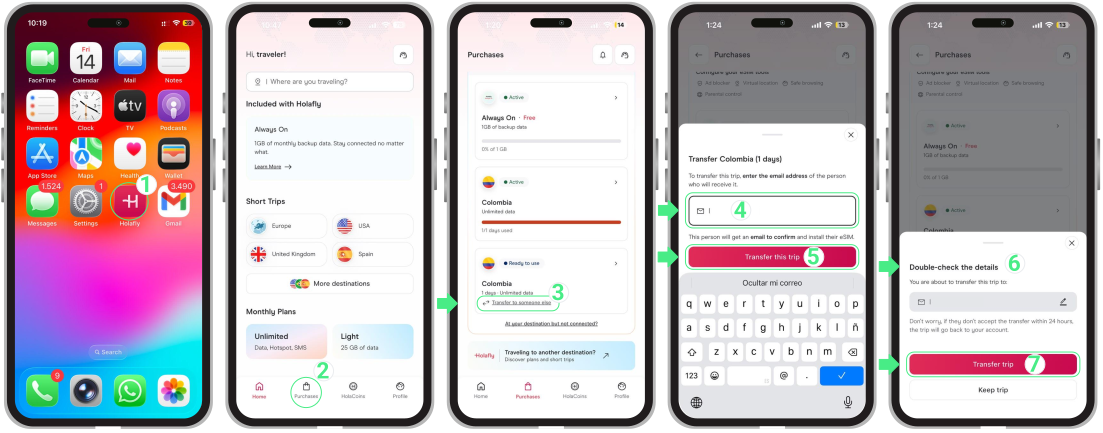
- Open the Holafly app → Go to Purchases → Select the Trip you want to transfer → Tap Transfer to someone else → Enter the recipient’s email address → Select Transfer this trip and double-check the recipient’s details. If you spot a typo or mistake in their email address, tap the pencil icon to make changes before confirming → Tap Transfer trip to send it.
Before accepting a transfer trip
If you already have a Holafly account make sure you are logged into the Holafly App on the phone where you plan to use the trip with the exact email address where you received the transfer link. If you are signed in with a different email, the accept transfer screen won’t appear, so please log out and switch to the correct email first.
What happens when the recipient accepts the transfer?
Depending on whether the person you sent the trip to already has a Holafly account or eSIM, the system will act as follows:
If they are a new user (don’t have a Holafly account or App):
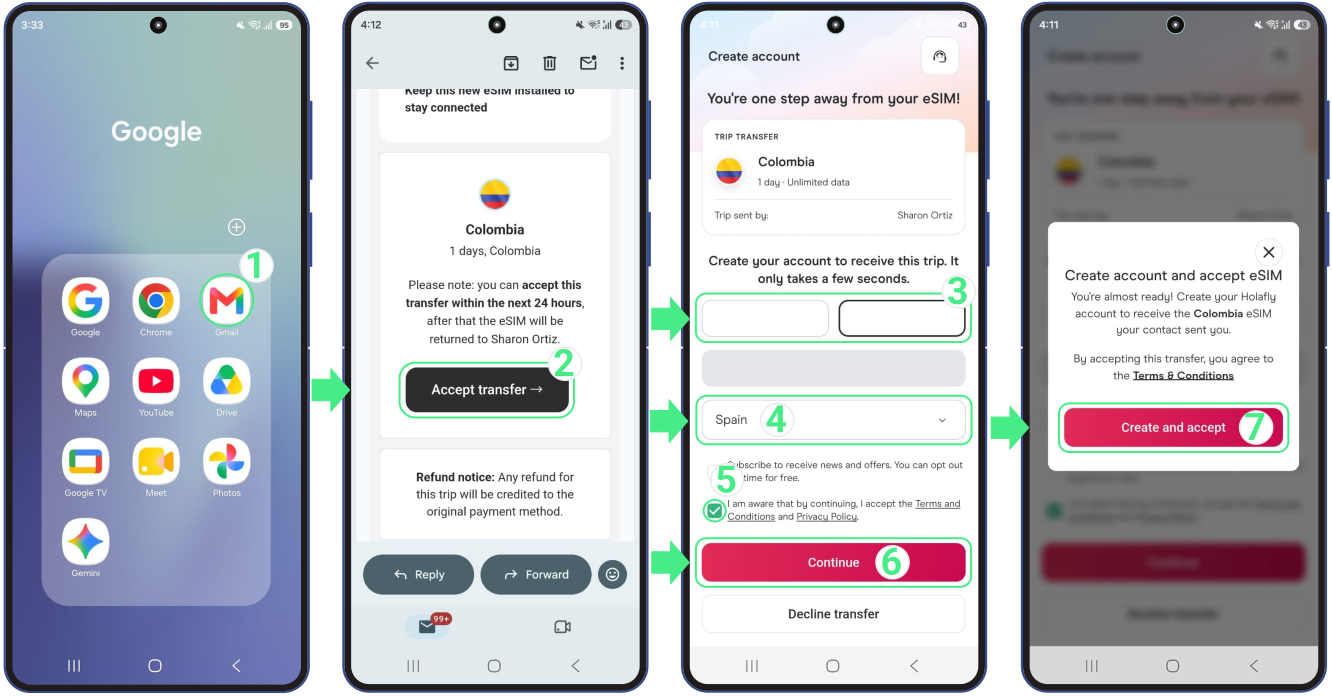
The email link will guide them to download the Holafly App and create an account. They will just need to fill in their details, accept the Terms and Conditions, and confirm the transfer. Once registered, the system will automatically generate their own reusable eSIM with a unique setup code ready to be installed on their phone.
Here is a quick visual guide showing how to accept a transfer as a new user:
If they already have a Holafly account (with a reusable eSIM):
The transferred trip will be assigned directly to their existing eSIM. No extra QR code or setup is needed; their new package will be ready to use as soon as they arrive at their destination and activate it.
If they have an older eSIM (purchased before September 30, 2026):
Trips (daily data packages) cannot be attached to eSIMs purchased before this date. Instead, a new Reusable eSIM, including its QR code and manual setup details, will be sent to them automatically, which they will need to install on their phone as usual and can use for this and all future trips.
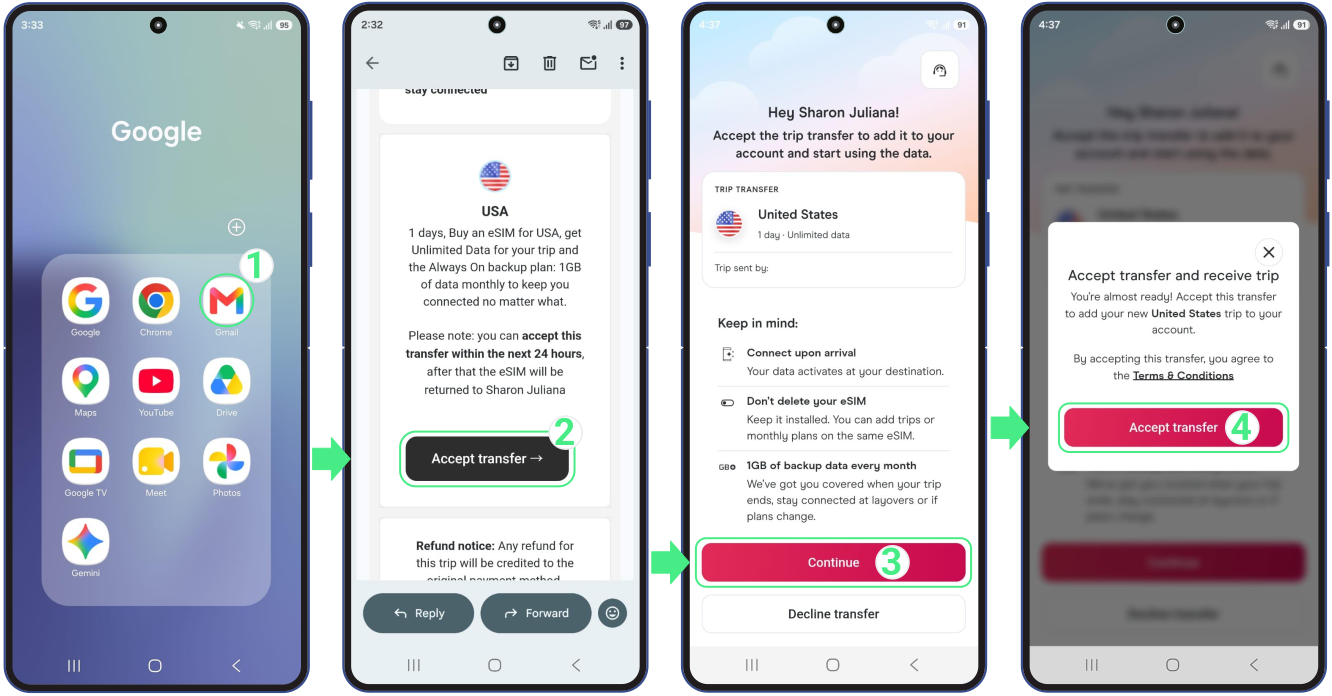
Here is what accepting a transfer looks like for an existing account holder:
Note for the sender: As soon as the recipient accepts the transfer, the trip will automatically disappear from your app and purchase history. You will no longer be able to view, manage, or activate that data package.
What happens if the recipient doesn’t accept the transfer?
If your companion does not accept the transfer, you don’t have to worry about losing your trip:
- The transfer email link is valid for 24 hours. If your recipient does not open the link and accept the transfer within that time, it automatically expires.
- Once the 24 hours pass, the unused trip return automatically to your account.
- If you still want to give the trip to your companion, simply select it again in your app and tap Transfer trip to send them a fresh transfer link via email.
- You can check whether your transfer is still pending or already accepted at any time from your Holafly app under your purchases.
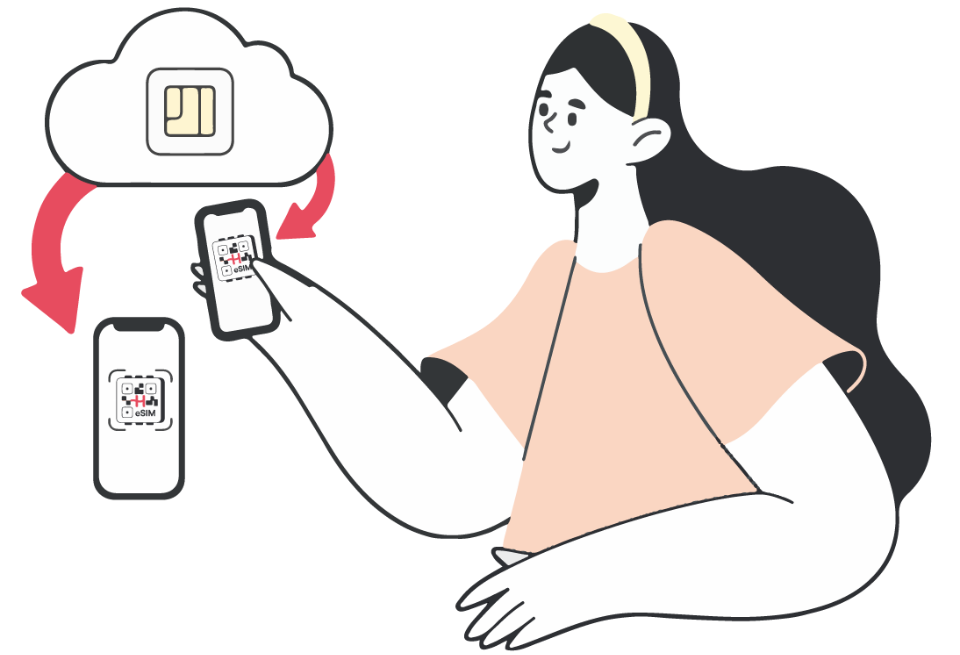
2. Moving your eSIM to a new phone (Device switch, loss, or theft)
If you recently bought a replacement phone, or if your phone was lost or stolen, you cannot move an installed reusable eSIM to another device by deleting and reinstalling it yourself in your phone settings.
Because an installed eSIM is linked to your original phone, moving your remaining days and data to a replacement device requires a quick profile replacement (Swap) handled by our Support team.
To request this profile swap, contact our team through any of our 24/7 Support channels:
- Live Chat: Available on the Holafly App, our website, Instagram, and Facebook.
- WhatsApp: +1 (661) 384-8482
- Email: help@holafly.com
What happens when support completes the eSIM swap?
- Our team securely transfers all your remaining travel days and unused data to a new eSIM profile.
- Once the swap is completed, the old eSIM automatically stops working on your previous device. If you still have access to that phone, you can safely delete or remove the old eSIM from your settings.
- As soon as the swap is processed, our Support team will share your new QR code directly in the chat and send it to your email. If you don’t have a second screen available to scan the QR code, you can find the manual setup codes in the email containing your new eSIM. Alternatively, you can install it directly through the app by following the steps below.
How to install your eSIM using the Holafly app
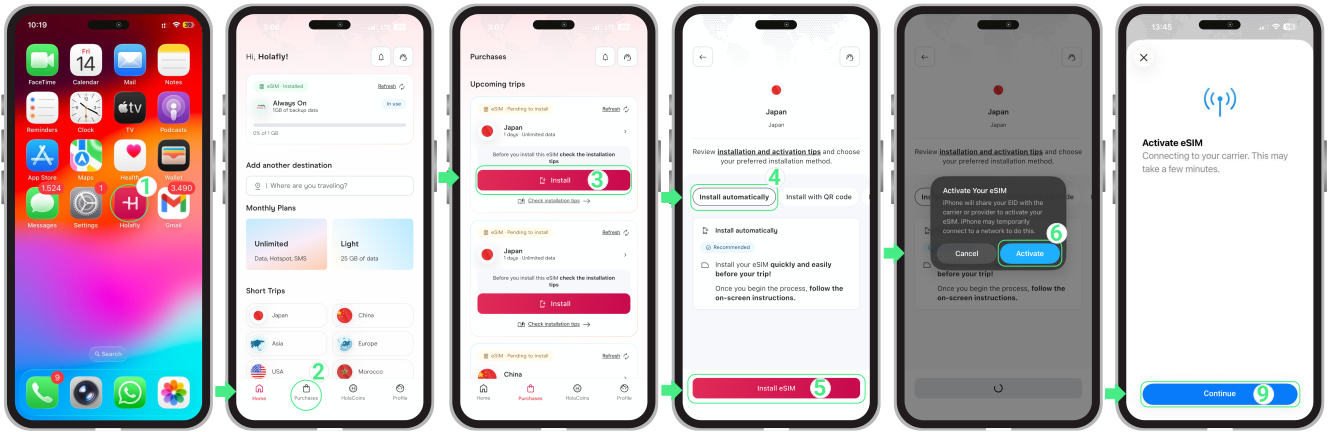
- Download and open the Holafly App on your new phone→ Go to Purchases → TapInstall on the eSIM you want to add → Choose Install Automatically → Tap Install eSIM → Tap Activate to start the installation → Then, tap Continue when the Activate eSIM screen appears (this step only continues the setup; the eSIM will not activate yet).