Language


 No results found
IMEI eSIM: What it is and how you can find it
An IMEI eSIM number is used to identify your eSIM card in a mobile network, and can be used to check eSIM compatibility, find, or block your device.

An IMEI (International Mobile Equipment Identity) number is a unique identifier of your phone’s hardware. It is used on mobile networks to identify your device and ensure a smooth and secure connection. It can also provide all the information about your phone’s specifications, including whether your device supports eSIM technology.
eSIM-compatible phones also have a separate IMEI (eSIM) code, which is used to identify your device on the network.
Follow along to learn all about IMEI, including what it is and where you can find your IMEI number. Keep in mind that IMEI only shows eSIM compatibility — you’ll still need an eSIM plan to use the technology. For unlimited data and worldwide coverage, check out Holafly eSIMs.

An eSIM you can rely on
Join over 10 million Holafly customers and get connected with our trusted, global services.
What is IMEI (eSIM)?
The IMEI (eSIM) is a code that identifies the embedded SIM on the network, separate from the IMEI number of a physical SIM card slot. On many devices, IMEI (eSIM) can also show up as IMEI2.
The IMEI should not be confused with an EID (Embedded Identity Document) number, which is used to identify the eSIM chip on your phone.
How to find your IMEI number
There are several ways to find the unique IMEI number for your device:
- If you still have the original box your device came in, you should be able to find IMEI numbers on the back of the box or in the documents inside the box.
- On most devices, dialing *#06# brings up IMEI information and EID number on the screen.
- You can find the IMEI numbers through your phone’s settings:
- To find IMEI on iPhone, go to Settings > General > About > Scroll down to find IMEI numbers
- To find IMEI on Android, go to Settings > About Phone > Status > IMEI. Keep in mind that these steps may differ slightly depending on your device and the version of your operating system.
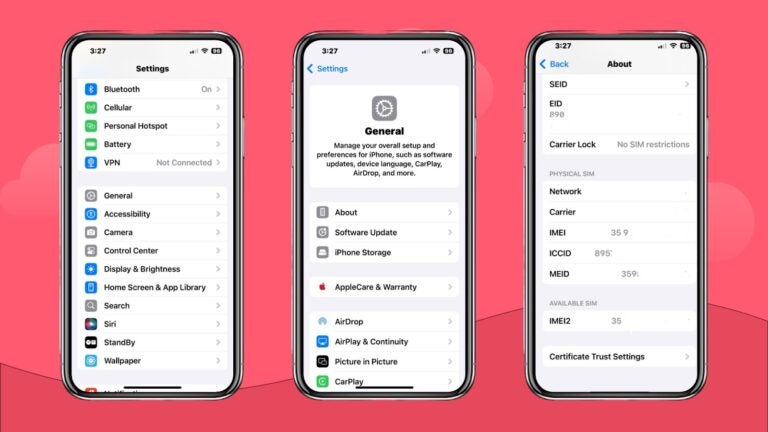
What are IMEI numbers used for?
While primarily used to identify your device on a mobile network, IMEI numbers have several other uses as well. Let’s take a look at some of the main use cases:
- Identify devices on a network.
- Check if devices are eSIM-compatible.
- Check if devices are locked and unlock them.
- Block stolen phones from accessing mobile networks.
- Find lost or stolen phones.
- Activate and connect new devices to cellular plans.
Is eSIM IMEI different from physical SIM card IMEI?
Yes, the IMEI numbers for eSIM cards and physical SIM cards are typically different. In phones with dual-SIM functionality, the IMEI for physical SIMs is typically marked as IMEI, while the number for eSIMs is marked as IMEI2 or IMEI (eSIM).
Enjoy unlimited data with Holafly
While an IMEI number can be used to check if your phone is eSIM-compatible, it won’t get you connected. That’s where Holafly has your back. Choose from travel digital SIM plans for 200+ destinations or get long-term coverage with Holafly Plans and enjoy a reliable and secure connection wherever you go.
All travel eSIM plans include unlimited data, while Holafly Plans lets you choose between unlimited data and 25 GB/month options. On top of that, all plans include data sharing and 24/7 customer support, ensuring that you always stay connected.
An eSIM you can rely on
Join over 10 million Holafly customers and get connected with our trusted, global services.
Frequently asked questions
If you have a phone that supports both physical SIM cards and eSIMs, the IMEI number for eSIMs will typically be named IMEI2 or IMEI (eSIM).
Your IMEI code is needed to activate an eSIM plan. Before activation, your carrier may ask you to provide the IMEI code to verify that your phone is eSIM compatible. When activating the eSIM, the IMEI code is usually filled out automatically.
Plans that may interest you

A senior SEO writer from Lithuania, combining my passion for writing and travel at Holafly. With years of experience in technical fields, I'm here to answer all of your questions about staying connected. I specialize in turning even the most complicated topics into something everyone can understand.