Language

How to turn off your eSIM without deleting it
You can turn off your eSIM at any time from your phone settings. This temporarily disables the line and prevents it from using mobile data, while keeping your eSIM safely stored on your device so you can turn it back on whenever you need. This can be useful if you want to avoid roaming charges from your home carrier, switch between data plans, or save battery while traveling.
Keep in mind that turning off your eSIM does not pause your plan’s validity or subscription. If your plan has already been activated, its validity continues even while the eSIM is turned off. Below you’ll find step-by-step instructions for iPhone and Android, plus some tips to get the most out of your eSIM.
How to turn off eSIM on iPhone and Android
The process is slightly different depending on whether you have an iPhone or an Android. Pick your device below and follow the steps.
How to turn off eSIM on iPhone
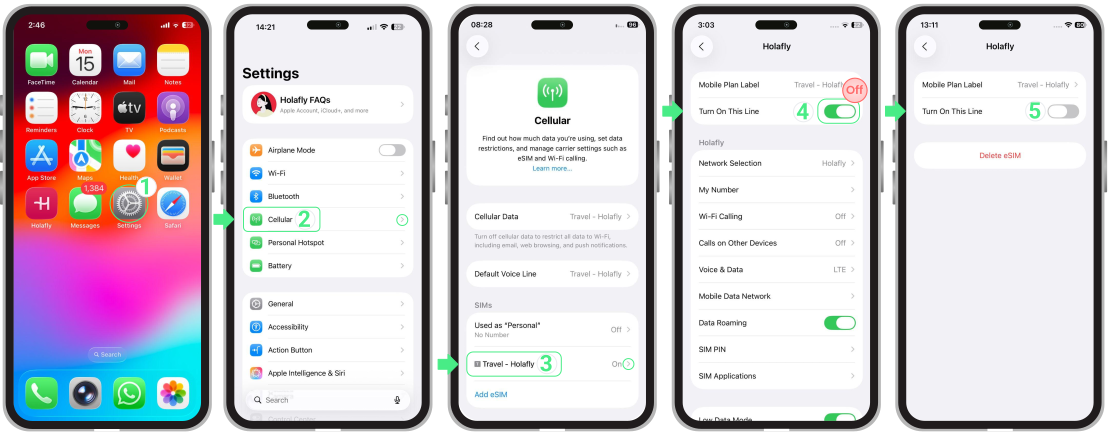
- Go to Settings → Tap Cellular or Mobile Data → Select the eSIM you want to turn off → Toggle off the Turn On This Line option. Your eSIM will be deactivated without being deleted.
How to turn off eSIM on Android
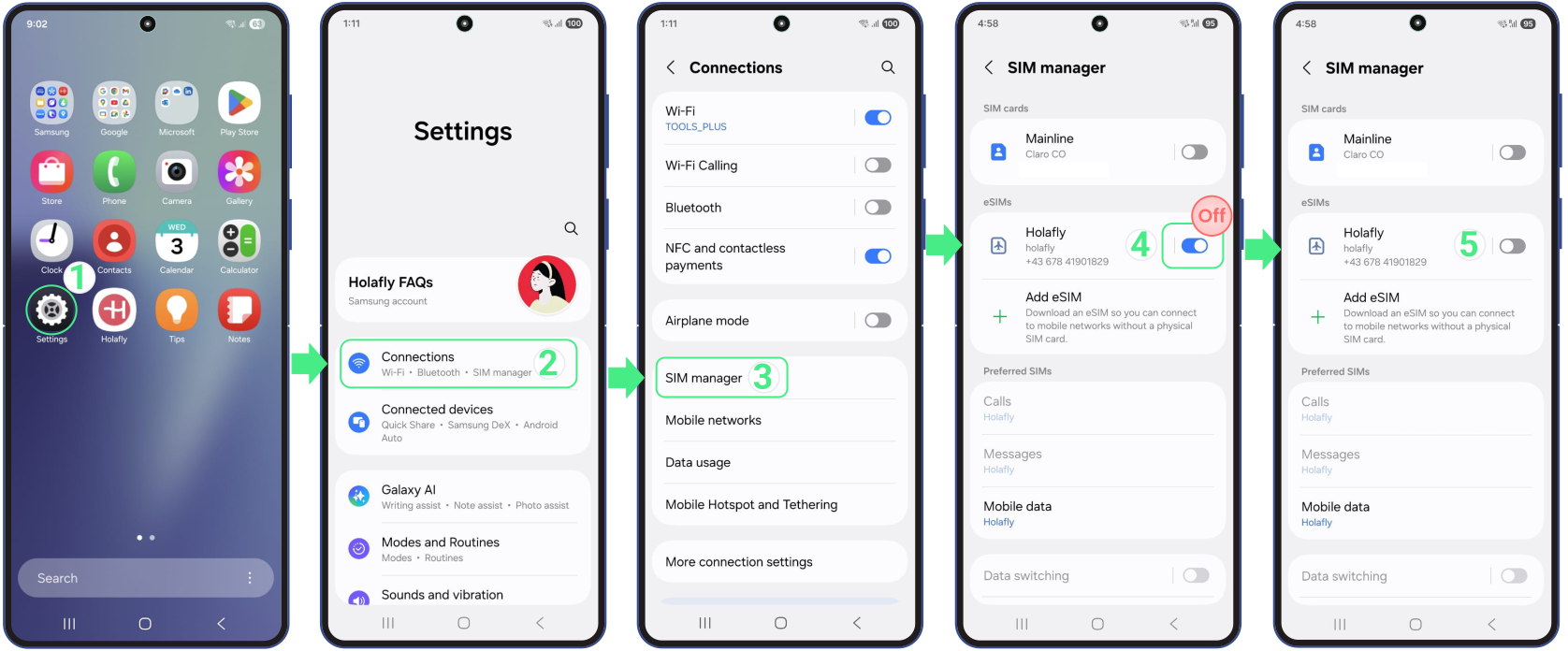
- Go to Settings → Tap Connections → Select SIM Manager → Toggle off the switch for the eSIM you want to turn off. This will safely disable your eSIM without removing it from your device.
What happens when you turn off an eSIM
Turning off or deactivating your eSIM temporarily disables data usage while keeping your line on your device. This means you won’t lose your eSIM, won’t need to install it again, and can turn it back on whenever you need, as long as your plan or subscription is still active.
Disabling your eSIM doesn’t pause your plan’s validity or billing cycle. Whether you have a daily travel plan or a monthly subscription, the time continues to count down from the moment of activation, regardless of whether the eSIM is turned on or off.

To keep in mind
- Deactivating your eSIM isn’t the same as deleting it. Your line stays on your phone, so you can use it again without a new QR code.
- If you’re abroad, turn off your primary SIM to avoid extra charges with your home carrier. When you’re back home, turn it on again and switch off your travel eSIM.
- After you turn off your eSIM and turn it back on, it may take up to 2 minutes to establish a connection. Avoid switching it on and off repeatedly during this process.
- When you re-enable your primary SIM, you may need to manually set it as your default for mobile data, calls and SMS in your device settings.
- Turn off your eSIM in low or no coverage areas (like during a flight) to save battery.
- Since some carriers offer emergency backup dataor recurring perks even after a plan expires, it’s often better to keep your eSIM turned off rather than deleting it. This ensures you don’t lose any benefits that might still be available for future use.