Language

Can I top up a Holafly eSIM?
No. Holafly no longer uses traditional top-ups. Instead, we’ve upgraded to Reusable eSIM technology to make managing your connection much easier.
When you require more data, you don’t need to install a new eSIM. You can add extra days for your current destination or buy a package for your next journey directly on the line already on your phone, since any purchase made with your original email address will automatically link to that same eSIM.
Important: Adding data or extra days applies to purchases made from September 30, 2026 onward, excluding single-use destinations (Maldives, Monaco, Yemen, Guinea, and St. Pierre and Miquelon).
Steps to add data or extra days (App or Website)
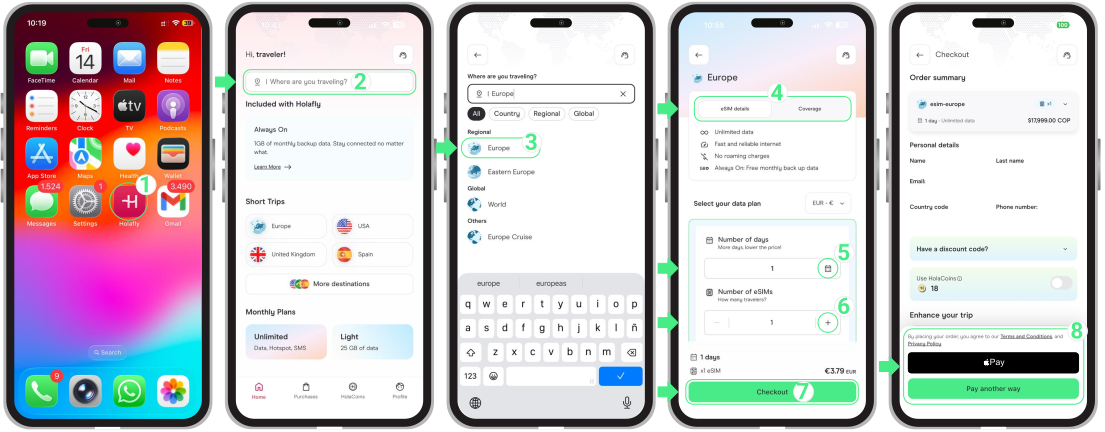
You can add extra days to your current destination, or buy a trip (daily data package) or a monthly plan (subscription) for your next stop in just a few steps:
- Open the Holafly App or visit holafly.com → Search for your destination into the search bar labeled “Where are you traveling?” → Select your destination → Review the eSIM details and Coverage → Choose the number of days and eSIMs you need → Tap Checkout → Under Personal details, make sure to enter the same email address you used for your first purchase → Select your preferred payment option → And that’s it! You’re ready to go.
To keep in mind
- Leave your Holafly eSIM installed in your phone, even after a plan ends or between destinations. This allows you to add new trips (daily data packages) or monthly plans (subscriptions) to the same line without installing a new one.
- If you purchase extra days while your current package is still active, your new days will be saved and scheduled to start automatically the moment your current trip expires.
- Active trip days (daily data package) run continuously and cannot be paused. If you buy a trip for a new country before your current one ends (e.g., Europe to Turkey), both trips will run simultaneously once you arrive and connect to the local network. Your previous trip won’t pause and will keep counting down its remaining days.
- If your package has already expired, your internet connection will stop immediately. Buying a recharge or a destination reactivates the same eSIM right away, just ensure your line is set as active and restart your phone to restore service.
- You can switch between trips (daily package) and monthly plans on the same reusable eSIM. Subscriptions renew automatically each month, but if canceled, your eSIM remains ready to use for standard trips anytime you travel next.

Troubleshooting tips
If your internet is not working after adding a new package, try these:
- Check your purchase status. Open the Holafly app and verify if your new bundle or extra days are listed as “Active”.
- Verify line and roaming settings. Ensure your Holafly eSIM is toggled ON as your active Mobile Data line in your iOS or Android device settings and confirm that Data Roaming is enabled.
- Refresh your connection. Toggle Airplane Mode ON for 10 seconds and turn it back OFF. If you still have no connection, restart your phone to force your eSIM to register with the local network.
- Allow up to 5 minutes. Network registration can take a moment after landing or after a new package activates.
- Confirm your purchase email. Make sure you entered the same email address when buying the eSIM installed on your phone. If you provided a different email, the trip (daily data package) was sent to that other account. If that account didn’t have a Reusable eSIM, the system generated a new eSIM (which requires a fresh installation). You can transfer this trip (does not apply to monthly plans) to your correct account directly from the Holafly app, but check the email address carefully before sending: this transfer is permanent and cannot be undone.