Language


 No results found

How to Delete an eSIM from iPhone?
Deleting an eSIM on an iPhone is a simple process. If you’re wondering how to delete an eSIM from iPhone, you’ve come to the right place. This guide offers helpful insights, explaining when it’s safe to delete an eSIM and when it’s better to hold off. You’ll also find a clear step-by-step process to erase an eSIM on your iPhone.
Steps to delete an eSIM on iPhone (iOS)
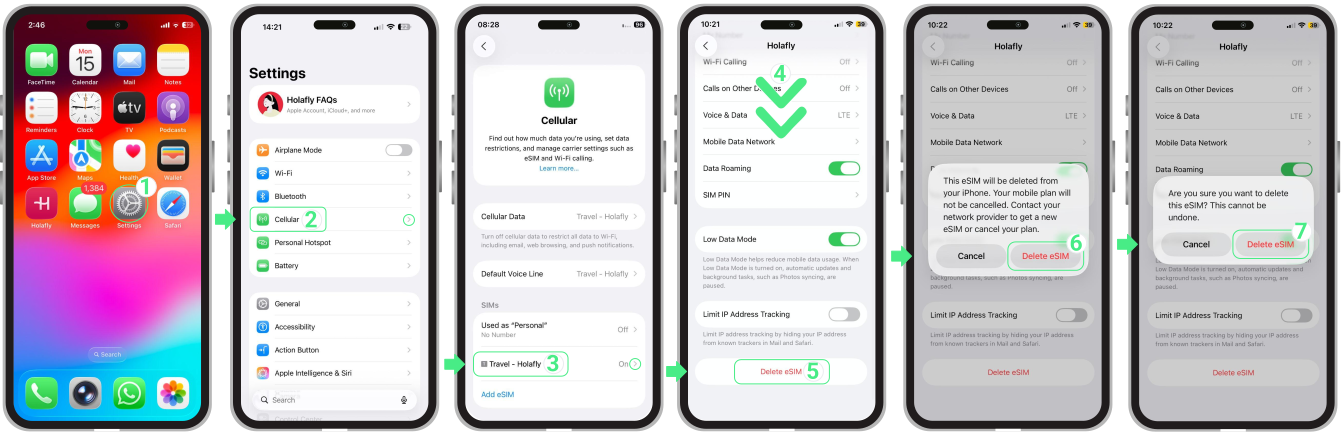
To remove the eSIM from your device, follow these steps:
- To delete an eSIM, go to Settings → Tap on Cellular → Select the eSIM you want to remove → Scroll down and tap Delete eSIM, then confirm twice.
To Keep in Mind
- You can delete your eSIM when you have consumed all your data.
- Avoid deleting your eSIM if you're experiencing setup issues, as this might cause permanent damage.
Troubleshooting Tip
- If you accidentally deleted the eSIM on your iPhone, it may not be possible to reinstall it; however, in certain cases, you can try to install it again with the manual codes.
Watch this video to learn how to install your eSIM manually!