Language


 No results found

Can I use an eSIM for multiple countries?
Yes. You can use a single eSIM for multiple countries if you choose a regional or global plan. This type of eSIM is designed to work across predefined geographic zones, allowing you to stay connected across borders without installing a new eSIM for each destination.
Instead of managing multiple local plans, an eSIM for multiple countries keeps the same profile active throughout your trip. Below, we explain how regional eSIM coverage works, what determines country availability, and what to check if the network doesn’t switch automatically when crossing borders.

How regional eSIM coverage works for multiple countries
An eSIM for multiple countries operates through regional coverage zones rather than individual country profiles. Your device uses a single eSIM profile that is authorized to work across several destinations within the same region.
In practice, this is how a multi-country eSIM behaves across different regions:
Global eSIM
A global eSIM is designed for travelers visiting multiple regions on a single trip. It works across dozens of countries worldwide by managing network transitions through international roaming agreements, keeping the same eSIM active as you move between continents.

Europe eSIM
In Europe, a regional eSIM covers more than 40 countries under one profile. As you move between destinations such as France, Germany, Italy, or the UK, the eSIM connects to supported local networks automatically, maintaining continuous data access across borders.

Asia eSIM
In Asia, regional eSIMs are optimized for multi-stop itineraries. When traveling between nearby destinations like Indonesia and Singapore, the eSIM detects the new country and connects to authorized local carriers without manual configuration.

Latin America eSIM
A Latin America eSIM uses a shared regional configuration that allows the same data plan to work across several countries. As you cross borders between destinations such as Brazil, Argentina, or Colombia, the eSIM remains active and updates the network in the background.

Africa eSIM
African regional eSIMs authenticate with different partner networks depending on the country. This setup allows travelers to move between destinations like Egypt, Morocco, or South Africa without changing eSIM profiles.

Multi-country eSIM plans often include other specific zones such as North America, the UK, the Caribbean, and the Middle East.
Advantages of using an eSIM for multiple countries
Using an eSIM for multiple countries simplifies connectivity by relying on one regional profile instead of multiple country-specific SIMs.
Key operational benefits include:
- One eSIM profile that works across several destinations, ideal for multi-country travel.
- Automatic network switching between supported countries without reinstalling the eSIM.
- Stable data access when moving between supported countries within the same region.
- Easy verification of supported destinations before traveling.

To keep in mind
- Keep Data Roaming enabled so the eSIM can authenticate with local networks when crossing borders.
- Check coverage in advance, since availability depends on regional agreements rather than individual countries and may vary between operators.
- Expect minor performance differences between destinations due to local network infrastructure.
- Use the same eSIM profile throughout your trip without reinstalling or changing settings.
Troubleshooting Tips
If your eSIM doesn’t update to the local network when you enter a new country, it’s usually a temporary network sync issue. Try the following steps before making changes.
- Toggle Airplane Mode for 30 seconds and turn it off again to refresh the network connection.
- If mobile data isn’t working, make sure Data Roaming is turned on so the travel eSIM can connect to local partner networks.
- Wait a few minutes after arrival, as network registration may take a short moment.
- Do not delete the eSIM profile if data does not work immediately, as removing it permanently disables the plan.
Check coverage and supported networks
If the connection still doesn’t update, first confirm that your destination is included in your eSIM plan’s coverage and review the supported local networks. This helps determine whether the eSIM should connect automatically or if manual network selection is needed.
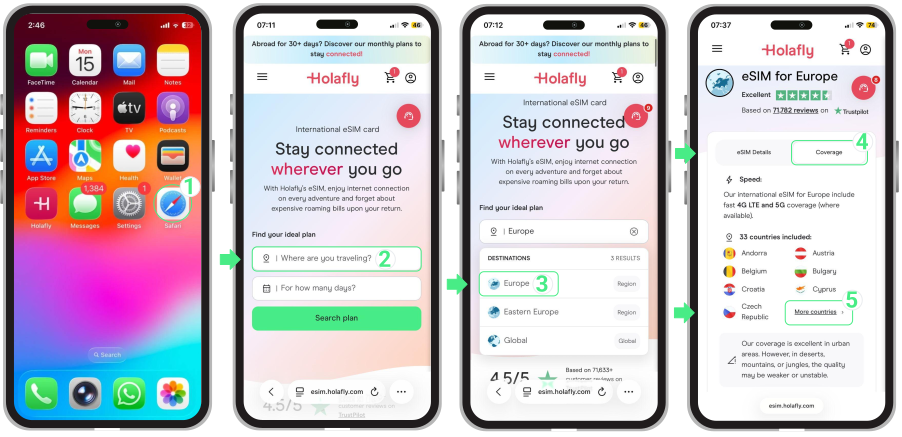
On Holafly, for example, you can check this information directly from the website by following these steps:
- Go to our website → Tap Where are you traveling? → Select your destination (for example, Europe) → Open the eSIM plan page → Tap Coverage → Review the supported countries and available local networks.