Language

How Does Holafly eSIM Work?
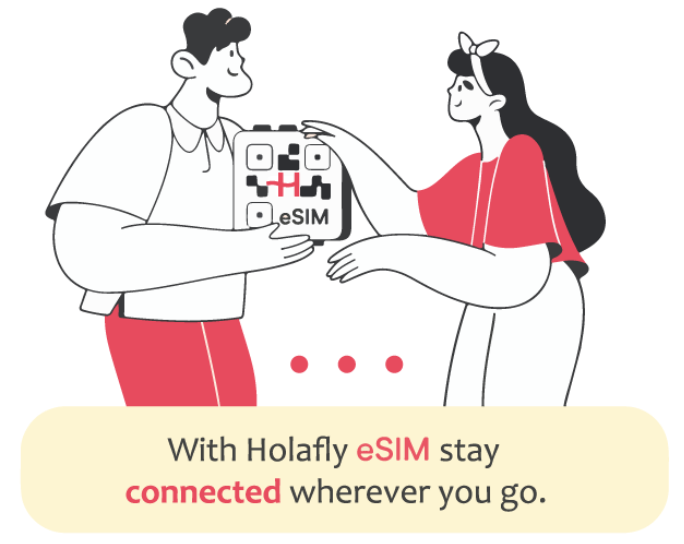
At Holafly, we make staying connected on your travels easier than ever. How does Holafly work? It’s simple: our eSIM technology replaces the need for a physical SIM card with a digital solution. This allows you to activate limited and unlimited data plans and switch networks or destinations without hassle. In this article, we’ll explain how Holafly’s eSIM works, the benefits it offers for your travels, and how you can easily purchase one. Keep reading to stay connected wherever you go!
Benefits of Using a Holafly eSIM:
When using Holafly’s eSIM, here are a few things to consider getting the most out of this technology:
- Enjoy unlimited data with most Holafly eSIM plans, plus the option to share data in some destinations.
- Install your eSIM via QR code, manual setup, or app configuration.
- You can access multi-destination plans, like the regional ones and the Global eSIM, which cover over 200 destinations, without the need to buy multiple eSIMs.
- Seamlessly switch networks without changing SIM cards while traveling.
- Easily add more days or new trips to your installed eSIM, without needing to install a new QR code.
- Monitor your data and remaining days through the Holafly app or website.
- Stay connected in many countries with Holafly’s wide global network.
- Get help 24/7 with our round-the-clock customer service.
How to buy the eSIM through the Holafly Website?
Buying your Holafly eSIM is a quick and simple process. With just a few clicks, you can get connected for your travels. Before purchasing, make sure your device is compatible and unlocked to ensure a smooth installation:
Follow these steps to complete your purchase:
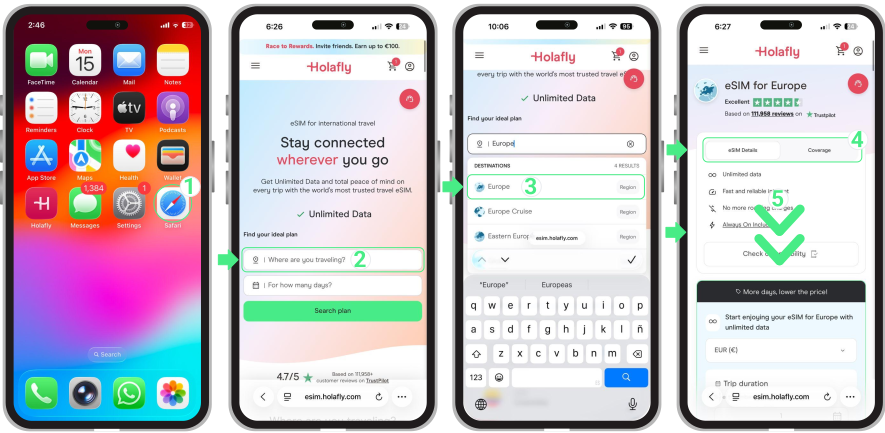
- To buy an eSIM, go to holafly.com → Type your destination into the search bar labeled “Where are you traveling?” → Select your destination, and tap on the Search plan button → Review your plan details and coverage → Scroll down to the bottom to choose the number of days and eSIMs you need.
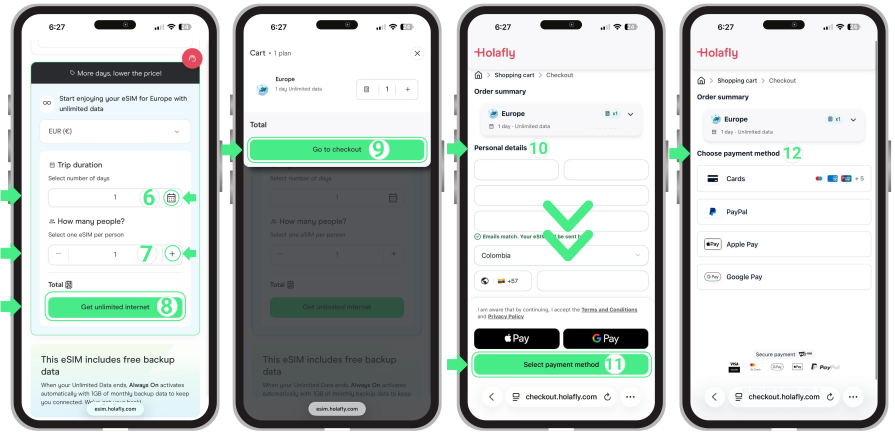
- Under “Trip duration,” select the number of days you require mobile data (The calendar is only for counting days, it does not set your activation dates. Your plan starts when you activate the eSIM at your destination) →Under “How many people,” select how many eSIMs you need, either for yourself or for each person traveling with you →To confirm your plan selection, tap “Get unlimited internet” → Review the plan details and tap “Go to Checkout” → Enter your personal information, making sure all your details are correct → Tap “Select payment method” and select your preferred payment option → And that’s it! You’re ready to go.
Important: We’re currently improving our website’s checkout experience. For now, if you’re purchasing eSIMs for different destinations, you’ll need to complete each purchase separately. For example, if you want one eSIM for France and another for Spain, you’ll need to check out each one individually. We’re working to bring this option back very soon.

To keep in mind
- To ensure a smooth installation, you’ll need a stable and secure Wi-Fi connection.
- Keep your reusable eSIM installed on your phone to easily buy more days for your current trip or add new destinations for future travels.
- We recommend installing your eSIM at home, before traveling.
- The Holafly eSIM doesn’t affect your physical SIM card. You can use both at the same time.
- Data usage on your Holafly eSIM only starts once you activate itand connect to the local network at your destination.
- For devices with eSIM and Dual SIM support, you can use both a physical SIM and the eSIM simultaneously. However, only one can be active for mobile data at a time.

Troubleshooting tips
Once you’ve purchased your Holafly eSIM, it’s time to set it up! The process is quick and easy, taking just 3 to 5 minutes. If you need help, we recommend checking out our helpful guides on how to install and activate your eSIM on Samsung Galaxy, iOS, Google Pixel, Huawei, Xiaomi, Motorola, and other devices.
You can also watch our step-by-step installation videos for iPhone, Samsung, and Google Pixel to make the process even easier.