Language

What is Always On and how does it work?
Always On is Holafly’s new benefit, included with every eSIM. If your main plan has ended and you need internet access to check a map, confirm a booking, or contact someone, Always On gives you 1 GB of data every 30 days at no additional cost (unused data does not roll over). It’s available as soon as your eSIM is installed in supported destinations and continues after your Short trip eSIM expires or your Monthly plan cycle ends, acting as a safety net as long as you keep your Holafly eSIM installed on your device.
Designed for your peace of mind, Always On helps you stay connected when your primary plan is not in use. Whether you’re between destinations, during a layover, or if your plans suddenly change, Holafly has your back when it really matters.
How does Always On work
This benefit follows a different activation logic depending on the type of eSIM you’re using. While the monthly 1GB allowance is the same in both cases, the moment it becomes available depends on your chosen plan.
Note: Always On is an additional benefit included with your eSIM. It works alongside your original plan and does not replace any data or days included with your purchase.
Short trip eSIMs
As of February 16, 2026, Always On is included with Short trip eSIMs purchased from that date onward and becomes available as soon as your eSIM is installed. From that moment, you receive a 1 GB monthly allowance that becomes available for use during layovers or after your purchased days have ended. It automatically resets every month from the installation date of your eSIM, not the calendar month. You can use it every month as long as it remains installed, turned on, and with Data Roaming enabled.
Monthly plan eSIMs
As of November 4, 2025, for Monthly plans purchased on or after that date, Always On provides continued reassurance even if you cancel your recurring plan. It’s included with your eSIM and does not create a new subscription or recurring charge. Rather than becoming available only when you cancel, this data is ready for use as your current period ends.
Since your regular service continues until the cycle fully expires, this ensures a seamless transition so you can stay connected without interruptions. It renews every month as long as the eSIM remains installed.
How to track your Always On data in the Holafly app
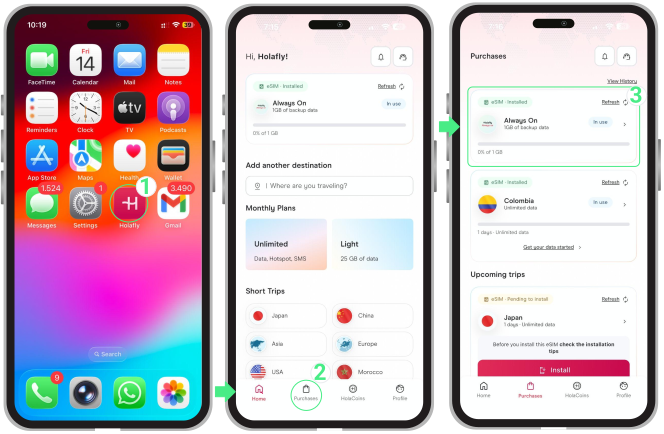
You can check your Always On, included at no additional cost, directly in the Holafly app. From the Purchases section, you’ll be able to see whether it’s currently active and how much of your 1 GB has been used, helping you stay in control of your data.
- Open the Holafly app → Tap on Purchases → There you’ll see your Always On, including its active status and usage percentage.
Note: Always On will only appear once your current plan is no longer active.
Coverage: Which destinations is Always On available?
Always On keeps you connected across 160 supported destinations in regions such as the Americas, Europe, and Asia, so you can rely on it when you need it most.
This extra data covers all destinations listed below for both Monthly Plans and Short-trip eSIMs. Even if you purchased a single-country plan, your 1 GB allowance can be used across any of them.
If you’re planning to use Always On during a layover, make sure your transit destination is included in the coverage list below.
Below, you’ll find the full list grouped by region for easy reference.
- Europe: Germany, Spain, France, Italy, United Kingdom, Greece, Netherlands, Belgium, Poland, Romania, Switzerland, Czech Republic, Norway, Austria, Hungary, Ireland, Croatia, Albania, Sweden, Lithuania, Bulgaria, Denmark, Slovakia, Montenegro, Cyprus, Latvia, Luxembourg, Finland, Malta, Estonia, Slovenia, Serbia, North Macedonia, Iceland, Gibraltar, Liechtenstein, Monaco, Moldova, Ukraine, Georgia, Portugal, Andorra, Armenia, Azerbaijan, Bosnia and Herzegovina, Guernsey, Isle of Man, Jersey.
- Asia:Japan, Turkey, United Arab Emirates, Thailand, Indonesia, Vietnam, South Korea, Philippines, India, Israel, Singapore, Malaysia, Hong Kong, Jordan, Russia, Kuwait, Taiwan, Sri Lanka, Uzbekistan, Kyrgyzstan, Laos, Macao, Bangladesh, Oman, Pakistan, Bahrain, Brunei, Cambodia, China, Kazakhstan, Qatar, Saudi Arabia, Tajikistan.
- North America:United States, Canada, Mexico.
- Central America & Caribbean: Antigua and Barbuda, Bahamas, Barbados, Belize, Costa Rica, Dominica, Dominican Republic, El Salvador, Grenada, Guatemala, Honduras, Jamaica, Nicaragua, Panama, St. Kitts and Nevis, St. Lucia, St. Vincent and the Grenadines.
- South America: Brazil, Argentina, Bolivia, Chile, Colombia, Ecuador, French Guiana, Paraguay, Peru, Suriname, Uruguay.
- Africa: Egypt, Morocco, Guinea-Bissau, Réunion, Algeria, Botswana, Burkina Faso, Cameroon, Central African Republic, Chad, Democratic Republic of the Congo, Eswatini, Gabon, Ghana, Ivory Coast, Kenya, Liberia, Madagascar, Malawi, Mali, Mauritius, Niger, Nigeria, Republic of the Congo, Rwanda, Senegal, Seychelles, South Africa, Tanzania, Tunisia, Uganda, Zambia.
- Oceania: Australia, New Zealand.
- Territories and Special Regions: Puerto Rico, British Virgin Islands, Cayman Islands, Turks and Caicos, Saint Barthélemy, Guadeloupe, Guam, Hawaii.
How to check Always On coverage in the Holafly app
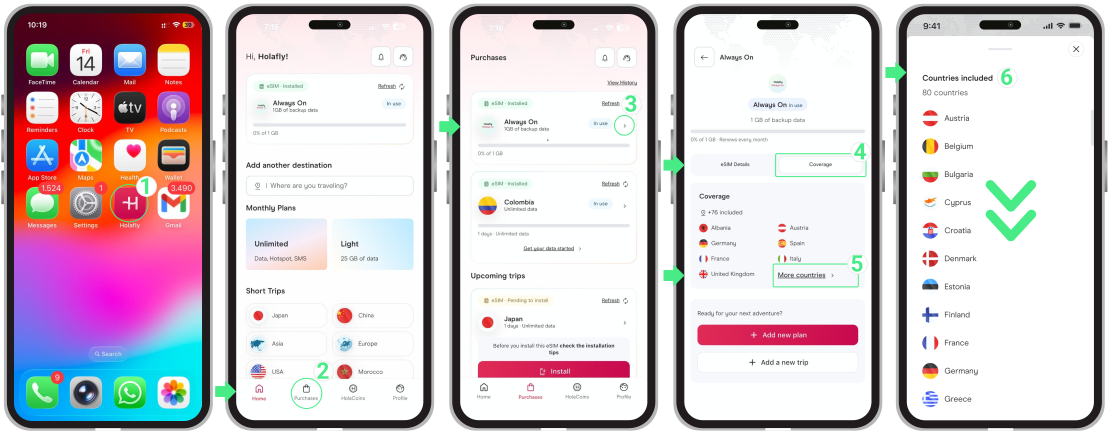
You can always check real-time coverage directly in the Holafly app to confirm whether Always On is available in your current location.
- Open the Holafly app → Tap on Purchases → Select Always On → Tap on Coverage → You’ll see the list of included countries.
Can I use a hotspot with Always On?
No. Hotspot sharing is not available with Always On. The 1 GB can only be used directly on the device where the eSIM is installed.
Terms and Conditions
- Always On works only while the Holafly eSIM remains installed on the original device. If you delete the eSIM, the benefit is permanently lost. We recommend deactivating the line instead of removing it.
- If the order linked to the eSIM is refunded, access to Always On will be removed.
- Unused data does not roll over. Each 30-day cycle, you receive a fresh 1 GB allowance, regardless of previous usage.
- This extra data is available only in the 150 supported destinations listed above, which may differ from your original plan’s coverage.
- This benefit is tied to the device used for the initial installation. It cannot be transferred to a new phone or a different eSIM.
- Access is valid for 12 months. However, Holafly reserves the right to verify the status of the service if it remains inactive for several weeks.
- If you use a Regional or Multi-destination Short trip eSIM, turning on mobile data in a country included in your purchased plan automatically starts your plan’s validity. To avoid unintended activation, use this extra data only in destinations not covered by your plan or after your purchased days end.
To keep in mind
- If you no longer want to use it, simply delete the eSIM from your phone. Remember that once you remove it, you’ll permanently lose access to your monthly 1GB of extra data.
- If you’re not planning to use the 1 GB yet, you can keep the eSIM turned off until you need it. Naming your travel eSIM on an iPhone or Android (for example, with the destination) can also help you avoid confusion with your personal SIM.
- You can always track your usage percentage directly in the Purchases section of the Holafly app to see how much of your included 1 GB is remaining.
Troubleshooting tips
If you think Always On didn’t activate correctly, try the following
- Make sure your eSIM is still installed and not deleted.
- Check that your billing cycle has fully ended if you had a Monthly Plan.
- Turn on your eSIM the same way you did the first time.
- Check that you’re in one of the supported destinations.
- Restart your phone and verify that mobile data is enabled.
- Check your Holafly account on the app to see if Always On appears active.
2. If you still can’t use your 1GB, our Holafly Support team is here to assist you. Just reach out and we’ll review your case to get you connected.
You can reach us through:
- Holafly App on iPhone and Android
- WhatsApp: +1 (661) 384-8482
- Chat: via Instagram, Facebook, or our website