Language
Traveling to the US for the World Cup™? Read this before you go
From navigating host cities to staying connected, here’s the practical checklist every international fan needs before flying to the US for the World Cup™.

The 2026 World Cup™ will be the largest, most spread-out tournament in FIFA’s history, so naturally, fans from all over the world want to be part of the action.
But this World Cup™ will be unlike the previous editions in Europe or South America. The distances between cities are much bigger, public transport is patchier, and your phone plan almost certainly won’t work the way you expect.
If you’re flying to the USA for the 2026 World Cup™, here’s what you need to know before you land. Read on to learn how to navigate between the host cities and how to stay connected as you do so.
Which US cities are hosting World Cup 26™ matches?
The 2026 World Cup™ will feature the largest number of host cities ever. There are 16 World Cup™ host cities spanning three countries (the US, Canada, and Mexico) and 9 US states.
Here’s a snapshot of the 11 US host cities, the matches that will be taking place there, and the stadium hosting the magic:
| City | Stadium | Matches |
|---|---|---|
| New York/New Jersey | MetLife Stadium | Group stage + Final |
| Los Angeles | SoFi Stadium | Group stage + Semifinals |
| Dallas | AT&T Stadium | Group stage |
| San Francisco Bay Area | Levi’s Stadium | Group stage |
| Miami | Hard Rock Stadium | Group stage |
| Boston | Gillette Stadium | Group stage |
| Seattle | Lumen Field | Group stage |
| Houston | NRG Stadium | Group stage |
| Kansas City | Arrowhead Stadium | Group stage |
| Philadelphia | Lincoln Financial Field | Group stage |
| Atlanta | Mercedes-Benz Stadium | Group stage |
Getting between the US World Cup™ host cities
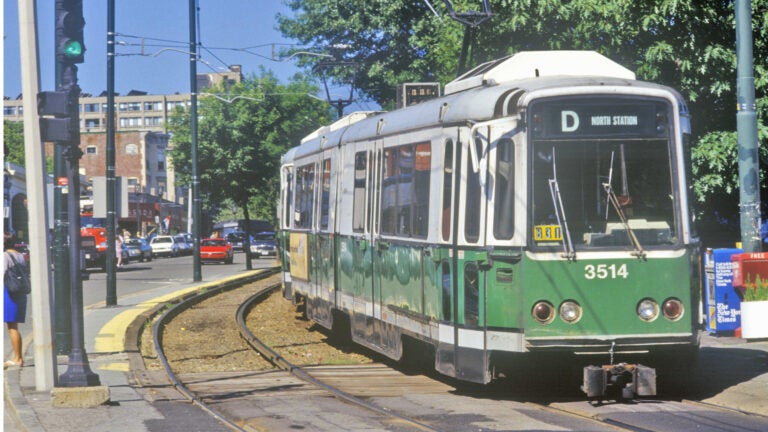
Many international fans don’t realize just how huge the USA is. You might assume you can drive between each host city, but often that’s not realistic. For example, New York to Miami is a 20-hour drive.
Domestic flights are the most practical option for traveling between major host cities. However, even flights between US cities can be longer than expected. While you can hop between European countries in 1-2 hours, flying across the states takes longer. New York is a 3-hour flight from Miami and a 6-hour flight from Los Angeles.
Then there’s the in-city transport to consider. Some cities have decent public transit, such as New York and Boston, which have efficient subways. But many US World Cup™ cities are car-dependent, including Dallas, Houston, and Miami.
For these cities, you’ll likely need to use ride-hailing apps to get around. Uber and Lyft are widely available, but they do require a working phone and data connection to use, which we’ll discuss further in the next section.
The thing most international fans don’t think about: your phone
Watching the World Cup™ in the US will require a lot more mobile data than you probably expect. Between ordering Ubers, navigating with Google Maps, and checking train times, you’ll be relying on your phone constantly.
The problem?
Your regular phone plan likely doesn’t include free data in the US, and international roaming charges can add up fast. And let’s be honest, a World Cup™ trip is already expensive enough without coming home to an unexpected phone bill.
In many countries, you can avoid roaming fees by buying a local SIM card at the airport. However, in the US, this is not as simple as you expect. Prepaid options can be limited, airport SIM kiosks are often overpriced, and setup requires time and ID verification, after a long flight when you just want to get moving.
A travel eSIM is the easiest and most affordable solution. An eSIM installs directly on your device (no physical SIM swap required), then once you land, you activate it and get instant, unlimited data.
What to do in the World Cup™ host cities beyond the matches
Most of the host cities of the 2026 World Cup™ are popular US tourist destinations, so there is plenty to do besides watching the match.
New York
New York’s MetLife Stadium is hosting 8 matches across 5 weeks, including the final. If you’re staying here for multiple matches, there are plenty of things to do in New York, such as:
- See the sights of Manhattan, such as Times Square and the Empire State Building
- Catch a Broadway show
- Explore Brooklyn’s innovative food scene
Los Angeles
The SoFi Stadium is also hosting 8 matches, making LA another of the most-visited cities during the World Cup™. There’s plenty to keep you entertained here, including:
- Relax on the long, sandy beaches
- Stroll down the Walk of Fame in Hollywood
- Shop and dine in Downtown Santa Monica
Miami
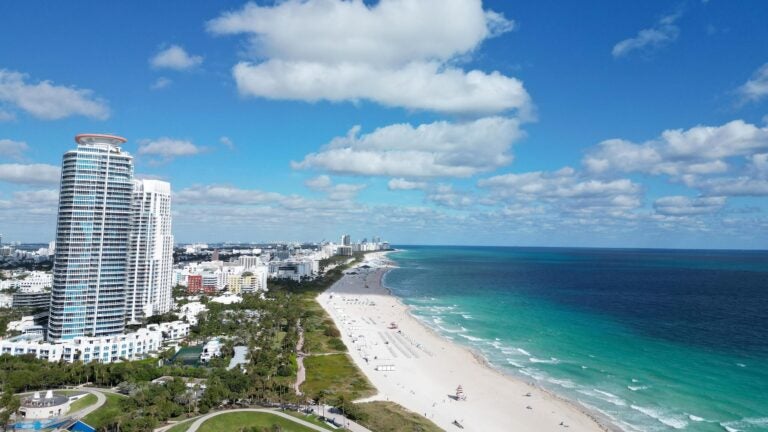
Between the 7 matches being played at the famous Hard Rock Stadium, there are many cool things to do in Miami, like:
- Soak up the sun on South Beach
- Hop between the Cuban restaurants and run bars in Little Havana
- Explore the murals and galleries in Wynwood
Boston
Boston is hosting 7 games at Gillette Stadium, about 1 hour by train from the very walkable city center. Popular Boston attractions include:
- See the city’s historic sights by walking the Boston Freedom Trail
- Explore the distinct neighborhoods like North End and Back Bay
- Tuck into clam chowder and lobster rolls at the Boston Sail Loft
Dallas/Houston
Dallas and Houston are two host cities that are easy to drive between. With an average journey time of 3.5 hours, visiting both Texan cities makes for an epic US weekend trip, while maximizing the number of group stage games you get to see.
Practical checklist before you fly to the US for the World Cup™
Before you head to the airport, scan through this international travel checklist to make sure you’ve got all the essentials sorted:
- ESTA or visa approved: Don’t assume you can apply at the last minute; it can take up to 72 hours to receive your ESTA, and visas take much longer.
- Accommodation booked near public transport: Staying close to the stadium isn’t important, but choosing accommodation close to transit links is.
- Match tickets downloaded to your phone: Avoid scrambling through your emails at the stadium entrance by saving your tickets to Apple Wallet or Files for easy access.
- USD currency on hand: While cards are widely accepted in the US, some smaller vendors or transport situations may still be cash-only (plus cash is useful when tipping).
- eSIM installed and activated: Install a travel eSIM for the USA before you fly so you can connect the moment you land and avoid wasted time at the airport.
Why international World Cup™ fans are choosing Holafly
For an event as busy and fast-moving as the World Cup™, a patchy connection is not just frustrating, it actively costs you time. Missed Ubers, failed navigation, a group chat that won’t load. None of that belongs on a trip like this.
A Holafly eSIM for USA removes that risk before you land. Install it on your device ahead of the trip, activate it when you touch down, and you are online instantly. No SIM swap at the airport, no overpriced roaming bill when you get home. Just unlimited data, 5G speeds, and 24/7 customer support across every host city from New York to Los Angeles.
Holafly also includes Always On with every eSIM: 1 GB of monthly backup data at no additional cost. Keep your eSIM installed after the tournament ends and that data stays with you, renewing every month in 70+ destinations worldwide. Whether you extend the trip, cross into Canada or Mexico for more matches, or simply want coverage on your next travel, it is already there.
Check out Holafly Plans if you are moving between multiple countries during the tournament. One plan, broader coverage, no repeat purchases.
One thing you don’t want to leave to chance? Your data connection. Make sure you’re covered from the moment you land.
Unlimited data for your World Cup™
Stay covered in every FIFA World Cup™ host city for as long as you need it, all with one eSIM.
Plans that may interest you

Hi, I'm Mika, a South Korean writer living in the US. I cover travel and live events, focusing on the practical stuff that makes your trip smoother, whether you're navigating a new city or heading to a major international event.I'm also the founder of Search SEOul, South Korea's leading SEO conference, bringing together search marketing experts and speakers from around the world.