Language


 No results found
Boost eSIM not working? Try these simple solutions
Is your Boost eSIM not working? Try these quick fixes for iPhone and Samsung to get back online in minutes.

Boost Mobile Australia uses the Telstra network and offers prepaid eSIMs for flexible, contract-free connectivity. But setup doesn’t always go smoothly, and you might find your Boost eSIM not working.
This guide walks you through the most common Boost eSIM problems and how to fix them on your iPhone and Android devices.
And if you still can’t get your Boost eSIM working, we’ll show you how to stay online with a more reliable alternative like Holafly’s travel eSIM.

Peace of mind before you fly
Set up your eSIM before travel and get unlimited data on arrival.
Why is your Boost eSIM not working?
Your Boost Mobile eSIM might not be working due to a compatibility issue, an activation error, or missing mobile data settings. Most problems fall into one of these categories, and they’re usually easy to fix.
Here are the most common reasons why your Boost eSIM is not working:
- Your phone isn’t eSIM compatible: Not all devices support eSIM, and some are still locked to a specific network.
- The eSIM activation failed: A network or app hiccup can prevent full activation, even if the QR code was scanned.
- Your eSIM QR code has expired or already been used: eSIM profiles can’t be reused once installed or transferred.
- The eSIM is installed but not active: The Boost eSIM may be installed on your phone, but not selected as the data line.
- Your Mobile data and/or data roaming are off: You must manually turn on these settings to use the data connection.
- The wrong network is selected: Boost runs on the Telstra network, but automatic network selection can fail overseas.
- Your APN settings are incorrect or outdated: Without the right Access Point Name, your phone won’t know how to connect to mobile data.
- The eSIM was deleted: You might have accidentally removed it and need a new QR code to reinstall.
- Software or carrier settings are outdated: Sometimes, on iPhones, this can block your eSIM from working properly.
How to fix Boost eSIM issues
Most Boost eSIM problems can be solved by checking compatibility, reinstalling the eSIM, or adjusting network settings.
iPhone and Android menus may differ slightly; we’ll flag the key differences as needed.
Check if your device supports Boost eSIM
Your phone must be eSIM-compatible and unlocked to use with another carrier. If not, your Boost eSIM won’t activate.
Most recent iPhones from XR onwards, and newer Android models, like the Pixel 4, Galaxy S20 series, and Motorola Edge, are eSIM-ready.
However, it’s best to always double-check if your phone supports eSIM in your settings. Here is how to do it:
On iPhone:
- Go to Settings > Mobile Data > Add eSIM to check if the option appears
On Android (e.g. Samsung):
- Go to Settings > Connections > SIM manager or Mobile Network > Add eSIM
Check if your Boost eSIM QR code has expired and request a replacement if needed
Boost QR codes are single-use and may expire after a short time. If you see an “invalid” or “already used” error, contact Boost support to request a new QR code.
You can submit a ticket to request Boost support by going to your Profile > Help Centre in the app or on their website.
Restart your phone after installation
After installing or re-adding your Boost eSIM, restart your device to apply all settings properly.
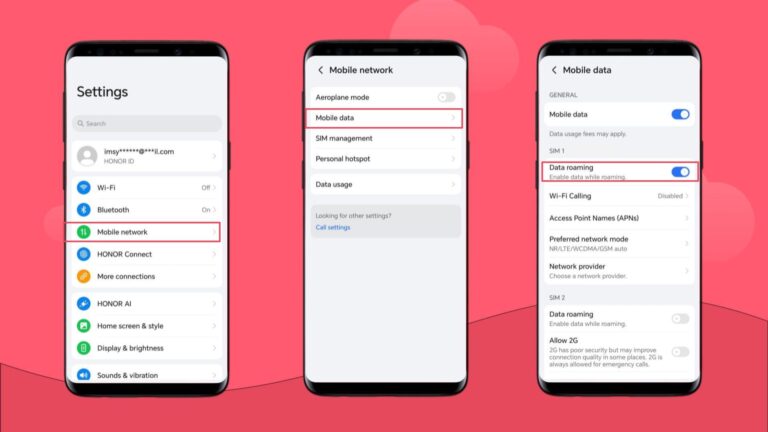
Turn on mobile data and data roaming
If mobile data or Boost international roaming is off, your eSIM won’t connect. Make sure both mobile data and data roaming are enabled before troubleshooting any further. Here is where to find them in your device settings.
- On iPhone: Go to Settings > Mobile Data > Data Roaming
- On Android: Go to Settings > Network & Internet > Mobile Network > Roaming
Enable and disable Airplane Mode
Switch Airplane Mode on for 10 seconds, then turn it off. This can force a fresh network connection.
Manually select a local network
Sometimes the auto-selection feature fails, and you need to choose a local network manually.
- On iPhone: Go to Settings > Mobile > Network Selection > disable Auto > pick Telstra or partner
- On Android: Go to Settings > Connections > Mobile Networks > Network Operators
Update or reset your APN settings
Incorrect or missing APN settings can block data. Check Boost’s APN guide or reset your device’s settings:
- On iPhone: Go to Settings > Mobile Data > Mobile Data Network > Reset
- Android: Go to Settings > Mobile Network > Access Point Names > Reset to default
Reset your network settings
Resetting your network clears any conflicts that might have been blocking your Boost eSIM function.
- On iPhone: Go to Settings > General > Transfer or Reset > Reset Network Settings
- On Android: Go to Settings > System > Reset > Reset Network Settings
Contact Boost customer support
If none of the above help, there may be an issue on the provider’s end, not an issue with your device. Contact Boost’s customer support to see if they can solve your issue.
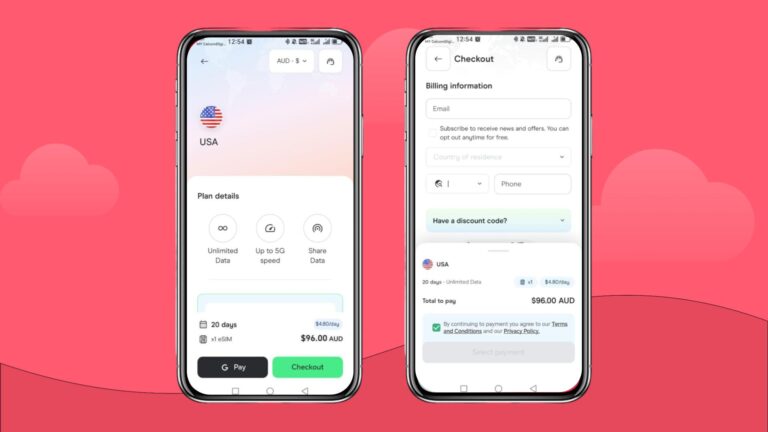
Still not working? Stay connected effortlessly with Holafly eSIM
If your eSIM still won’t activate, Holafly offers an easy Boost alternative: a single eSIM you can use in Australia and keep using as you travel around the world with no roaming fees or SIM swaps.
With unlimited data in 200+ destinations, Holafly international eSIM offers you contract-free flexibility, instant setup, and instant QR code activation. Just choose a daily or monthly plan that fits your trip, and get 24/7 multilingual support if you ever need help.
It’s one eSIM for Australia, and everywhere you go next.
Get connected from anywhere
Buy your eSIM no matter where you are. All you need is an internet connection.
Disclaimer: The data in this article is accurate as of February 4th, 2026, and is subject to change.
Plans that may interest you


Formerly a travel journalist turned marketing copywriter, I found my way back to the travel world with Holafly—my dream company that made remote work possible. My motto? “Dream big and make it happen.” I’m passionate about writing, exploring the world, and staying active through walking, running, swimming, and hiking. I also love learning, reflecting, and connecting with inspiring minds.