







 Language


 No results found
VPN Unlimited review: What do I need to know?
Full VPN Unlimited review: User options, pros, areas for improvement, general features, and user experience.

Looking for a way to browse freely while traveling the world? This VPN Unlimited review explores why it’s an appealing choice in the world of cybersecurity, especially for those who want simplicity and hassle free access to global content. But when it comes to protecting our digital “peace of mind,” it’s crucial to see if it truly lives up to its promises.
In this review, we’ll take a close look at VPN Unlimited, covering user opinions, technical features, pros and cons, the overall experience, and alternative options if the service doesn’t meet your needs. The goal is to help you determine whether this provider is the right companion for you.
What is VPN Unlimited and what is it used for?
VPN Unlimited is a Virtual Private Network service developed by KeepSolid Inc., a digital security company based in New York, USA. Since its launch in 2013, it has grown from a simple tool into a key component of the MonoDefense security suite, gaining popularity for its focus on providing access to global content.
Its main purpose is to act as a secure tunnel for your data, encrypting your information so you can browse safely on public Wi-Fi networks. Because it operates under U.S. jurisdiction (a member of the “Five Eyes” alliance), it can raise concerns among users who are particularly strict about privacy. Even so, the brand has maintained a solid reputation thanks to years of uninterrupted service and a highly loyal user base.
In today’s market, it has carved out a niche for itself, largely thanks to its distinctive lifetime plans. This approach has made it a practical choice for travelers looking for a one-time purchase to access streaming platforms while maintaining a simple layer of online security.
What does VPN Unlimited include?
VPN Unlimited offers a well-rounded set of features tailored to modern travelers who prefer to keep things simple. The service focuses on delivering a stable connection and reliable access to global content, supported by an infrastructure that has expanded significantly in recent years.
To give you a clear picture of its capabilities, here is a summary of its main features:
| Feature | Description |
| Servers | Over 3,000 servers |
| Countries | Coverage in over 80 countries |
| Devices | 5 or 10 simultaneous connections (depending on the plan selected) |
| Encryption | 256-bit AES military-grade encryption |
| Protocols | WireGuard, OpenVPN, IKEv2, and KeepSolid Wise |
| Kill Switch | Available on Windows, macOS, Android, and iOS |
| Split tunneling | Yes, you can choose which apps go through the VPN |
| Dedicated IP | Available as an add-on |
| Lowest subscription price | $161 for three years |
| Free trial | No, 30-day money-back guarantee |
| Lifetime plan | $5,999 |
| Dedicated IP | Yes, for an additional fee |
| No-logs policy | Yes, though without external audits |
No-logs policy
The company claims to follow a strict no-logs policy, meaning it doesn’t link your browsing activity, IP addresses, or connection timestamps to your account. It’s worth noting that, although it’s based in the U.S., the company states it does not store any data that could compromise user identity.
However, there is no information indicating that external audits have been conducted to confirm this no-logs policy,
Performance for streaming and gaming
This is one of the areas where the service really tries to reassure users. For streaming, it provides purpose-built servers for platforms like Netflix, Hulu, Disney+, and BBC iPlayer, aimed at getting around regional restrictions. In practice, that means you can watch your favorite shows smoothly and without interruptions.
Gamers will appreciate the inclusion of the WireGuard protocol, which is built for speed and efficiency and helps keep ping low, a key factor in competitive play. The VPN also provides protection against DDoS attacks, so other players cannot disrupt your game.
Keep in mind, though, that performance will always depend on how far you are from the server you choose. For the best results, it’s usually a good idea to connect to the closest available location.

Device and operating system compatibility
Versatility is essential for digital nomads, and this VPN covers all the major operating systems: Windows, macOS, Linux, Android, and iOS. It also provides browser extensions for Chrome, Firefox, and Edge, making it easy to secure your web traffic quickly when you only need protection for browsing.
A plus is that it works on devices that don’t have built-in VPN support. You can set it up manually on Apple TV, smart TVs, and gaming consoles. Depending on your plan, one account lets you connect five or ten devices at the same time.
Security and additional features
Overall, this provider offers strong security. It uses AES-256 military-grade encryption, keeping your banking and personal data safe from prying eyes. On top of that, it includes features that go beyond the basics:
- KeepSolid Wise: It’s a proprietary protocol that adds an extra layer of obfuscation by making VPN traffic appear like regular HTTPS activity. This makes it especially useful for getting past firewalls in countries with strict censorship or on office networks that block VPN use.
- Port Forwarding: This feature lets you manage incoming connections and is especially appreciated by advanced users who want to set up home servers or optimize specific P2P downloads.
- Router Compatibility: You can install the VPN directly on routers with compatible firmware, like DD-WRT or Tomato. This lets you automatically protect every device connected to that WiFi network, from your phone to your smart thermostat.
How to Use VPN Unlimited?
Setting up this tool is straightforward and only takes a few minutes, so you can focus on enjoying your trip or working peacefully from anywhere in the world.
Below, we explain the specific steps to activate your protection.
Booking process
The first step is to choose the plan that best fits your budget and travel dates.
- Go to the official KeepSolid website and navigate to the VPN Unlimited section.
- Select one of their plans: monthly, annual, or their famous lifetime plan.
- Create your account with a valid email address and choose your preferred payment method, whether it’s a credit card, PayPal, or even Bitcoin if you want an extra layer of anonymity.
- Once your payment has been confirmed, you will receive a welcome email with the details of your subscription.
Installing the app
Now that your account is set up, the next step is to get your devices ready to use the VPN.
- Go to the downloads section of the official website, or search for the app in the App Store on your iPhone or the Google Play Store on your Android device.
- Download and install the software. The process is automatic and very similar to that of any other app you use on a daily basis.
- Open the app and log in with the credentials (email and password) you created when you signed up.
- The first time you open it, the system may ask for permission to install a VPN configuration profile. You’ll need to allow this so the app can encrypt your traffic.
Connecting to the servers
Now that you’ve installed everything, you can connect in just a few clicks.
- On the main screen, you’ll see a map or a list of global locations.
- If you just want quick protection at an airport, you can tap the “Start” or “Optimal Connection” button, and the app will automatically connect you to the fastest server nearby.
- If you want to access content from a specific country, like your local streaming library, go to the “Streaming” tab and choose the server for that country.
- Once the button turns green and you see the confirmation on the screen, your connection will be encrypted and ready for unlimited browsing.
Customer service and support
VPN Unlimited provides 24/7 support via email and a ticket system. While live chat isn’t always available at every level, their online guides are thorough and easy to follow for handling common questions.
What are the pros and cons of VPN Unlimited?
Like any digital service, this tool has its strengths and weaknesses. To help you make the best choice for your next trip, we’ve summarized the key points in the table below:
| Pros | Cons |
| Lifetime plans: A unique option on the market for long-term savings. | Headquartered in the U.S.: Since it is located in a “Five Eyes” country, this may raise concerns regarding privacy. |
| Streaming servers: Optimized locations for Netflix and other platforms. | Variable speed: Some distant servers may experience a noticeable drop in performance. |
| KeepSolid Wise protocol: Ideal for bypassing blocks in countries with internet censorship. | Customer support: Instant live chat isn’t always available for urgent issues. |
| Intuitive interface: Very easy to set up for users without technical expertise. | Router configuration: The process can be somewhat complex for non-technical users. |
In conclusion, VPN Unlimited stands out as an appealing option for travelers looking for a practical and cost-effective long-term solution. Its biggest advantage is undoubtedly the lifetime one-time payment, freeing you from the hassle of renewing monthly subscriptions while on the go.
While there are areas that could be improved, such as server stability in very remote locations or its U.S. jurisdiction, it delivers on its promise to provide access to global content and keep your data safe on public networks. It’s a great choice if your priority is entertainment and simplicity, letting you enjoy your travels with the peace of mind that you’re always protected.
VPN Unlimited: User reviews
Looking at what users say on trusted platforms, most praise its simplicity and reliability for everyday tasks, as well as the support team’s effectiveness and how quickly they respond.
On Trustpilot, it scores 4.3 out of 5 stars, reflecting generally positive user feedback. It also performs well on Google Play with 4.2 stars, and even better on the App Store, where it reaches 4.7 stars.
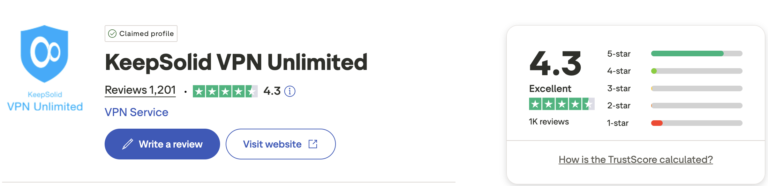
But let’s take a look at some reviews from these sites that reflect users’ actual experiences with the service. For example, regarding technical support, users say:
- “Great support and excellent service. A couple of months ago, several of my email accounts were hacked. After dealing with the fallout, I reached out to the team to regain access to my VPN, and it was resolved very smoothly. Kudos for a reliable VPN service I’ve trusted since 2018!” – Michael Berger, Trustpilot, July 2024
- “I’m a VPN Unlimited user. I reached out to support because there was no option to change my email address (what a bummer). Still, I got an immediate response (under two minutes). After a few back-and-forths, I created a new account and had my information transferred. In the end, it was far less stressful than I expected. They resolved everything in under 30 minutes, which is incredible for customer service in general. Kudos to KeepSolid!” – Erik X, Trustpilot, September 2025
- “I purchased a lifetime subscription in 2020, and recently had to contact support. They were friendly, helpful, and responded incredibly quickly.” – Pedro, Trustpilot, October 2025
- “I highly recommend the KeepSolid VPN team and service. Why? Fast responses, 24/7 availability, expertise, great customer care, and quick problem resolution. Excellent!” – Sabino, Trustpilot, September 2025
Regarding the VPN’s overall performance and its use for streaming, users say:
- “It has a lot of features, including Split Tunneling, and the speed is very good. It has met my needs quite well for years. That said, streaming from a foreign server doesn’t always deliver the best quality, but that’s to be expected. Email support was excellent, fast and effective.” – y0LAs*, Trustpilot, September 2025
- “Very good VPN. You can browse at the same speed as your regular network without any problems, which makes it great for streaming, unlike other VPNs I have used that always slow things down. I also like that I can connect to a server in Mexico, my home country, even though I now live in South America, so I can access streaming sites that are blocked in my current country. I wish there were another server in Mexico.” – José Gpe Núñez S., Google Play, October 2020
While positive reviews predominate, we also found users who are not very satisfied with VPN Unlimited:
- “I like KeepSolid VPN, but my main concern is privacy. It seems to collect a lot of information, and since it’s based in the USA, I feel uneasy that the government or the FBI might be monitoring our activity. Also, if the VPN is running on a router, all the data is stored until you restart or turn off the VPN. Ideally, there shouldn’t be any logs of user devices or browsing activity at all.” – Morfo360 DX4, Google Play, April 2025
- “The VPN no longer works for Denmark, or at least every website I try can tell that I’m not actually in Denmark.” – Adán Dreyer, Trustpilot, December 2025
The bottom line? We think giving VPN Unlimited a try is worthwhile, especially if you value simplicity and a lifetime plan. That said, it’s not the only reliable option out there. Here are some alternatives to consider.
What are the best alternatives to VPN Unlimited?
While KeepSolid’s lifetime plans are very tempting, the cybersecurity market offers other strong alternatives that excel in areas like extreme privacy or raw speed. Here are some of the best options to replace or complement your VPN connection:
1- Proton VPN
It’s undoubtedly the most comprehensive option for those who prioritize privacy above all else. Its main advantage over VPN Unlimited is its Swiss jurisdiction, a country with very strict data protection laws and outside international surveillance alliances.
While KeepSolid is based in the U.S., Proton VPN offers an independently audited no-logs policy and open-source apps, meaning anyone can verify its security. It also has a free version, widely regarded as one of the best available, and advanced features like Secure Core, which routes your traffic through multiple servers before it reaches the internet.
Paired with Holafly’s monthly plans, you can browse safely in over 160 countries worldwide. From our perspective, Proton VPN is the top choice for both travel and remote work. Combined with Holafly, it’s an unbeatable setup.
Important: If you are a frequent traveler and want to stay connected without worrying about expensive roaming or looking for a new SIM at every destination, Holafly’s subscription plans are for you. With a single eSIM, enjoy internet in more than 160 countries for a fixed price and no surprises on your bill. Travel without limits and connect easily and securely! 🚀🌍

2- NordVPN
If speed and performance are your priorities, NordVPN is hard to beat. Its network of more than 8,000 servers across 129 countries gives it a clear edge over KeepSolid, providing faster and more reliable connections even during the busiest hours.
It stands out for extra security features like Threat Protection Pro, which blocks ads, trackers, and malware right from the app. It’s a great choice for digital nomads who need to make 4K video calls or download large files without noticing any impact from the VPN.
3- Surfshark
Surfshark is ideal for families or travelers with many devices, since a single account can cover unlimited connections. Unlike VPN Unlimited, which limits you to 5 or 10 devices, you can protect all your gadgets and those of anyone traveling with you without extra cost. It also offers excellent value and smart features like rotating IPs to make it harder to track your activity.
Frequently asked questions about VPN Unlimited
Yes, with its KeepSolid Wise protocol, the VPN can get around China’s Great Firewall. It makes your VPN traffic look like regular web browsing, which helps you access sites even in countries with heavy government censorship.
Like in other restricted regions, it helps travelers stay connected while in Cuba. It’s a top choice for accessing social media and banking services that are often blocked on the island.
The company offers a seven-day free trial so you can explore all its features risk-free. On top of that, there’s a 30-day money-back guarantee, letting you test the service during a short trip and get a refund if it doesn’t meet your expectations.
You can manage your subscription through your account on the official website. Cancelling is simple, and if you went with a lifetime plan, there’s no need to worry about renewals or future cancellations.
It works with Apple TV, Android TV, and Amazon Fire TV. If your TV doesn’t support apps natively, you can always set up the VPN on your router to protect your entire home entertainment system.
For peace of mind, the app includes a Kill Switch on Windows, macOS, Android, and iOS. This feature automatically blocks your internet connection if the VPN drops, preventing your real data from being exposed by accident.
Plans that may interest you


Hi! I'm a Spanish-English translator working with Holafly, helping bring travel content to life for curious travelers. As a digital nomad with a passion for exploring, I'm always adding new spots to my bucket list. If you love to travel like me, stick around because you're in the right place to find inspiration for your next trip! ✈️🌍








