







 Language


 No results found
VPN.AC review: Features, pricing & performance
Could this be your VPN? Check out what other users think of VPN.AC and rate its performance.

More and more internet users are concerned about their device’s security and privacy while browsing, especially when connecting to a public Wi-Fi network, where personal data becomes more vulnerable. If you work remotely, study online, or simply seek solid protection, today we bring you an analysis of VPN.AC reviews.
Choosing a VPN that meets your needs and expectations among all the available options isn’t easy. That’s why today we want to introduce this brand, its features, how you can use it, and its available plans. We’ll also show some user reviews from people who have used it, which can help guide your choice. Finally, we’ll mention similar alternatives so you can compare and see which VPN suits you best.
What is VPN.AC and what is it for?
If you still aren’t sure what a VPN is, it’s a service that encrypts your internet connection to protect your data, prevent tracking, and access content restricted in your location. It’s an excellent solution for travellers, digital nomads, and anyone frequently connecting to public Wi-Fi networks.
VPN.AC belongs to the company Netsec Interactive Solutions, established in Romania since 2009. This product was designed in 2012 by a group of digital security activists with over 20 years of experience and developers committed to online privacy. This VPN lets you browse securely, avoid geographical restrictions, and maintain a stable connection at home or on international trips.
What does VPN.AC include?
One of the main features of VPN.AC is the transparency of its offerings, clearly presented on the official website by the technical team without misleading anyone. Being a smaller company than other VPNs, it guarantees higher bandwidth speed and focuses on having fewer locations but with excellent performance. See more details in the table below:
| Features | Details |
|---|---|
| Number of servers | Over 7,000 |
| Available countries | 21 |
| Special servers | Obfuscated, P2P, streaming, and high-speed servers |
| Encryption type | AES-GCM 256-bit |
| Protocols | OpenVPN, WireGuard, IKEv2 |
| Emergency switch (Kill Switch) | Yes |
| No-logs policy | Yes, externally audited |
| Simultaneous connections | 12 devices |
| Speed | Unlimited |
| Ad and malware blocker | Yes |
| Split Tunneling | Yes |
| Private DNS | Yes |
| Native apps | Windows, macOS, Android, iOS, Linux |
No-logs policy
Its no-logs policy is very strict, ensuring it doesn’t store your browsing history, IP addresses, connection times, or DNS requests. Furthermore, external auditing strengthens its transparency in this regard.
Customer support
What users value most in VPN.AC reviews is the excellent 24/7 customer support via live chat, tickets, and personalised assistance. The team helping you are the same professionals who created the VPN, so they have all the technical skills to assist effectively.
DNS security and privacy
All DNS queries you make are encrypted with 128-bit AES to protect against monitoring and DNS hijacking, so resolvers do not log any queries. By generating millions of daily DNS requests and mixing them with VPN user queries, the DNS resolver becomes more effective.
Important: If you are a frequent traveler and want to stay connected without worrying about expensive roaming or looking for a new SIM at every destination, Holafly’s subscription plans are for you. With a single eSIM, enjoy internet in more than 170 countries for a fixed price and no surprises on your bill. Travel without limits and connect easily and securely! 🚀🌍

How to use VPN.AC?
Now that you understand the VPN’s features, let’s go through each step you need to take to install it on your device and start using it. We based this guide on official website information and real VPN.AC user reviews.
1. Choose a plan and create a VPN.AC account
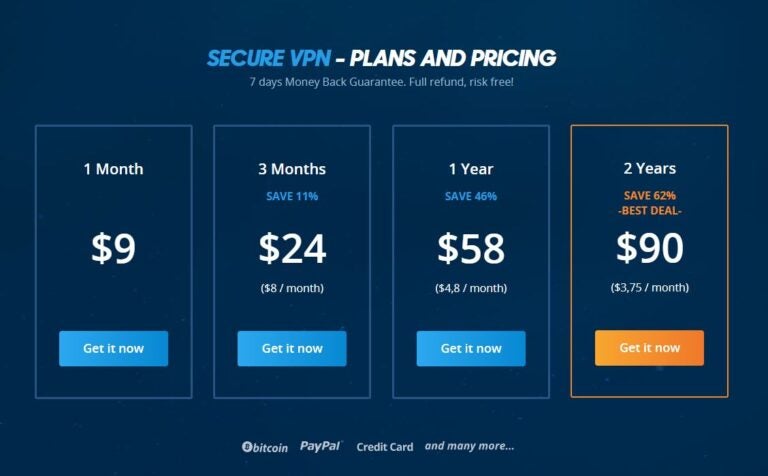
Go to the official VPN.AC portal and select your preferred plan, from one month up to two years, then click “Get it now”. Next, create your customer account and select a payment method (card, PayPal, or cryptocurrency). These are the available plans, all with a 7-day money-back guarantee:
- 1-month plan: $9.00 (€7.80)
- 3-month plan: $24 (€20)
- 1-year plan: $58 (€50)
- 2-year plan: $90 (€78)
2. How to install the VPN.AC app
You will receive an email after purchase with a link to download the app for your operating system: Windows, macOS, Linux, Android, or iOS. You can also install it on compatible routers. On all devices, you must authorize the installation.
3. Launch and recommended settings
Once installed, open the app and log in using the username and password you created during purchase. If prompted to configure the VPN, accept to enable the connection. Then, we recommend the following settings:
- Activate the kill switch from the security options.
- Enable private DNS to prevent DNS leaks.
- If you want to prioritise speed, select WireGuard.
VPN.AC review: Advantages and Disadvantages
Before choosing VPN.AC, it is useful to review and analyse its strengths and actual limitations. While it has very practical features, if you prioritise privacy and stability across multiple devices, it may have some shortcomings for other users. Discover all pros and cons in the table below:
| Pros | Cons |
|---|---|
| Extensive server network | Dedicated IP is not always available on all plans |
| Good speed | Some servers can congest at peak times |
| Advanced features like kill switch, private DNS, and split tunneling | Not all routers are natively compatible (verification required) |
| Compatible with Windows, macOS, Linux, iOS, Android, and several routers | Some platforms may temporarily block it |
| Modern protocols like WireGuard | Ad or malware blocker not included in all plans |
| Unlocks streaming platforms | Long-term plans may be expensive for occasional users |
| No-logs policy and strong encryption | Lack of premium features like double VPN or multi-hop routing |
| Stable interface with auto-connect and network profiles | Higher latency on distant connections |
| Allows multiple simultaneous connections per account |
User experience and VPN.AC review
Now it’s time to see what other users think about VPN.AC after testing it over time and in different contexts. According to Trustpilot, this VPN has a score of 4.1 out of 12 reviews. Although there are not many reviews due to it being less known, it’s worth seeing what people who used it in other countries, like China, or for streaming think.

VPN.AC review as a digital nomad
“I’m very satisfied with the service and have renewed multiple times. I haven’t experienced any downtime in China in recent years, not even on important dates.” (Source: Xarth – Trustpilot)
“Their Taiwan server (HiNet) now redirects to their Japan server because no replacement has been found after six months; it was the best option for users based in China.” (Source: Jens – Trustpilot)
“I’ve used this VPN for over seven years in China and the experience has been very satisfactory. It’s also useful outside China if you want a practical VPN.” (Source: Jubo – Trustpilot)
VPN.AC review in streaming
“I’ve been a customer for some time, but currently the service isn’t good enough to stream audio or video during peak hours. They refuse to acknowledge it even when proven with their tests.” (Source: Roger – Trustpilot)
“Speed can vary a lot depending on the time of day, but I’ve had issues with other providers too, so it’s normal. Most of the time, HD video works fine. I think the ISP also plays a role.” (Source: Sotavento – Trustpilot)

VPN.AC review for general use
“A pretty good VPN for the price. Good speed, though I wish there were more servers.” (Source: Andrés – Trustpilot)
“I’ve been using this service for some time and I can say it’s the best among the group. It’s cheap and fast in comparison. Yes, there were occasions when I couldn’t connect, but like most, and I’ve tried several, all have some downtime occasionally.” (Source: Trevor – Trustpilot)
Alternatives to VPN.AC
If you still have doubts after reading VPN.AC reviews, both positive and negative, and want to compare it with other options, here are three notable alternatives with excellent features and security functions. Among them, ProtonVPN is the most recognised and complete on the market.
1. ProtonVPN
Undoubtedly, ProtonVPN is one of the best VPNs today. Based in Switzerland, it benefits from strict local data protection laws. It stands out from other VPNs with speed increases of up to 400% using the WireGuard protocol. It also offers strong AES-256 military encryption with RSA-4096 key and SHA-384 HMAC authentication for comprehensive protection. With ProtonVPN, you can connect to over 15,000 servers in 120 countries. It has a free option and plans from $3.44 (€2.99) per month.
2. MullVad VPN
The second alternative is Mullvad VPN, from Sweden, which doesn’t require any personal data to create an account, so you don’t need to provide an email address. It uses open-source protocols like WireGuard and OpenVPN with AES-256 encryption. Its no-logs policy ensures no online activity information is stored. It has over 600 servers in 48 countries and a fixed plan of $5.75 (€5.00) per month.
3. TunnelBear VPN
Finally, you can also consider TunnelBear VPN, with over 8,000 servers in 47 countries, AES-256 encryption, and OpenVPN, IKEv2, and WireGuard protocols. TunnelBear also includes an ad and tracker blocker for browser extensions. It offers a free plan with 2 GB per month or paid plans from $3.33 (€2.89) with unlimited data.
VPN.AC review: Frequently Asked Questions
According to many VPN.AC reviews, it works perfectly in China thanks to its obfuscated servers and high-security protocol.
No, you can only choose paid plans starting from one month with a seven-day money-back guarantee.
Yes, this VPN supports P2P traffic on most servers and real VPN.AC reviews appreciate that streaming works without issues.
VPN.AC works with a wide variety of devices and operating systems, including Windows, macOS, Linux, Android, iOS, OpenVPN-compatible routers, and Smart TVs.
Yes, it offers multiple optimised servers that can access platforms like Netflix, HBO, or Amazon Prime Video in different regions.










