







 Language


 No results found
RiseupVPN review: Features, pricing & performance
Find out everything you need to know about RiseUpVPN: User reviews, usage experience, security and privacy, strengths and areas for improvement.

If you’re looking for a truly different VPN, RiseupVPN may suit you. Unlike most commercial providers, this product started as a community, non-profit project. Its main goal is simple: Provide a secure connection. It also avoids accounts, ads, and tracking. Instead, it runs on user donations. In this RiseupVPN review, we’ll explore what RiseupVPN offers. We’ll cover user opinions, how it works, ease of use, security reliability, and ideal user profiles. Also, we’ll show where it may fall short against commercial VPNs.
RiseupVPN review: What is RiseupVPN?
RiseupVPN is a Virtual Private Network service from the Riseup collective. It’s an autonomous group based in Seattle (United States). Since 1999, it has built secure and free communication tools.
Unlike most commercial VPNs, RiseupVPN was designed as a non-profit tool. It relies on donations and focuses on privacy, free expression, and protection from surveillance or censorship. Based on RiseupVPN user opinions, one major strength stands out. It doesn’t require an account, it doesn’t ask for identification, and it claims it won’t store logs that could link you to your online activity.
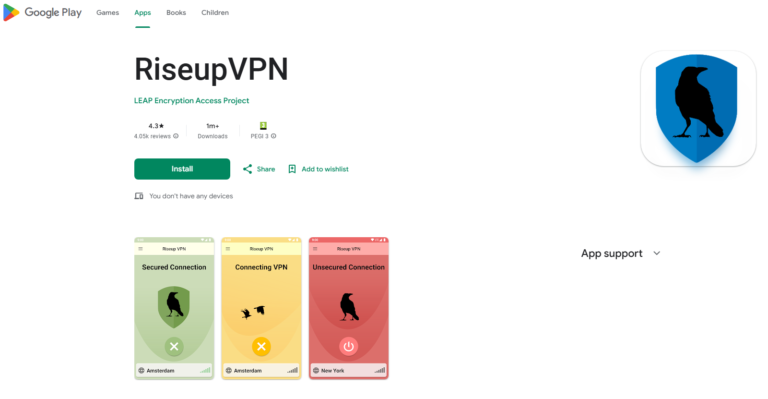
In practical terms, RiseupVPN is a simple product that works on major operating systems (Windows, macOS, Linux, Android). You won’t need complex settings. You install it and you’re protected. In short, it prioritises privacy, simplicity, and free access. It doesn’t chase premium speed or mass geo-unblocking.
So, RiseupVPN suits journalists, activists, human-rights defenders, and privacy-minded users. It won’t suit people who want Netflix in another country. It also won’t suit gamers on geo-based servers. It doesn’t offer top speeds or advanced customisation. However, it can offer a trusted space for people who put security first.
What does Riseup VPN include?
RiseupVPN doesn’t seek to compete with the big brands in terms of features or speed. Its proposal is simpler and more straightforward: To offer a free, secure and easy-to-use VPN, designed for those who need to protect their privacy without the hassle of configurations and registrations.
Here are the main features it offers:
| Attribute | RiseupVPN |
|---|---|
| Price | Free (it runs on user donations) |
| Account registration | Not required |
| Number of Servers | Unknown (it isn’t published) |
| Server locations | Multiple countries, not specified |
| Protocols | OpenVPN, LEAP |
| Encrypted | AES-256 bit |
| Kill Switch | No (but it cuts traffic if the tunnel fails) |
| Ad Blocking | Not included |
| Router support | No |
| Available apps | Windows, macOS, Linux, Android |
| Simultaneous connections | Unlimited (no account required) |
| Logging policy | No logs |
| External audit | No |
| Speed | Medium to low |
| Streaming | Not recommended |
| Technical support | Limited, via email and forums |
As you can see, RiseupVPN covers the essentials for anonymous, secure browsing. Its biggest win is simple: It needs no account and it stays free for everyone. However, you won’t find advanced tools or ultra-fast speeds like Proton VPN offers.
Next, we’ll analyse how you use it in practice. We’ll also cover real browsing experience. Then we’ll assess daily reliability for people who need a solid VPN. This matters even more when you travel or use public networks.
RiseupVPN’s no-logs policy
According to RiseupVPN’s own website, the service says it doesn’t store your IP address. It also says it doesn’t log DNS queries. Its help page states:
“We do not keep logs, other than a record of the day a user connects. Specifically, we don’t log any IP addresses and we never log DNS queries.”
This means that, at least in theory, RiseupVPN won’t keep a history that tracks your activity. It also won’t store the IP address you used to connect. This privacy-first stance suits people who prioritise online anonymity.
However, independent audits that confirm this no-logs policy remain limited. We haven’t found a recent, fully verified external audit report. We also haven’t seen the same depth common in commercial VPNs. Those reports often cover infrastructure and logging claims.
So, what does this mean?
- RiseupVPN’s no-logs stance looks clear and privacy-focused. It needs no account, logs no IP, and stores no DNS. This is a big plus.
- The lack of detailed public audits adds uncertainty. The organisation has a privacy reputation, yet you can’t verify claims independently.
- If you want a VPN that feels free and logs as little as possible, RiseupVPN fits well. However, if you want deep technical proof, other brands may reassure you more.
RiseupVPN performance
When you evaluate a VPN, performance matters. That means speed, stability, and daily usability. With RiseupVPN, several nuances matter. You can see them in user opinions. For example:
- “The VPN is pretty good. However, it depends on donations, so it’s very slow and has few servers. It’s more private than other ‘free’ VPNs” – User D3O2, Reddit.
- “I tried it several times and it works, but it performs very badly. It won’t connect, and when it does, it takes ages. Also, it doesn’t reach 2 Mbps. It worked a bit better at the start” – User Juan, Google Play (26 June 2024)
When your base connection is strong and the server isn’t congested, RiseupVPN can deliver acceptable speeds. However, it’s a free, community service. So, it doesn’t have the same scale as commercial VPNs. This creates fewer servers, more users per server, and higher congestion or latency.
On weaker networks, like hotels, public WiFi, or mobile data, peak hours can hurt performance. Then you may notice buffering, slow browsing, and occasional dropouts.
Conclusion: RiseupVPN offers competent performance for basic use. It works well for browsing, public WiFi safety, and occasional IP changes. However, if you need top speed, heavy streaming, online gaming, or demanding multi-device use, you’ll likely notice limits. If you travel often and want constant connectivity, you won’t want pricey roaming.
Important: If you are a frequent traveler and want to stay connected without worrying about expensive roaming or looking for a new SIM at every destination, Holafly’s subscription plans are for you. With a single eSIM, enjoy internet in more than 170 countries for a fixed price and no surprises on your bill. Travel without limits and connect easily and securely! 🚀🌍

RiseupVPN security features
RiseupVPN focuses on privacy, simplicity, and anonymity. It doesn’t focus on advanced customisation. Even so, it offers a solid security baseline:
- Strong encryption: It uses AES-256-bit encryption. Banks and security agencies use the same standard. So, it protects all VPN traffic from third parties.
- Secure protocols: It uses OpenVPN, one of the most trusted and audited protocols. Some platforms also mention LEAP, a Riseup ecosystem project.
- No logs: RiseupVPN says it stores no browsing logs or IP addresses. It doesn’t add further detail. This strengthens its privacy stance.
- Basic kill switch behaviour: It doesn’t offer a configurable kill switch like commercial VPNs. However, if the VPN connection drops, it cuts traffic automatically. This helps prevent unprotected leaks.
- No advanced extras: It doesn’t include ad blocking, malware protection, split tunnelling, or obfuscated servers. It keeps things simple, and it reduces extra attack surface.
In short, RiseupVPN offers basic yet reliable security. It suits people who want protection without setup. It won’t suit users who want deep control. Instead, it suits people who value anonymity and ease of use, especially in sensitive contexts.
How do donations work in RiseupVPN?
RiseupVPN isn’t a typical commercial service. It won’t ask you to buy a plan. It also won’t register your name or an account. Instead, the community keeps it running through generosity.
On its official website, it says the estimated cost to run the service is about €55.20 ($60) per person, per year. The service stays free for users. However, RiseupVPN encourages users to donate at least that amount.
This helps cover infrastructure, maintenance, servers, and security. Accepted donation methods include:
- Credit or debit card (Visa, MasterCard, American Express)
- Direct debit from a euro bank account (for EUR donations)
- PayPal in several currencies (USD, CAD, GBP, EUR)
- Cryptocurrencies (for example, Bitcoin)
On the donations page, they also clarify one key detail. If you use a link that isn’t marked “for the VPN”, they can’t tag it for the VPN service. So, they ask you to use the correct links.
So, why does this donation model matter?
- Because without monthly fees, RiseupVPN can keep financial independence. It won’t rely on ads, data sales, or paying users.
- Because the suggested $60 (€55.20) per year helps fund access for everyone. People who can pay help keep it online.
- Because it adds transparency. The “about $60 (€55.20) per person per year” message shows real costs and shared responsibility.
- Because you can use the VPN for free. Still, any technical infrastructure needs resources. So, if you use it, donating helps keep it alive.
How do you use RiseupVPN?
One of RiseupVPN’s biggest advantages is simplicity. In user reviews, many people agree it feels easy to use. You don’t need to register, create an account, or configure anything manually. It’s built for quick activation.
In practice, you’ll do the following:
- 1. Download the app: Get it directly from the official website. It’s available for Windows, macOS, Linux (packages for Debian, Ubuntu, Arch, Fedora, and more), and Android (Google Play or APK). It isn’t available for iOS right now.
- 2. Install and open the app: After downloading, install it like any other program. When you open it, you’ll see a simple window with an on/off button.
- 3. Connect to the VPN: Press the main button and RiseupVPN will connect automatically. You can’t choose a country or server manually. The app prioritises availability and performance.
- 4. Done! Browse securely: Once connected, you’ll see a notification or a button colour change. From that moment, your traffic is encrypted and protected.
- 5. Disconnect: Press the button again and the VPN turns off.
As you can see, using RiseupVPN is as easy as pressing a button. You won’t need protocol knowledge or manual tweaks. It suits people who want quick protection, without technical friction.
What are RiseupVPN’s pros and cons?
By now, you’ve likely formed your own view of RiseupVPN’s strengths and weak points. After all, every VPN has advantages and limits. Here’s a summary to help you decide if it fits you:
| Pros | Cons |
|---|---|
| No registration or account required | It won’t let you choose a server location |
| Strong encryption (AES-256) and OpenVPN protocol | Limited speed compared with commercial services |
| Free and donation-based | No iOS app |
| Clear no-logs policy | No advanced features (ad blocking, split tunnelling, etc.) |
| Open source and developed by a digital activism organisation | Very basic interface with few options |
| Ideal for journalists, activists, and users in censored countries | Not suitable for unblocking streaming services |
| Multi-platform (Windows, macOS, Linux, Android) | No direct or real-time technical support |
In conclusion, RiseupVPN is an excellent option if you want real privacy, simplicity, and a VPN without trackers or ads. However, it isn’t built for users who want speed, customisation, or region-unlocked content.
Next, let’s review RiseupVPN user opinions.
RiseupVPN: User opinions and experience
When you choose a VPN, you won’t rely only on specs and features. Real user experience shows how a service performs day to day. So, we reviewed verified opinions from Google Play and forums like Reddit. We looked at key scenarios: Entertainment, travel, and remote work. Here’s what users say after using RiseupVPN.
RiseupVPN: Entertainment use reviews
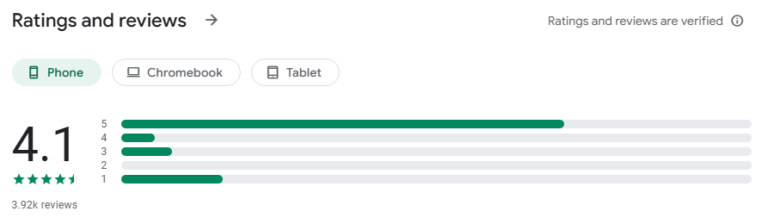
“You can tell they care about privacy, because the app is open source. It has no ads, and it doesn’t require an account. I’m already used to rubbish internet, so that doesn’t bother me. Excellent work!” – Juan Torres, Google Play, 9 September 2025.
This review doesn’t focus on streaming or gaming. Still, it highlights good general performance and zero ads or registration.
“It doesn’t work on my Android TV. It only works on my phone. Nowadays, that feels outdated.” – TL, Google Play, 6 December 2023
RiseupVPN review: Travel use
“It’s good and functional. It’s not like other free VPNs that limit hours. However, everything loads very slowly and it has few places…” – Choripán con Mayo, Google Play review, 5 August 2025.
This testimony fits travel use and multiple locations. It highlights reliable basic access, yet it flags speed as a key limitation. For travellers, it feels easy to use. However, slow speeds can hurt the experience.
RiseupVPN review: For digital nomads / remote use
“The VPN is quite good, but since it depends on donations, it’s very slow and has few servers. It’s more private than other ‘free’ VPNs.” – Reddit user, r/vpns.
This comment fits remote work well. It praises privacy as the main advantage. However, it says speed and server count can block demanding workflows.
From this, we can draw several conclusions about RiseupVPN’s user experience:
- If you plan to use RiseupVPN to watch films or series from other countries, it may work. However, you may see lag or buffering if servers sit far away.
- If you’re travelling or changing countries often and want a VPN that simply protects, RiseupVPN can fit. However, it won’t feel as smooth as a premium option.
- If you’re a digital nomad who needs bandwidth, video calls, or many devices, reviews suggest privacy is solid. However, speed and coverage may feel limited.
What alternatives to RiseupVPN exist?
Don’t like what RiseupVPN offers? Don’t worry, because you have plenty of options. The VPN market is wide and competitive. So, you’ll find a choice for every profile. Some users want maximum privacy. Others want a free but reliable service. Others want gaming and streaming speed. Others are digital nomads moving worldwide.
Here are three RiseupVPN alternatives you may like:
1- Proton VPN: The most complete, with a free plan
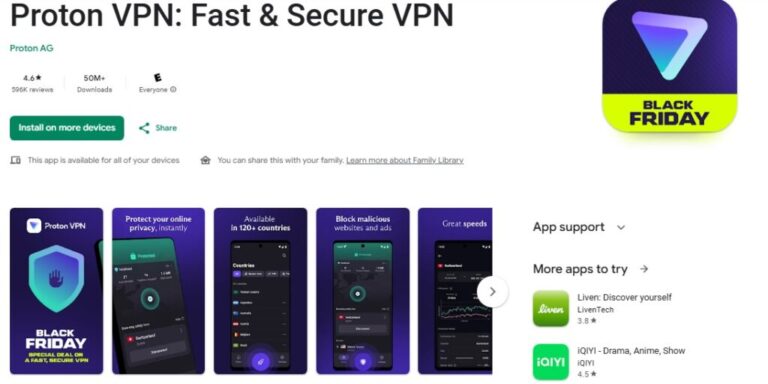
Proton VPN is a top pick for people who want privacy without losing quality. The same team behind ProtonMail created it. Independent auditors have reviewed its no-logs policy. Also, its free version is among the most generous: No ads, no time limit, and access to secure servers in 10 countries.
It also includes advanced features like Secure Core (double-hop routing), Kill Switch, NetShield (ad and malware blocking), and multi-device support. If you’re leaving RiseupVPN and want something equally trustworthy, Proton fits well. Plus, it’s faster. It also adds support and geo-unblocking.
2- Mullvad VPN: Maximum privacy with a minimalist approach
Mullvad is a Swedish VPN that pushes privacy to the extreme. It won’t require an email account. Instead, you’ll get a random number as your login. It accepts cash, crypto, and cards, and it stores no logs. Its software is fully open source, and like RiseupVPN, it avoids aggressive marketing or trackers.
It suits users who demand strong anonymity, although the interface feels more technical. It doesn’t offer a free plan, but its flat rate is €5 per month. That’s very affordable. If you’re an activist, journalist, or privacy-first user, Mullvad is a global reference.
3- TunnelBear VPN: Ideal for beginners
TunnelBear is perfect if you’re new to VPNs. It has a very visual design, a friendly interface, and a free mode (2 GB monthly) so you can test it. It suits casual use and safer browsing on public networks. It won’t suit heavy tasks like international streaming or remote work with large data use.
Although it’s based in Canada, it has a clear privacy policy and it publishes transparency reports. Still, it won’t match advanced tools or top speeds from premium options.
RiseupVPN review: Frequently asked questions
Yes. Unlike many VPNs with limited free versions, RiseupVPN doesn’t use subscriptions and it won’t charge for its services. It runs through voluntary donations (they recommend supporting with at least €55.20 ($60) per year).
No. RiseupVPN is one of the few VPNs that won’t require an account, an email, or personal data. It stays anonymous from installation.
No. RiseupVPN wasn’t designed for streaming or geo-unblocking. Instead, it focuses on privacy and security in sensitive contexts, like journalism or digital activism.
Yes, but only on Android for now. It doesn’t have an iOS app (iPhone or iPad). However, you can use it on Windows, Linux, or macOS computers.
Yes. Although it lacks real-time support, Riseup is an activist collective with a long privacy track record. Its VPN is open source, transparent, and backed by a committed community.










