







 Language


 No results found
Malwarebytes VPN vs NordVPN: Which is better?
Comparison Malwartebytes VPN vs. NordVPN and we show you which of the two has the most advantages for travelling and working remotely.

Choosing a VPN for travel and remote work isn’t always as simple as it seems. Some work as a security add-on. Others deliver complete solutions for moving between countries, without losing privacy or performance. In that context, if we compare Malwarebytes VPN vs. NordVPN, we have two very different proposals.
On one side, Malwarebytes VPN covers basic online protection needs. It also leans on the reputation of its anti-malware software. On the other side, NordVPN ranks among the best-known VPNs. It brings a large global network and advanced features for frequent travellers and remote workers.
In this article, we review how each option performs abroad. We cover security levels, speed results, and server network size. We also explain when you should choose one over the other. So, you can decide based on the strongest advantages.
Malwarebytes VPN vs. NordVPN: General comparison
Before we dive into each service, it helps to compare them directly. Malwarebytes VPN and NordVPN target different users. You’ll notice that quickly when you compare features, infrastructure, and overall reach.
The table below summarises the most important differences. That way, you can see what each VPN offers abroad.
| Attribute | Malwarebytes VPN | NordVPN |
| Servers | Over 400 | 8,800 |
| Countries | Over 30 | 177 |
| Protocols | WireGuard | NordLynx, OpenVPN, IKEv2 |
| Encryption | AES-256: | AES-256: |
| Customer Support | Email and web support | 24/7 live chat |
| Available plans: | Included in Malwarebytes plans | 3 plans |
| Free trial | Yes (limited by region) | No |
| Estimated speed impact | −20% to −30% | −5% to −10% |
| Monthly price | €4.60 ($5), with a single annual payment of €55.19 ($59.99) | Approximately €9.39 ($10.40) |
| Streaming support | Limited | Yes (Netflix, Amazon, Disney+, etc.) |
| Ad / malware blocker | Yes (within its ecosystem) | Yes (Threat Protection) |
| Dedicated IP | No | Yes (as an add-on) |
| Kill switch | Yes | Yes |
| Compatible devices | Windows, macOS, iOS, Android | Windows, macOS, iOS, Android, Linux |
| Simultaneous connections | 5 devices | 10 devices |
| No-logs policy | Yes | Yes |
| Independent audits | No specific audits | Yes |
This comparison shows a clear difference in focus. Malwarebytes VPN works as a basic solution within a wider security bundle. NordVPN, instead, starts as a purpose-built VPN for speed, global coverage, and advanced travel features.
From here, we’ll break down each point in detail. Then, you’ll see which scenarios suit each VPN.
Important: If you are a frequent traveler and want to stay connected without worrying about expensive roaming or looking for a new SIM at every destination, Holafly’s subscription plans are for you. With a single eSIM, enjoy internet in more than 170 countries for a fixed price and no surprises on your bill. Travel without limits and connect easily and securely! 🚀🌍

Customer support: Malwarebytes VPN vs. NordVPN
When you travel and rely on a VPN, technical support can decide everything. This matters most during public WiFi issues. It also matters during a workday.
Malwarebytes VPN provides customer support through web support and email. It sits inside Malwarebytes’ wider assistance system. The documentation feels clear and well organised. However, it targets the whole product ecosystem. In practice, response times can run longer. Also, support won’t always specialise in VPN-specific issues.
If you only need simple fixes, this support can feel sufficient. However, during urgent travel moments, it can fall short.
NordVPN, instead, offers 24/7 live chat, plus email support. Chat usually responds within minutes. Also, staff train for VPN problems specifically. So, they resolve issues faster. This helps when you move between countries and need a quick reconnection.
Streaming and content unblocking: Malwarebytes VPN vs. NordVPN
Many VPNs let you access your usual streaming platforms anywhere in the world. Here, consistency matters most. Also, speed stability matters.
In this area, Malwarebytes VPN offers limited streaming support. It may work with some platforms occasionally. However, it doesn’t focus on unblocking geo-locked catalogues. In practice, results vary by country and server. It won’t always keep stable access to Netflix, Prime Video, or Disney+. In other words, it targets basic protection more than entertainment.
NordVPN, in contrast, ranks among the most reliable VPNs for streaming. It works consistently with Netflix, Amazon Prime Video, Disney+, HBO, BBC iPlayer, and more. Also, its broad network supports HD and 4K streaming without drops. This holds true even from distant locations.
Countries and servers: Malwarebytes VPN vs. NordVPN
It also lets you pick specific locations for your destination.
Malwarebytes VPN has a limited network, with coverage in just over 40 countries and fewer servers. Its coverage is mainly concentrated in North America and Europe, which may be sufficient for short trips or regular destinations, but is restrictive if you are moving in less covered regions. Also, it doesn’t offer specialised servers or advanced selection options.
This limit shows up when your chosen server sits far away. Then, the connection can lose stability or speed.
Its rival, NordVPN, runs one of the largest networks on the market. It operates 8,800 servers across 177+ countries. As a result, global coverage improves speed and reduces congestion.
In addition, NordVPN offers specialised servers, including Double VPN, Onion over VPN, and P2P-optimised servers. So, you get more flexibility for different travel use cases.
Once again, Nord wins this Malwarebytes VPN vs. NordVPN match-up.
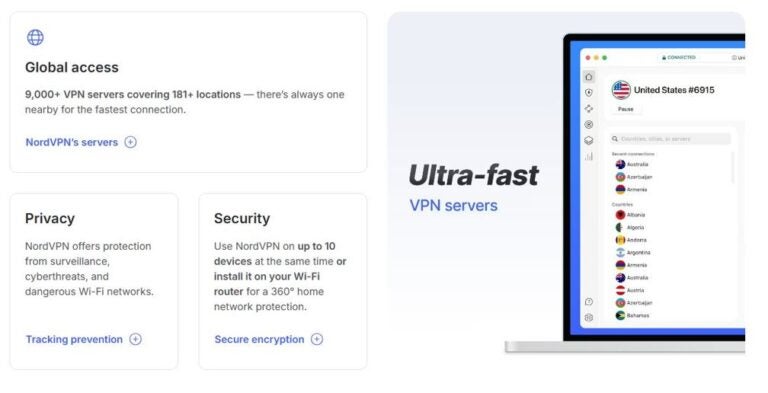
Performance and speed: Malwarebytes VPN vs. NordVPN
VPN speed affects daily experience directly. It impacts page loading and video calls. It also affects cloud work.
Malwarebytes VPN delivers acceptable performance for basic browsing. On nearby servers, the connection often stays stable. However, speed can drop more sharply on distant locations. This happens partly because its network stays smaller. Also, it lacks advanced optimisation options. It works for simple tasks, yet it won’t suit heavy use.
NordVPN stands out for consistent performance thanks to its NordLynx protocol. It builds on WireGuard, so it keeps high speeds and low latency. This holds even on distant servers. You’ll notice this during video calls, file transfers, and remote work. The connection stays smooth over long periods. Thanks to this protocol, NordVPN ranks among the most competitive brands. It also works as a strong travel option and for remote work.
Dedicated IP for digital nomads
For some digital nomads and remote workers, a dedicated IP can help a lot. Why is that? It can reduce automated blocks. It can also reduce repeated checks. Plus, it can ease access to banking and corporate platforms. These systems often distrust shared IPs.
Malwarebytes VPN doesn’t offer a dedicated IP. Its service uses shared, dynamic IP addresses. This supports anonymity, but it can cause issues. Sensitive work tools may trigger alerts. Systems that expect a fixed IP can also block you. So, consider this if you work with restricted access abroad.
NordVPN, instead, does offer a dedicated IP as a paid add-on. This option gives you an exclusive IP address. It also avoids sharing with other users. As a result, it reduces captchas, security alerts, and access blocks. It’s especially useful for stable professional sessions while travelling.
No-logs policy: Malwarebytes VPN vs. NordVPN
A no-logs policy becomes decisive on public networks and across different legal frameworks. Promises alone don’t matter here. Instead, focus on collected data, company location, and external verification.
Malwarebytes VPN says it doesn’t log a user’s browsing activity. However, its VPN works as an add-on within the Malwarebytes ecosystem. Also, public information about VPN-specific external audits stays limited. This doesn’t mean it’s unsafe. Still, it does make the no-logs stance less transparent than VPN specialists.
In addition, Malwarebytes operates from the United States. Under certain conditions, US laws can require data disclosure. For some travellers, this matters when they assess privacy risk.
NordVPN, in contrast, maintains a clear and detailed no-logs policy. It doesn’t store IP addresses, browsing history, or identifiable connection data. It operates under Panama jurisdiction, which has no mandatory data retention laws. Also, independent auditors have reviewed its policy several times.
Moreover, NordVPN uses RAM-based servers. So, the system deletes data automatically when it restarts.
Which VPN offers more security features?
When you travel and use public WiFi, VPN security becomes essential. Encryption matters, but extra protections matter too. They help across different travel scenarios.
Malwarebytes VPN uses AES-256 encryption, which protects data in transit. It keeps things simple and integrates with Malwarebytes security tools. It includes basic features like a kill switch. This blocks traffic if the VPN drops, which helps prevent accidental leaks.
However, its approach stops there. It doesn’t include advanced options like obfuscated servers, double VPN, or network-bypass settings. It provides solid security for basic use. Yet it can feel limited for complex travel environments.
NordVPN offers a much more complete security approach. It also uses AES-256 encryption, yet it adds extra layers. For example, Threat Protection blocks malware, trackers, and malicious sites. It can work even without an active VPN connection. It includes obfuscated servers, which help in restricted countries. It also offers Double VPN, which routes traffic through two servers to strengthen privacy.
In addition, NordVPN includes an advanced kill switch and leak protections. It targets DNS and IP leaks specifically. So, it suits frequent travellers on unreliable networks.
Reputation and reviews: Malwarebytes VPN vs. NordVPN
When people talk about reputation, these brands play in different spaces. Both names appear in cybersecurity, yet their VPN prestige differs greatly.
Malwarebytes is widely known for its anti-malware and antivirus software. Its VPN works as an add-on within that security ecosystem, not a standalone product. Therefore, its reputation links more to malware protection than heavy VPN use. That includes travel, streaming, and remote work.
On review platforms, users often value Malwarebytes VPN’s simplicity and its integration with other tools. However, recurring criticism mentions its limited network. Users also report weaker stability outside major regions. In addition, they note missing advanced features expected from premium VPNs.

NordVPN ranks among the most recognised VPNs worldwide. Over the years, it has gained awards and mentions for privacy, security, and performance. Its independent audits, infrastructure, and regular feature updates keep it as a sector benchmark.
User reviews highlight its speed, stable long-trip performance, and content access across countries. The most common criticism targets the monthly plan price. Even so, many users feel the service quality balances the cost.
So… Which VPN offers more advantages?
After reviewing both services, one point feels clear. Malwarebytes VPN and NordVPN don’t compete at the same level for travel. In other words, NordVPN offers far more advantages overall.
Malwarebytes VPN fits users who want basic protection inside an antivirus bundle. It works well for simple browsing and occasional use. However, its limited network and missing advanced features reduce travel value. Also, slower support can hurt remote work needs.
NordVPN, instead, delivers a far more complete travel experience. It also suits remote work from home. Its broad global network, better performance, and advanced protections stand out. Plus, the dedicated IP add-on helps frequent movers. So, it fits public networks and stable remote work abroad.
To make it even clearer, here’s a final table of advantages for each VPN:
| Key aspect | NordVPN | Malwarebytes VPN |
|---|---|---|
| Global coverage | Very broad network with servers in 60+ countries, ideal for frequent location changes | More limited network, fine for occasional connections but less flexible |
| Speed and stability | High performance on distant servers thanks to NordLynx | Solid performance for basic browsing |
| Advanced features | Double VPN, obfuscated servers, Threat Protection, dedicated IP | Simple approach, without advanced features |
| Privacy and no-logs | Strict no-logs policy, independently audited | Stated no-logs policy, without VPN-specific audits |
| Jurisdiction | Panama, with no mandatory data retention laws | United States, with a more restrictive legal framework |
| Remote work use | Very suitable for video calls, corporate platforms, and stable access | Suitable only for simple tasks |
| International streaming | Works consistently with Netflix, Disney+, Prime Video, and more | Limited compatibility and less reliable |
| Customer support | 24/7 live chat with fast replies | Email support and help centre |
| Dedicated IP | Available as a paid add-on | Not available |
| Ideal user profile | Frequent travellers, digital nomads, and demanding users | Users who want a simple VPN as an antivirus add-on |
To wrap up, NordVPN and Malwarebytes VPN each fit their own approach. However, we recommend choosing Proton VPN alongside Holafly monthly plans. This combination gives you stable internet from the start. It also adds a stronger privacy layer. So, frequent travellers can connect with confidence. They won’t depend on public WiFi networks.


