







 Language


 No results found
Hide.me VPN review: Features, pricing & performance
Check out the reviews of Hide.me VPN and decide if its features are what you need for your browsing.

In today’s digital era, we browse the internet several times daily. We do it for personal use, work, and study. So, you must know how to protect your privacy. Many VPNs compete in the market. However, today we’ll share this Hide.me VPN review from real users. This way, you can judge it more clearly.
We’ll also explain how this VPN started, its purpose, what it includes, and how you can begin using it. Then we’ll cover its main pros and cons. We’ll also share similar alternatives, so you can compare features. Then you can pick what fits your needs best. Don’t miss this comparison of a very secure, very fast VPN.
What is Hide.me VPN, and what does it do?
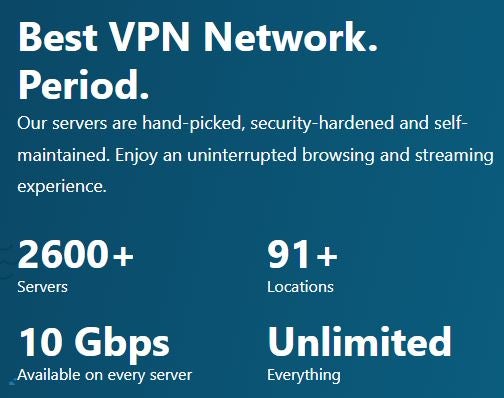
Hide.me VPN is a 100% independent provider. It launched in 2012 to give internet users more freedom and security. Its creators set three core principles to stand out from other VPNs. These are: Free plans, fast connections, and ease of use. So, they released Hide.me VPN as a virtual private network service. It offers secure, anonymous browsing without geographic restrictions.
Over the years, it has upgraded its server infrastructure and increased speed. It has also added advanced features like kill switch, leak protection, and streaming-optimised servers for downloads.
What does Hide.me’s VPN include?
When you read most Hide.me reviews online, one point stands out. The feature set boosts privacy and digital freedom. This VPN includes advanced tools, so you get an accessible experience. Also, you’ll get full flexibility when you choose a monthly plan. Plus, it offers a free plan, so you can test it first. See more details in the table below:
| Features | Details |
|---|---|
| Number of servers | Over 2,600 |
| Available countries | 91 |
| Special servers | Optimised for streaming, it supports P2P / torrenting on suitable servers. |
| Encryption type | AES-256: |
| Free plan | 1 simultaneous connection and 8 locations |
| Monthly plan | $11.60 (€9.99) |
| 14-month plan | €3.50 ($4.07) + 2 extra months |
| 28-month plan | €2.49 ($2.89) + 4 extra months |
| Protocols | WireGuard, OpenVPN, IKEv2, SSTP, SoftEther |
| Emergency switch (Kill Switch) | Yes |
| No-logs policy | Yes, externally audited |
| Simultaneous connections | Up to 10 |
| Speed | Unlimited |
| Ad and malware blocker | Yes |
| Split Tunneling | Yes |
| Private DNS | Yes |
| Native apps | Windows, macOS, Android, iOS, Linux, routers, Smart TV/ and consoles |
Privacy, encryption, and no-logs
Based on Hide.me VPN reviews and its official website, it uses one of the safest ciphers, military-grade AES-256. Plus, an independent auditor reviews its policy for added privacy assurance. In fact, it was among the first providers to do this in 2015 with Securitum, a security audit leader:
“As a result of the audit, Hide.me’s no-logs policy worked effectively. Also, the audit found no issues in the VPN container that could compromise user privacy.” (Source: Hide.me VPN)
Split tunnelling, multihop, port forwarding
If you want to protect some apps and keep other traffic normal, use split tunnelling. This way, you can save speed on lower-priority tasks. Meanwhile, multihop routes traffic through two servers. So, it adds an extra privacy layer. Also, with port forwarding, you can open more ports for direct connections. This helps P2P, torrenting, and gaming.
Customer support and flexibility
With 24/7 support via live chat or email, you can solve technical issues quickly. Also, it offers monthly, 14-month, and 28-month plans. Moreover, it adds flexibility with 3, 6, and 36-month options.
Important: If you are a frequent traveler and want to stay connected without worrying about expensive roaming or looking for a new SIM at every destination, Holafly’s subscription plans are for you. With a single eSIM, enjoy internet in more than 170 countries for a fixed price and no surprises on your bill. Travel without limits and connect easily and securely! 🚀🌍

How do you use Hide.me VPN?
If you want to start using this VPN, we’ve prepared a practical guide with the steps you’ll take. Hide.me VPN reviews often praise ease of use. Even so, we’ll explain purchasing, installation on computers and smartphones, and server connection.
1. Choose a plan and create an account
First, visit the official Hide.me website and choose a paid monthly plan or the free plan. Then it will ask you to enter your email and choose a payment method (PayPal, credit card, SEPA, Google Pay, Bitcoin, or Kucoin Pay). After payment, you’ll get an email confirmation and access to your user panel. From there, you can download the VPN.
2. Install the app on your computer
Log into Hide.me and download the correct version for Windows, macOS, or Linux. On macOS, it may ask you to allow network extensions in System Settings. Once it downloads, open the app and sign in with your email and password. As a best practice, enable the kill switch and leak protection during setup. This helps you avoid accidental IP exposure.
3. Install the app on your smartphone
If you want the VPN on your smartphone, find the Hide.me VPN app in an official store, App Store or Google Play. Then install it, open it, and grant the requested network permissions. In settings, you can enable the kill switch, choose the WireGuard protocol, and set auto-connect for public WiFi.
4. Connect to a server
In the app, you can browse servers by country and by purpose, like streaming or low latency. We recommend that you choose a server close to your location. Then select the platform country you want to watch. For example: Choose the US to access American catalogues. When you tap “connect”, the app should show a new IP. For extra safety, check it on an external site to confirm your IP stays hidden.
5. Advanced options
To set up a router, consoles, or your Smart TV, Hide.me provides guides and credentials on its official website. In your user panel, you’ll also find steps based on router type. As a tip, write down your current settings before changes. This way, you can revert them if something breaks.
Advantages and Disadvantages
Before you choose a VPN, you should review features and strengths. However, you should also weigh limits against other options. Many Hide.me VPN reviews praise the free plan, since you can test it first. Users also praise its speed. Still, you should note it has fewer servers than some competitors. Take a look at this comparison table:
| Pros | Cons |
|---|---|
| It offers a free plan without needing a card | The free plan has limited servers and data |
| Good speed with WireGuard | Some servers can congest at peak times |
| Strict no-logs policy and excellent privacy level | Not all servers are optimised for streaming |
| Modern protocols (WireGuard, OpenVPN, IKEv2). | Fewer servers compared with other VPNs |
| Split tunnelling, multihop, port forwarding, kill switch. | Some countries have few available locations |
| Good P2P / torrenting performance with dedicated servers. | Router setup needs more steps, and it won’t support every model |
| Compatible with Windows, macOS, Linux, Android, iOS, routers, consoles, and Smart TV | The monthly subscription costs more than some VPNs |
| 24/7 support | Doesn’t offer dedicated IP |
| Flexible subscription plan options |
User experience and Hide VPN reviews
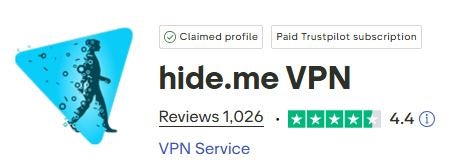
Now it’s time to review Hide.me feedback from different users. They tested it for personal use, business, travel, and streaming. They also mention customer support. For this, we used the official Trustpilot platform. Users rate it 4.5 out of 5, based on 1,000+ reviews. This gives a clear view of overall satisfaction. However, some negative comments also appear, as with any service. Here are samples, so you can judge them closely.
Hide.me VPN reviews about support
“I’m extremely grateful for a reliable experience with your support team. My previous service made me doubt it, so I cancelled it. Since we switched to ‘hide’, it has felt more than satisfactory. Also, the human approach helps far more when I explain the issue.” (Source: Berna – Trustpilot)
“I’ve used Hide.me for over two years. Whenever I needed setup help, customer service helped me quickly. The VPN feels incredibly easy to use. Also, it offers settings that fit your needs. The website also gave me lots of useful information. Today I contacted support about a subscription charge I forgot to cancel. I got a quick reply and they refunded the full amount to my PayPal account the same day.” (Source: Tormund – Trustpilot)
Hide.me VPN reviews for streaming
“I’ve used hide.me for several years, after testing other VPNs. I’m extremely impressed with hide.me because I get consistent speeds. Also, it doesn’t drop at all. I download a lot of movies and this VPN allows me to access torrent sites that would normally be blocked by my internet provider.
You can get cheaper VPNs, but all I will say is that you get what you pay for. Very fast speeds. Brilliant VPN. 5/5.” (Source: Clive – Trustpilot).
“Streaming with hide.me feels really difficult; it always interrupts my movie session.” (Source: Miguel Sousa – Trustpilot)
“Hideme is useful for streaming foreign broadcasts” ( Source: Gilles – Trustpilot)
Hide.me VPN reviews as a digital nomad
“It didn’t work on UK sites. The VPN is on, but the site still knows I’m not in the UK.” (Source: Ikenna – Trustpilot)
The accessibility and the ease of trial, purchase, and installation felt unmatched.
I felt satisfied with the experience, so I subscribed personally. I still use it daily. I’ve been a customer for two or three years, and I keep using it.” (Source: Ozwald – Trustpilot)
“One of the best VPNs, without doubt. And yes, it works in China (February 2025). Highly recommended.” (Source: PhD in Philosophy – Trustpilot)
Alternatives to Hide VPN
If you still want to compare options beyond Hide.me, here are alternatives with free plans and similar features. If we had to pick the best, we’d choose Proton VPN. It offers strong security, a large server network, and modern protocols. As a result, it delivers excellent speeds. Review these VPNs and decide what fits your needs and budget.
1. Proton VPN
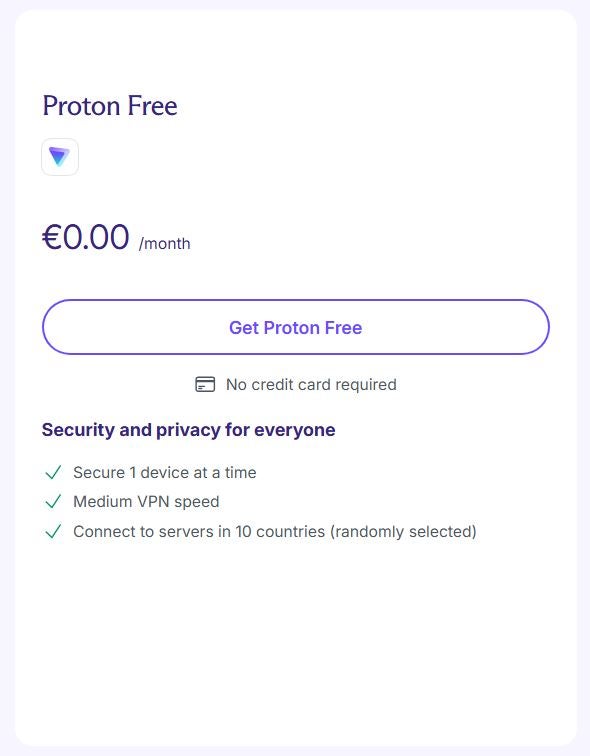
Proton VPN is one of today’s best options with a free plan and no speed cap. Since it’s based in Switzerland, it enforces a strict no-logs policy. It also uses AES-256-bit encryption, an RSA-4096 key, and SHA-384 HMAC authentication. Plus, it can boost speed by up to 400% with its VPN Accelerator. Another standout detail: It offers 15,000+ servers across 120+ countries. That’s hard for other brands to beat. You can choose its free plan with access to 10 countries. Or you can choose paid plans from €2.99 ($3.48) on the two-year plan.
2. Windscribe VPN
Another option is Windscribe VPN. Like Hide.me, it includes a free plan with no connection limit and 10 GB of free data. It also includes robust AES-256 encryption, reasonable privacy policies, and an ad or tracker blocker. If you don’t need heavy streaming use, it can work well. It offers servers in 69+ countries. You can also add extras via paid plans from €2.08 ($2.42 USD) per month on the annual plan.
3. Privado VPN
Finally, Privado VPN also offers a free plan. It isn’t unlimited, yet it suits basic browsing and public network access. It offers 240 global server locations, an ad blocker, and AES-256 encryption. On the paid plan, it offers social filters, plus unlimited data and devices. Prices start from €1.11 ($1.29 USD) on the two-year plan. It also allows 10 simultaneous connections.
Frequently asked questions about Hide VPN
Based on some Hide.me VPN reviews, it works in China. However, performance won’t always stay stable due to strict local restrictions.
Yes, it offers a free plan without needing a credit card. However, it includes 8 servers and only one simultaneous connection.
Yes. It uses high-grade AES-256 encryption and an externally audited logging policy. So, it won’t store data about your online activity.
Yes. We confirmed through Hide.me VPN reviews and official website info that it offers servers optimised for streaming.
With the free plan, you can connect only one device. However, any paid plan allows up to 10.










