







 Language


 No results found
Goose VPN review: Features, pricing & performance
Full analysis and Goose VPN review: user reviews, performance, security level, plans, server network, advantages and limitations.

Most people working online understand the importance of using a VPN. Often, it’s confusing to know which one to choose because the market is highly competitive, with VPNs for all kinds of users. Today, we examine a provider known for its simple and user-friendly approach. Here’s a full review of Goose VPN: User opinions, security features, performance, pros, cons, and alternatives if its offer doesn’t convince you.
Although GooseVPN isn’t one of the largest or most powerful providers on the market, it can be a good option for those seeking a straightforward VPN for travel, remote work, or private browsing. Keep reading for a complete picture to decide if it suits your digital needs.
What is Goose VPN and what does it offer?
GooseVPN is a VPN provider based in the Netherlands that focuses on simplicity and ease of use. Unlike more complex brands packed with advanced features, GooseVPN offers a minimalist experience with an intuitive app, clear settings, and a service designed for users who want protection without complications.
But what does a VPN actually do? In practice, Goose VPN encrypts your connection so no one can see your online activity, especially on public WiFi in airports, cafés, or hotels. It also hides your IP address and allows access to content that may be restricted in some countries.
Goose VPN’s offering rests on three pillars: Privacy, ease of use, and accessibility. It provides secure encryption, protection on public networks, and the ability to bypass basic geographic restrictions, all without technical knowledge. Moreover, it allows unlimited device connections with a single subscription, which not all VPNs offer. This makes it attractive for families, frequent travellers, or people managing multiple devices simultaneously.
While GooseVPN doesn’t compete with top providers in speed, advanced features, or streaming unblocking, it offers a basic, affordable, and easy-to-use solution for those who want to enhance privacy without hassle.
Important: If you are a frequent traveler and want to stay connected without worrying about expensive roaming or looking for a new SIM at every destination, Holafly’s subscription plans are for you. With a single eSIM, enjoy internet in more than 170 countries for a fixed price and no surprises on your bill. Travel without limits and connect easily and securely! 🚀🌍

What does Goose VPN include?
As mentioned earlier, GooseVPN is a service aimed at users seeking simplicity, basic anonymity and privacy, rather than elite-level features. It provides the essentials: Strong encryption, kill switch, P2P support, multiple locations, unlimited data, and multi-device compatibility.
However, some additional features like modern protocols, optimal speed, and reliable streaming unblock may lag behind high-end VPNs. Therefore, it’s suitable for safe browsing on public networks with basic privacy but not ideal if you want maximum performance, 4K streaming, competitive gaming, or constant international content access.
Here’s a complete table showing what Goose VPN includes so you can draw your own conclusions:
| Feature | Detail |
|---|---|
| Encrypted | GooseVPN uses AES-256 bit encryption to protect your traffic. |
| Supported protocols | Supports protocols such as OpenVPN, IKEv2, PPTP, and L2TP on desktops; mobile usually offers IKEv2 or compatible variants. |
| Kill Switch | Includes a kill switch: If the VPN connection drops, it blocks traffic to prevent leaks. |
| No-logs policy (privacy / anonymity) | GooseVPN states it does not log user activity or traffic. |
| P2P / Torrent support | Allows peer-to-peer connections and torrent use (some servers are designated for P2P). |
| Server distribution (locations) | About 100 servers in 22 countries, mainly in Europe. |
| Streaming / Geo-unblocking | Optimized servers for streaming, only in the US, UK, and Netherlands. Not ideal for restricted content. |
| Simultaneous connections / Multi-device | You can use the account on multiple devices. |
| Unlimited bandwidth | GooseVPN declares “unlimited data limits”. |
| Support / 24/7 customer service | Offers 24/7 email support. No phone. Includes chatbot. |
| Apps | macOS, Windows, Android TV, iOS, Linux, routers |
Next, we’ll dive deeper into this table and other aspects to give a clear picture of the service Goose VPN offers.
Is Goose VPN secure?
When choosing a VPN, one of the first questions is whether it truly protects your data. In this sense, GooseVPN covers the basics, although it doesn’t reach the security level of more advanced providers.
GooseVPN uses AES-256 bit encryption, the highest standard currently available. Simply put, it’s like placing your data inside a safe with an almost impossible combination to crack. Neither your internet provider, an insecure public WiFi, nor an attacker can see your activity while connected. This is the same encryption banks and governments use to protect sensitive information.
Regarding protocols, which are essentially tunnels carrying your information, GooseVPN uses:
- OpenVPN: Secure and widely used by most VPNs.
- IKEv2: Fast and stable, ideal for mobile devices.
- PPTP and L2TP: Older protocols, faster but less secure; generally not recommended today.
This means GooseVPN offers safe ways to connect, but does not use modern protocols like WireGuard, which is currently the fastest and most efficient standard in the industry.
In terms of advanced security features, GooseVPN has some important ones, but not as many as high-end competitors:
- Kill Switch: Blocks traffic if the VPN disconnects, preventing your IP from being exposed.
- P2P support on specific servers: Useful for torrent downloads with extra security.
- DNS/IP leak protection: Prevents accidental exposure of your real location.
However, it doesn’t offer advanced obfuscation for heavily censored countries (China, Iran, Turkey); no RAM-only servers that erase data after each reboot; no multihop, i.e., routing through multiple servers for extra anonymity; and no advanced malware or real-time protection.
In conclusion, GooseVPN is safe for basic use: Browsing, connecting to public networks, remote work, and general data protection. But it’s not the most robust option if you seek advanced features, maximum speed, or premium privacy comparable to Proton VPN.
Jurisdiction, no-logs policy and independent audits
GooseVPN is based in the Netherlands, an EU member state. This means it operates under strict European data protection laws, particularly GDPR, one of the world’s strictest privacy frameworks. It also means it’s part of the Nine Eyes surveillance alliance, which allows certain countries to share information under specific legal circumstances.
Being in the EU is positive because it obliges GooseVPN to be transparent about data handling and comply with strict regulations. However, being within Nine Eyes carries a theoretical risk that authorities could request information via court orders. Therefore, a strong no-logs policy is crucial.
In this regard, GooseVPN claims a strict no-logs policy, meaning it does not store user browsing activity. It does collect minimal operational data, such as number of connected devices, general bandwidth usage, and basic technical details to maintain accounts.
Such data is common in many VPNs and doesn’t directly compromise privacy if it cannot be linked to online activity. One important point: GooseVPN doesn’t specify what temporary logs are kept or for how long. This leaves some transparency gaps compared to brands like Proton VPN, Mullvad, or Surfshark.
Another weak point: GooseVPN has not undergone independent audits to confirm its no-logs policy. This doesn’t mean it’s unsafe, but users must rely solely on the company’s claims. For basic privacy, this is fine. For advanced users or travellers in heavily censored countries, it may not suffice.
GooseVPN speed and performance

Speed is crucial when evaluating a VPN, especially for remote work, streaming, or smooth browsing. In this regard, GooseVPN delivers acceptable performance but is far from the fastest providers.
Independent tests show GooseVPN maintains a reasonable portion of baseline speed on nearby servers. Local server losses average 25%–35%, depending on user connection quality, while distant servers (e.g., Latin America to Europe/Asia) can see losses of 50% or more.
This is because GooseVPN doesn’t use modern protocols like WireGuard, which typically improve speed and energy efficiency. Unlike other providers, it lacks advanced speed-boosting tools, such as Proton VPN’s VPN Accelerator.
Thus, GooseVPN is fast enough for everyday browsing, social media, moderate video calls, and standard-quality streaming, but may fall short for HD streaming, heavy downloads, or competitive gaming.
GooseVPN streaming unblocking capabilities
GooseVPN’s streaming access is limited and generally lags behind other providers. Although its website claims you can “watch shows and movies from anywhere”, independent tests and user reviews paint a more moderate picture.
GooseVPN can intermittently access some Netflix libraries, mainly US and Netherlands, but not reliably in all regions. Recent tests show issues with Disney+, BBC iPlayer, Hulu, and Amazon Prime Video. These platforms often detect GooseVPN, blocking playback or showing location errors.
Performance also doesn’t always keep up. If you want to watch 4K streaming, you should already know that it will be difficult with Goose VPN due to speed losses. In addition, at peak hours some users report constant buffering due to high server demand.
What about online gaming? Online gaming faces the same limitations. Latency increases, international connections fluctuate, and stability isn’t as strong as in advanced VPNs. Therefore, GooseVPN is suitable for casual gaming, but not recommended for esports, FPS, or latency-sensitive games.
Goose VPN servers
GooseVPN’s server network shows the most limitations compared to larger providers. While it claims servers across continents, its infrastructure is smaller and less diverse than premium VPNs like Proton VPN, Surfshark, or NordVPN.
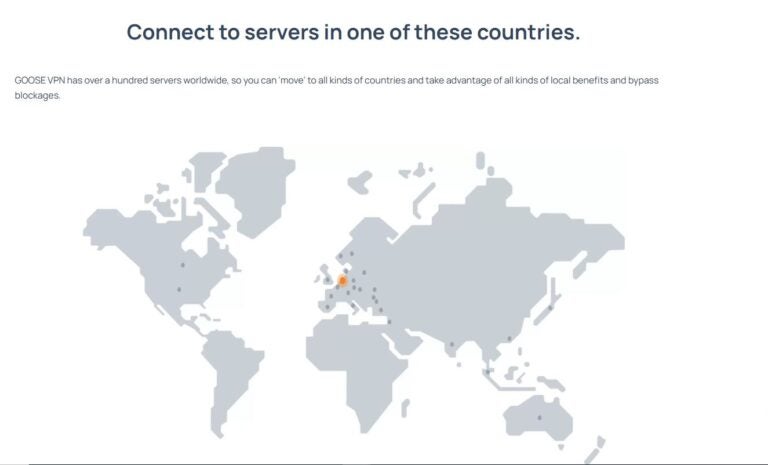
GooseVPN has over 100 servers in Europe, America, Asia, and additional locations, but most are in Europe. The exact number of active servers isn’t public. This is often a disadvantage because it makes it difficult to know how saturated they may be, how up-to-date locations are, or whether the network is optimally distributed.
GooseVPN offers specialised servers for streaming in the US, UK and the Netherlands, and for P2P in all other countries. However, the network focuses on essentials rather than high performance.
Goose VPN plans and pricing
GooseVPN offers a relatively simple pricing structure for users wanting a basic VPN without overspending. Unlike brands with multiple plans and add-ons, GooseVPN keeps three main options: Monthly, yearly, and lifetime plans.
This simplicity is an advantage over VPNs with tiers and extra packages. All plans allow unlimited device connections, appealing to families, travellers, or multi-device users.
The Lifetime Plan is a key differentiator, as not all VPNs offer it. It’s a one-time payment of €149 ($163) (promotions may vary) and grants permanent access without monthly or annual renewals. It’s convenient for users seeking a simple, long-term, economical VPN, although it isn’t as full-featured as premium options.

How to use Goose VPN
Using GooseVPN is very straightforward, even if you’ve never installed a VPN. Once you choose a plan and create your account, just download the app from their website or your device’s store. Installation is quick and doesn’t require complicated setups: Log in, select a country, and tap the connect button to start protecting your data.
The interface is designed to be clear and simple, so anyone can navigate the options easily. If all you want is to connect to a secure server and browse with more privacy, GooseVPN delivers this without difficulty. It also allows multiple devices to connect simultaneously, useful for users working across different devices.
However, this simplicity explains why GooseVPN is not aimed at advanced users. Configuration options are limited, it does not include modern protocols like WireGuard, nor sophisticated features like RAM-only servers, multihop, advanced obfuscation, or speed optimisation tools. Its user experience is ideal for basics, but may fall short for those seeking deeper control or higher performance for demanding tasks.
Goose VPN advantages and limitations
By now, the advantages and limitations of GooseVPN are clear, but let’s recap. Generally, it offers a simple experience, good basic privacy, and intuitive use, but lacks advanced features and performance compared to more powerful VPNs.
| GooseVPN Advantages | GooseVPN Limitations |
|---|---|
| Very easy to use, ideal for beginners. | Inconsistent speed, especially on distant servers. |
| Allows unlimited devices with a single account. | Doesn’t use modern protocols like WireGuard, affecting performance. |
| AES-256 encryption and kill switch for basic security. | Few advanced security features (no multihop, RAM-only, obfuscation). |
| P2P/torrent support on specific servers. | Limited ability to unblock streaming platforms. |
| Operates under strict EU privacy laws (GDPR). | No external audits to validate the no-logs policy. |
| Simple apps on most devices. | Smaller server network compared to leading competitors. |
| Unlimited bandwidth. | Not suitable for 4K streaming or demanding gaming. |
Goose VPN user experience and opinions User reviews
To truly understand GooseVPN’s daily performance, it’s important to review user experiences. In general, GooseVPN receives mixed feedback: Many praise its ease of use and simplicity, while others report stability issues, inconsistent speed, or difficulties on mobile devices. Here are some real examples:
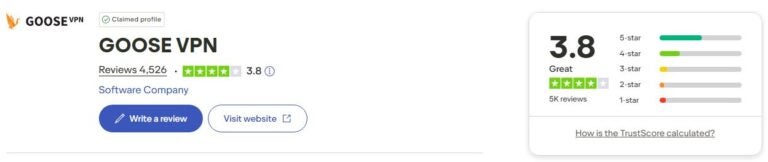
On Trustpilot, GooseVPN has a rating of 3.9/5 stars, indicating moderate satisfaction. Reviews highlight the app’s intuitiveness and suitability for basic use, though some complaints mention unstable connections or mobile issues. Here are some popular examples to give you an idea:
- “GooseVPN always worked well for me. Yesterday it started failing, and the support team patiently solved the problem. Very happy with the app and technical team” – Fidel, Trustpilot, December 2023.
- “Good technical support, good VPN. Missing some advanced options, ad blocking and other details, but overall an excellent VPN” – Aketza Moran, Trustpilot, June 2025.
- “Simple and practical. Perfect for home use.” – Angel R., Trustpilot, January 2019.
These reviews show a clear trend: GooseVPN is appreciated by users seeking an easy, hassle-free VPN but may not satisfy those needing constant stability or advanced features.
Goose VPN for entertainment
What about more specific uses of Goose VPN? Regarding specific uses, independent analyses and critical reviews highlight clear limitations, particularly for streaming or intensive gaming. For example, a Reddit user states “Goose VPN … worked fine for browsing, social media, and even YouTube… but isn’t consistent with Netflix or other international content.”
For gaming, there are almost no recent reliable reviews reporting strong performance. Technical analyses often rate its gaming performance as mediocre compared to low-latency-optimised VPNs.
Goose VPN for remote work
GooseVPN is suitable for basic remote work: Emails, browsing, social networks, and casual use. Some users successfully use it while travelling or in multiple countries. However, frequent disconnections or reconnections have been reported, affecting video calls, corporate servers, or sensitive work data, especially if fully reliant on the VPN.
- “I’ve had Goose VPN for several years. Recently, I’ve had issues with VPN connection drops. It tries reconnecting repeatedly and emits an annoying alert beep each time it fails. Switching to another UK server sometimes helps.” – Nigel, Trustpilot, September 2025.
- “The VPN takes long to connect, and even when it shows ‘connected’, it doesn’t work. I checked my IP; it remains the same. Seems not connected to any server, only displays ‘connected’.” – Diseño SOGA, Trustpilot, October 2025.
In conclusion, it’s not robust or reliable for users needing consistent performance, especially during long trips, frequent country changes, or demanding work. It’s better suited for occasional use or as a simple tool on insecure networks.
Alternatives to Goose VPN
While GooseVPN may be useful for users seeking a simple, inexpensive VPN, there are more complete and highly rated options for security, speed, and stability. Here are three alternatives offering superior performance depending on user needs.
Proton VPN: The most complete choice for privacy and speed
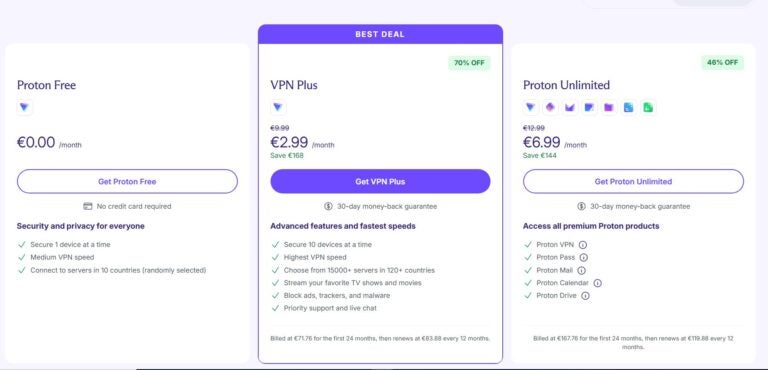
Proton VPN stands out as a solid alternative to GooseVPN. Its main difference is service quality: A vast server network, modern protocols like WireGuard and Stealth, very high speeds, and independently audited no-logs policy.
Additionally, being based in Switzerland (a country with strict privacy laws outside surveillance alliances) adds security GooseVPN cannot match. It is also much more reliable for streaming and remote work. Moreover, it offers a free plan with unlimited data across 10 countries, much more generous than most free VPN versions.
Mullvad VPN: An excellent choice for real anonymity
Mullvad is ideal for users prioritising privacy above all. Unlike GooseVPN, it doesn’t require personal data or email to create an account, accepts cash payments, and enforces a very strict no-logs policy.
It also uses RAM-only servers and supports WireGuard, providing better speed and security. Its approach is more technical and less aesthetic-focused, but offers a level of anonymity GooseVPN cannot reach.
TunnelBear: Simple like GooseVPN, but more stable
TunnelBear is an attractive alternative for beginner users. Like GooseVPN, it has a simple, user-friendly interface, but offers more stable performance, a wider server network, and additional features like tracker blocking and obfuscated servers (GhostBear), useful in countries with censorship or restrictions.
Although not the most advanced VPN, it often provides a more consistent experience than GooseVPN in browsing, stability, and mobile connections.
Goose VPN FAQ
Yes, GooseVPN provides a basic security level suitable for most users. It uses AES-256 encryption and includes a kill switch and DNS leak protection. However, it lacks advanced features such as WireGuard, RAM-only servers, or independent audits, so it doesn’t reach the privacy level of services like Proton VPN or Mullvad.
It may work for occasional streaming, but performance is inconsistent. Some users can access Netflix, but many platforms like Disney+, BBC iPlayer, or Amazon Prime Video detect or block it. Speeds may vary depending on the server, affecting video quality.
For basic tasks like browsing, social media, or protecting public WiFi, GooseVPN can be useful. However, several reviews mention stability and connection drop issues, which may affect video calls or remote access. For reliable travel or intensive work, more robust alternatives exist.
All GooseVPN plans allow unlimited device connections with a single subscription. This is one of its strengths and is useful for multi-device users or families needing to protect several devices simultaneously.










