Language

How to set up and activate an eSIM?
Setting up an eSIM is a quick and straightforward process you can complete directly from your device settings. It involves two stages: installation and activation. During installation, you add the digital eSIM profile to your phone using a QR code or manual details. Activation is the step that turns on mobile data and starts your plan.
For travel or international eSIMs, it’s recommended to install the eSIM before your trip and activate it once you arrive at your destination. This helps ensure your device connects to the local network at the right moment.
In this guide, you’ll learn how to set up an eSIM on iPhone and Android devices, what to check before getting started, and how to complete the process with confidence.
Before you install: What you need to check
Before setting up an eSIM, take a moment to check a few essentials. This ensures a smooth setup from start to finish.
- Make sure your device supports eSIM and is unlocked by your carrier. A locked device can’t install or activate an eSIM from another carrier.
- Connect to a stable Wi-Fi network to install the eSIM without interruptions. Public networks are not recommended.
- Ensure your device has at least 20% battery or keep it connected to a charger during the setup process.
- Decide how you’ll add the eSIM to your iOS or Android device: by scanning a QR code or by entering the manual installation codes. Manual entry is useful if the QR code doesn’t scan on iOS or Android and must be entered exactly as provided.
How to Install an eSIM
This step is completed before you travel and requires a stable Wi-Fi connection. During this process, the eSIM profile is added to your device, but data usage doesn’t start yet.
To install an eSIM on iPhone
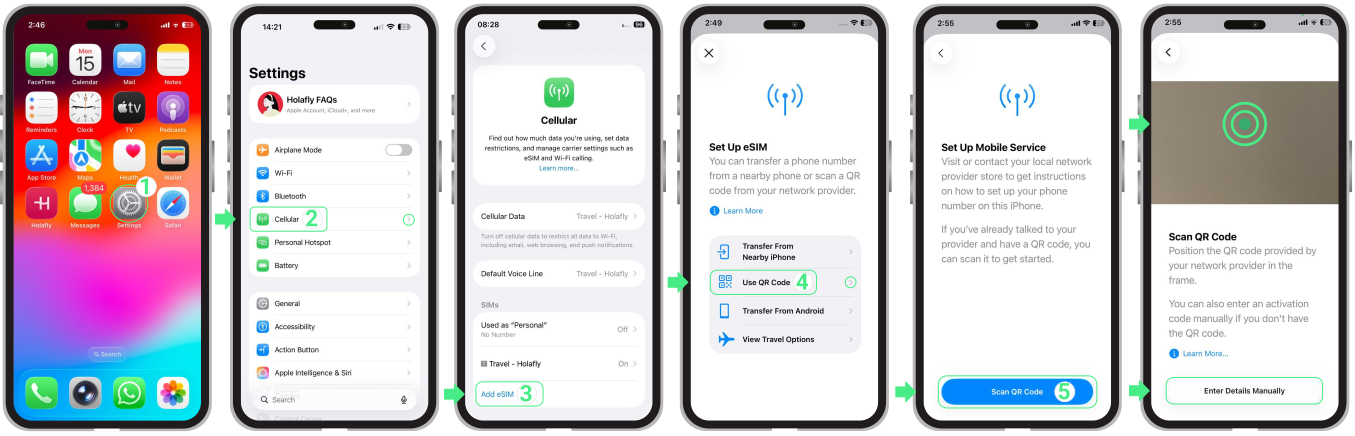
- Go to Settings → Tap Cellular or Mobile Data → Tap Add eSIM → Select Use QR Code → Tap Scan QR Code (from here, you can either scan the QR code or choose Enter Details Manually) → Tap Next → Continue with activation.
To install an eSIM on Android
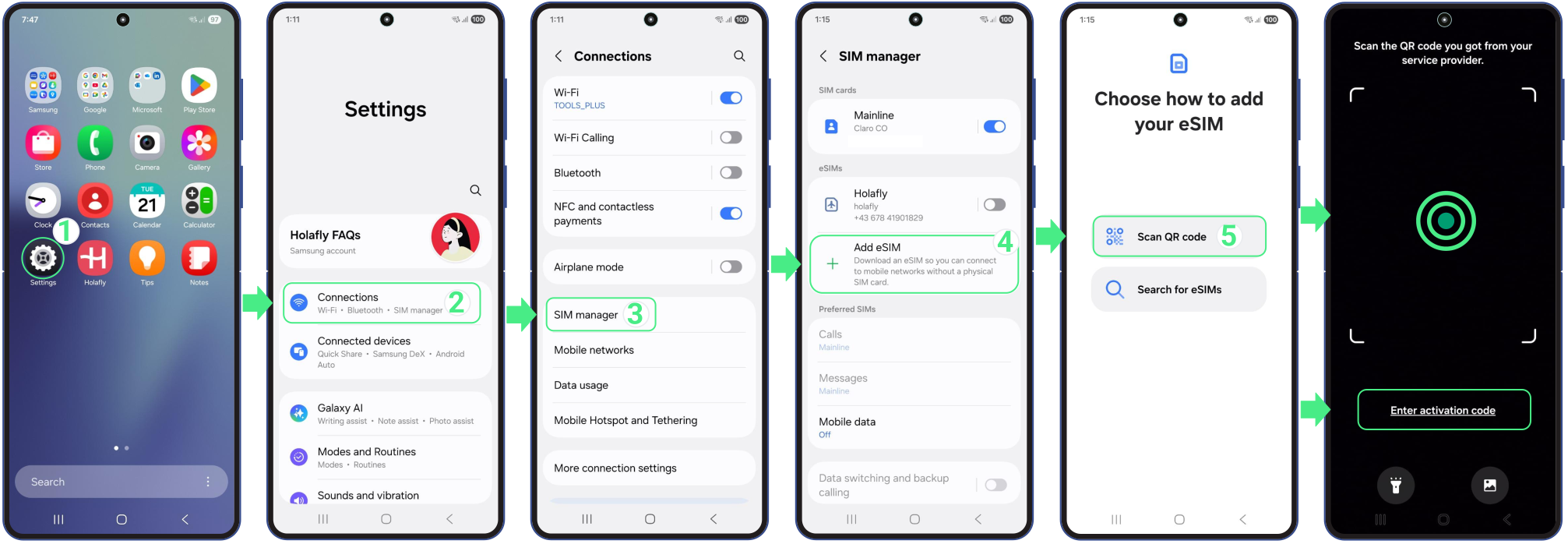
- Go to Settings → Connections → SIM Manager → Add eSIM → Tap Scan QR Code (from here, you can either scan the QR code or choose Enter activation code) → Tap Add → Continue with activation.

How to Activate an eSIM
Activation is the step where your eSIM connects to the local mobile network. This happens when you turn the eSIM line ON and enable data roaming after arrival.
To activate an eSIM on iPhone
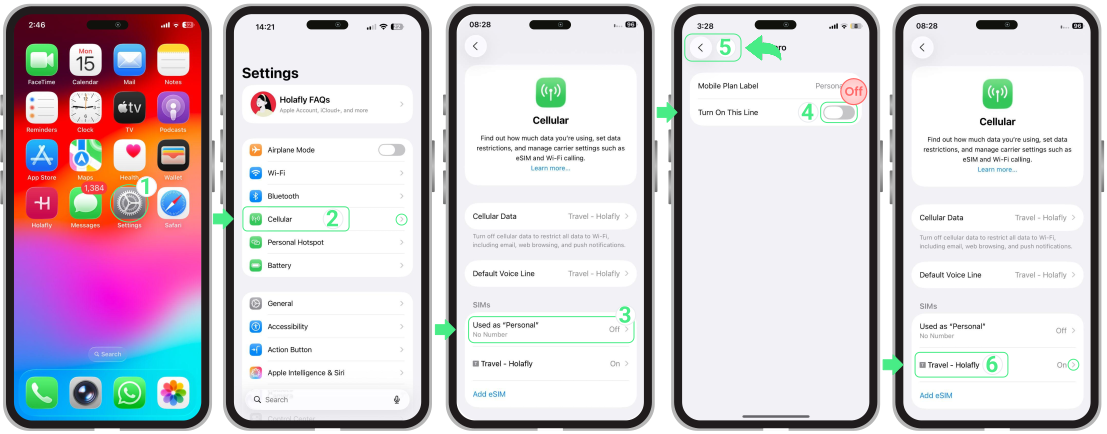
- Go to Settings → Cellular or Mobile Service → Turn off your personal SIMs or other eSIMs by switching off Turn On This Line → Go back to Cellular or Mobile Service → Select the eSIM you want to activate (your new Travel eSIM, which may appear with a custom name).
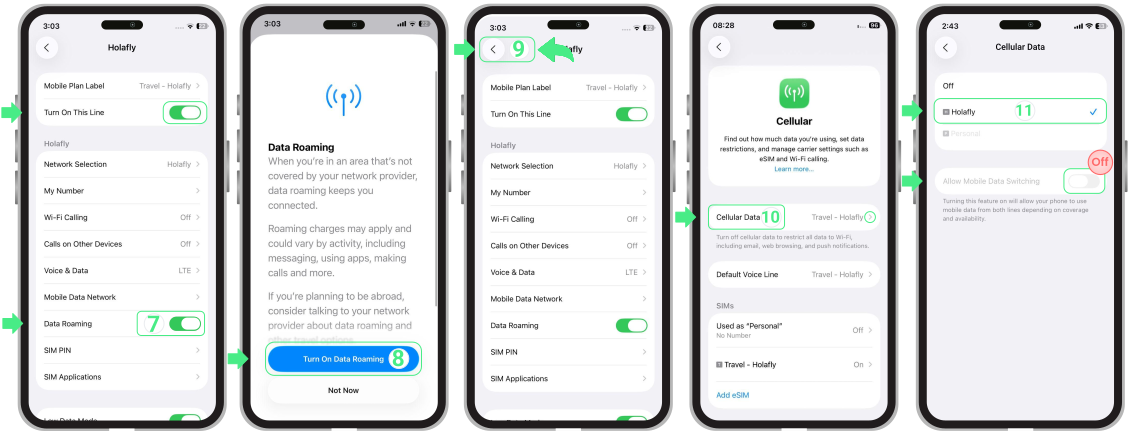
- Make sure the Turn On This Line button is enabled → Turn on Data Roaming → If prompted, tap Turn On Data Roaming to confirm → Return to Cellular or Mobile Service → Tap Cellular Data or Mobile Data and select the Travel eSIM as your data line → Check that Allow Mobile Data Switching is turned off to prevent the iPhone from switching between lines automatically.
If you’re using dual SIM:
- Use your personal line for calls and SMS only if needed, keeping in mind that your home carrier may charge for usage.
- Set the eSIM as the default line for mobile data and turn off Cellular Data Switching to prevent your phone from using your home line for data and avoid roaming charges.
To activate an eSIM on Android
- Go to Settings → Tap Connections → Select SIM Manager → Turn OFF any other active SIMs → Turn ON the newly installed eSIM → Tap Mobile Data and select the Travel eSIM → Go back to Connections → Tap Mobile Networks → Turn ON Data Roaming for the eSIM to start using mobile data.
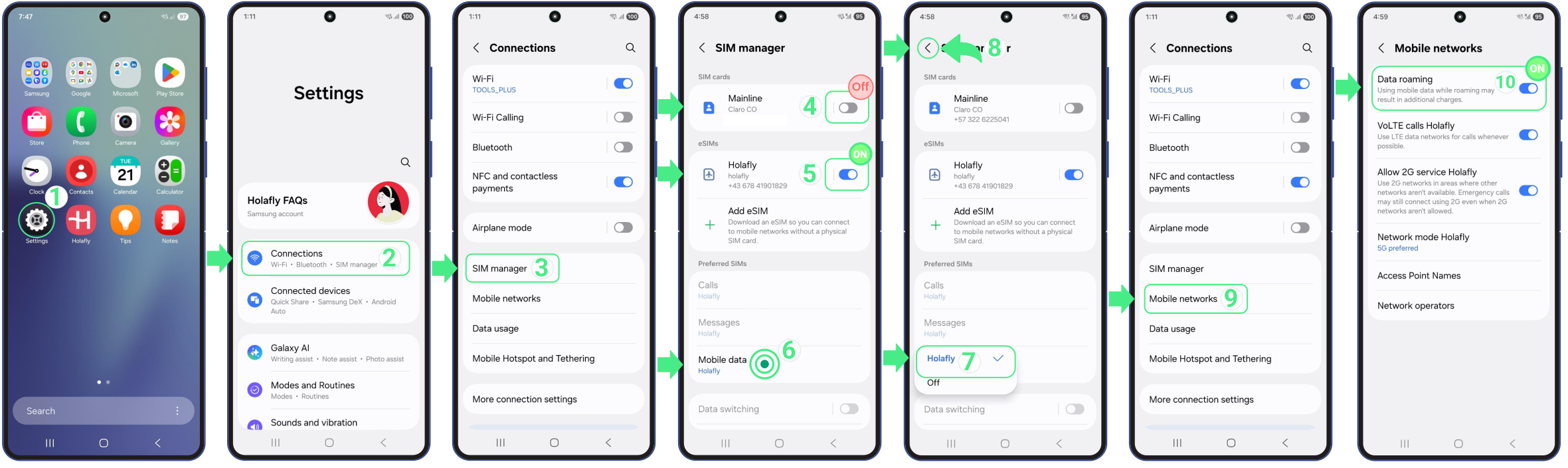
On some devices, menu names may vary slightly. If data doesn’t work right away, temporarily turn off other active SIMs and confirm the travel eSIM is selected for mobile data.
If you need more detailed steps on how to set up and activate an eSIM on Android, check our device-specific guides. You’ll find step-by-step instructions for Samsung, Google Pixel, Huawei, Xiaomi, Honor, Vivo, Motorola, Nokia, Sony, OnePlus, and Oppo devices.
Troubleshooting Tips
If you followed the steps to set up and activate an eSIM, but data isn’t working yet, review the points below. In most cases, it’s just a setting that needs a quick adjustment.
- Make sure you’ve already arrived at your destination. Data only works after you activate the eSIM at the destination.
- Confirm the new eSIM is turned on and selected as the mobile data line.
- Turn data roaming ON for the travel eSIM. This is the most common reason activation fails. You must enable this setting within your iPhone cellular options or Android network settings to connect correctly.
- If you’re using a dual SIM, temporarily turn off other active SIMs to prevent them from blocking data usage.
- Avoid deleting the eSIM. Once removed, it can’t be reinstalled and usually requires a new eSIM.