







 Language


 No results found
Best VPN for remote work: Complete guide
Protect your data and your company's data when working remotely. We'll tell you which is the best VPN for remote working and how to set it up.

Remote work has transformed how we live and handle our professional lives. Flexibility, saved commuting time, and work-life balance stand out. However, working from anywhere still brings real challenges. One major challenge involves protecting data security and connection privacy. Luckily, solutions exist. Today, we’ll cover one of the most effective options: VPNs for remote work.
These useful tools won’t only help you confirm your work stays protected. They’ll also help you keep your connection stable. As a result, they’ve become essential allies for working anywhere worldwide. Even so, you might need to connect to vulnerable networks.
Want to know which VPN suits you best? Then, we’ll share everything you need to choose one.
Why do people recommend a VPN for remote work?
When you work from home, a coliving, or any café with free WiFi, you won’t want exposed confidential data. Without a VPN, that’s exactly what could happen. Using public networks without protection feels like leaving your front door open: cybercriminals can exploit it. Also, others can track your online activity and sell your data to third parties.
With a VPN, you won’t need to worry about this. This tool encrypts your connection and makes all your internet activity unreadable to outsiders. Worried someone might intercept your password while you use Google Drive? Or worried someone could access team video calls? A VPN removes these risks.
Also, another advantage makes many remote workers rely on it: it lets you access company resources. Many corporate networks restrict access by location or security rules. However, a VPN lets you log in as if you sat in the office. Wherever you are in the world. Do you work from Thailand, yet need access to a server in Spain? With these tools, you can.
In short, remote work without a VPN feels like travelling without insurance: nothing may happen, yet the cost can sting.

What are the 5 best VPNs for remote work?
As you can see, you should get a solid VPN for remote work. But which one should you choose? If you’ve got little experience with these tools, you might feel lost. That’s normal, especially when you plan your first purchase.
Don’t worry, we’ll help you. The market offers many strong options, yet some stand above the rest. Based on remote work experiences worldwide and expert opinions, these five VPNs suit remote delivery without security or stability worries:
1. ProtonVPN
Built for people who value privacy, ProtonVPN pairs advanced security with a strong commitment to transparency. It suits working anywhere with fast, secure connections. The same team behind Proton Mail created it. Proton Mail ranks among the world’s most secure email services. ProtonVPN also bases itself in Switzerland, a country known for strict privacy laws.
Key features:
- Security: AES-256 encryption and support for WireGuard and OpenVPN protocols.
- Compatibility: Available to Windows, macOS, Android, iOS and routers.
- Performance: minimal speed impact, so it suits streaming and video calls.
Plans and prices:
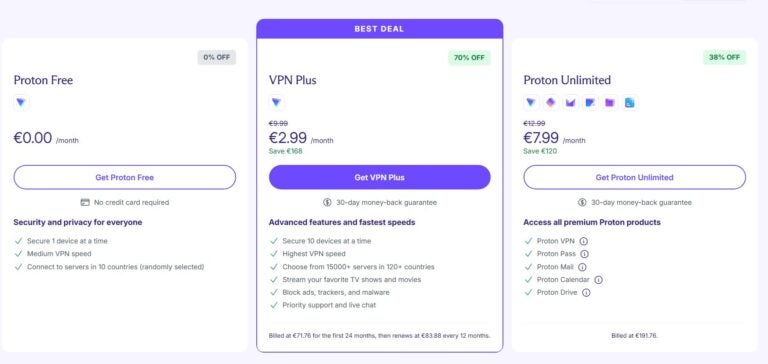
Proton VPN offers a free plan, a Plus plan, and an Unlimited plan, each with its own features. You can subscribe for one month, one year, or two years. The two-year subscription costs less, so you can save money. Also, you won’t mind committing long term.
Proton VPN’s Free plan ranks among the best on the market. If you want a free VPN for remote work, this is your top option. It has no data limit, and it lets you connect to servers in 10 countries (randomly selected). It also protects one device at a time. Paid plans extend protection to 10 devices per subscription.
Extra features:
- Secure Core VPN for stronger privacy.
- Servers optimised for remote work on public networks.
- Over 15,000 servers in 120+ countries
- No-logs policy with independent audits.
- It includes an ad blocker on premium plans (NetShield).
2. MullVad VPN
With almost 700 servers across 50 countries, Mullvad VPN suits remote workers who value privacy. Its stable connection and advanced encryption (WireGuard and OpenVPN) protect you on public networks. For example, you can work from cafés or coworking spaces with confidence. Also, its simple interface and anonymous payment make it ideal for global remote work.
Key features:
- Security: it offers WireGuard and OpenVPN encryption, so it protects your data at all times.
- Compatibility: available on Windows, macOS, Linux, Android, and iOS.
- Performance: minimal speed impact, so it suits video calls and collaborative work.
Plans and prices:
One standout feature of Mullvad VPN is its flat fee of €5 ($5) per month, with no commitment or extra charges. This pricing policy appeals to users who don’t want to juggle multiple plans. Also, they don’t want long-term subscriptions.

Extra features:
- Anonymous payments with cash or cryptocurrencies.
- Multi-hop server option for stronger security.
- Built-in tracker and ad blocking.
- No-logs policy with external audits.
3. Private Internet Access (PIA)
With more than 29,000 servers in 91 countries, PIA doesn’t only run one of the biggest networks on the market; it also blends privacy and customisation. As a result, it appeals to remote workers who want full control over security settings.
Key features:
- Security: AES-256 encryption with OpenVPN support.
- Compatibility: Available to Windows, macOS, Android, iOS and routers.
- Performance: minimal speed impact, so it suits demanding tasks.
- Simultaneous connections: unlimited.
Plans and prices:
PIA VPN offers three plan types: monthly, yearly, or three-year. As usual, the price drops when you choose longer subscriptions. However, some people may find a three-year plan excessive. It also offers an optional dedicated IP and antivirus as paid add-ons (only on the three-year plan).
In all cases, it offers a 30-day money-back policy.

Extra features:
- RAM-only servers that wipe all session data on every reboot.
- Advanced configuration for expert users.
- Servers optimised for P2P and streaming.
- Tracker and ad blocking.
- Strict zero-logs policy with independent audits.
4. CyberGhost
With an intuitive interface and more than 11,500 servers in over 100 countries, CyberGhost suits people new to VPNs. Its servers optimised for video calls and streaming make it an excellent option for remote workers.
Key features:
- Security: AES-256 encryption with the WireGuard protocol.
- Compatibility: available on Windows, macOS, Android, iOS, and routers.
- Performance: minimal speed impact, so it keeps a stable connection.
- Simultaneous connections: seven devices per subscription.
Plans and prices:
CyberGhost offers six-month, one-year, and two-year plans, with a lower monthly price on longer subscriptions. It also lets you add a dedicated IP and an extra security pack as optional upgrades.

Extra features:
- A 45-day money-back policy.
- Built-in ad blocker.
- Servers optimised for streaming.
5. Surfshark
If you want a budget-friendly option without sacrificing quality, Surfshark is a safe bet. It offers unlimited simultaneous connections, so it suits multi-device work. Its Camouflage Mode also helps you stay anonymous while you access corporate networks. It also helps when you work from locations with access restrictions.
Key features:
- Security: AES-256 encryption with support for OpenVPN and IKEv2.
- Compatibility: works on Windows, macOS, Android, iOS, Linux, and more.
- Performance: low speed impact, so it suits video calls or file sharing.
Plans and prices:
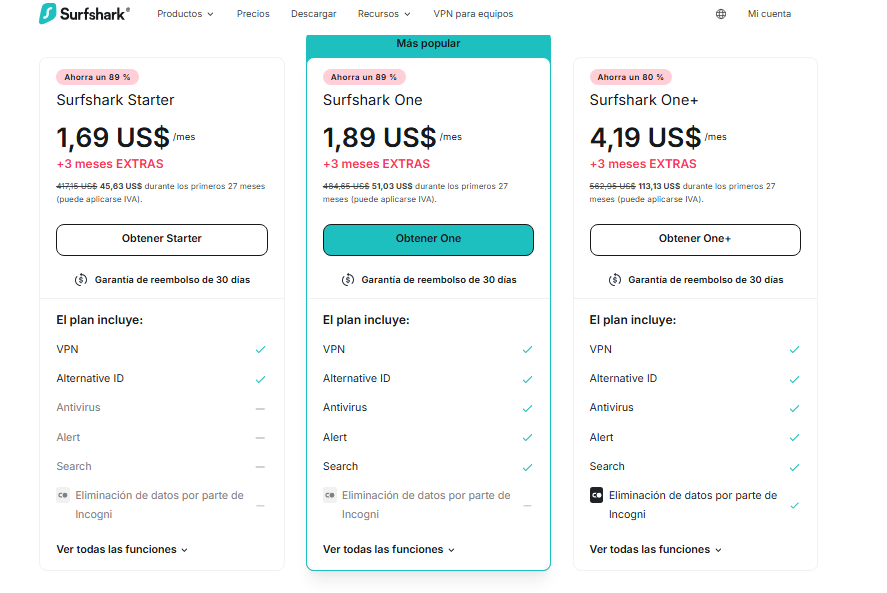
Surfshark VPN offers three plan types: Startet, One, One+, each available monthly, yearly, or two-year. Long-term plans cost less. Here you’ll find updated pricing. Keep in mind it currently shows Black Friday discounts. So, do check the prices again before you subscribe.
Extra features:
- MultiHop mode for extra privacy.
- Built-in ad blocker.
- 24/7 customer support.
What is the best VPN for remote work?

When you work remotely, you can’t rely on a fast VPN alone. Instead, you need real privacy, stable speed, and secure corporate access. You also need strong protection on public networks and clear technical transparency.
Among the options we reviewed, Proton VPN stands out as the most reliable for remote work. It suits you best when you prioritise professional security and daily connection stability.
Why did we choose Proton VPN for remote work?
Unlike VPNs that focus on server volume, streaming, or low prices, Proton VPN focuses on sensitive data. It builds a secure environment from the ground up, so you can work safely in any country.
Proton VPN is the only one of these five with an architecture created by CERN scientists and the Proton Mail team. Proton Mail ranks among the world’s most respected encrypted email services. This background translates into direct benefits for remote work:
- Safe jurisdiction (Switzerland), outside international surveillance agreements.
- Strict, audited no-logs policy, with no metadata retention.
- Secure Core, an extra layer that routes traffic through Switzerland, Iceland, or Sweden first. It helps you avoid surveillance and targeted attacks.
- Military-grade encryption and modern protocols like WireGuard and high-security OpenVPN.
For video calls, cloud work, collaboration tools, and corporate VPN connections, speed and stability matter. In this area, Proton VPN combines:
- WireGuard and Stealth, its anti-censorship, high-speed protocol.
- Owned physical servers in many countries.
- Infrastructure that avoids opaque virtualisation.
As a result, it stays consistent for long Zoom or Teams calls, file transfers, remote server access, and multi-tool workflows.
Surfshark and CyberGhost run fast, yes, yet performance can fluctuate more by location or time of day.
Finally, Proton VPN includes useful tools for people who work from home or anywhere worldwide:
- Profiles: saves settings by task type (video calls, uploads, corporate servers, and more).
- VPN Accelerator: speeds up connections when you’re far from the server.
- Stable automatic Kill Switch that prevents leaks during network drops.
- Verified protection against DNS leaks and WebRTC leaks.
- Seamless integration with Proton Mail, Proton Drive, and Proton Pass (a secure productivity ecosystem).
In contrast, Mullvad excels at privacy, yet it lacks day-to-day work features. Surfshark feels more consumer-focused overall. CyberGhost suits streaming, but it suits intensive work less.
How do you set up a VPN to access a corporate network?
Now that you know you need a VPN for remote work, it’s time to set it up. It may seem tricky at first. However, these steps will get you ready in minutes. Let’s get started!
1. Choose and install your VPN: First, pick a trustworthy VPN, like the ones we covered above. Then, download and install the app on your device (laptop, tablet, or smartphone). This step is simple, so follow the instructions on the VPN’s official website.
2. Get your company credentials: Many corporate networks use extra protection and require special access. Ask your IT team for what you need: the VPN server address, protocol type, and your login credentials. This way, you can connect securely to company resources.
3. Configure the VPN on your device: Open the VPN app and look for manual setup (if your company uses a private server). Enter the details from IT: Server address, protocol type (for example, OpenVPN or IKEv2), and your credentials. Most VPN apps keep this process intuitive.
4. Connect: Select the corporate server in the VPN menu and click “Connect”. Within seconds, you should join your company’s private network, with protected activity.
5. Verify corporate access: Open any work tool or resource you use, such as the file server or company intranet. If everything works, you’re ready to start.
Security requirements some companies set for remote work
When companies allow remote work, security becomes a top priority. They need to protect sensitive data and keep corporate networks intact. Otherwise, cyberattacks or leaks can hit hard.
That’s why many organisations set specific requirements so employees work securely, wherever they are. Here are some of the most common requirements:

1. Mandatory VPN use: Many companies require employees to use a VPN to access the corporate network. This keeps handled information encrypted and protected, even on public networks. For example, you might use a café or airport WiFi connection.
2. Two-factor authentication (2FA): 2FA adds an extra security layer. It requires more than a password; it also needs a temporary code or approval from an authorised device. So, even if someone steals your credentials, they still can’t access the network.
3. Company-approved devices: Some organisations provide dedicated equipment for remote work. For example, they might issue laptops with advanced security controls already configured.
4. Strong password policies: Companies often require unique, complex passwords and regular changes. They may also recommend password managers.
5. Automatic software updates: To reduce vulnerabilities, some companies insist on up-to-date operating systems and apps. This includes security patches.
6. Role-based access limits: Not every employee needs access to all company information. So, organisations apply the ‘least privilege’ principle. They limit access to sensitive data based on role.
Frequently asked questions about VPNs for remote work
A remote work VPN is a tool that protects your internet connection while you work from anywhere. It encrypts your online activity, secures your data, and lets you access corporate networks or business servers safely. This protection helps you keep privacy and follow your company’s security policies.
Yes, but we don’t recommend it. Free VPNs often limit speed, servers, and security. Although they can help with basic browsing, they won’t protect confidential data enough. They also won’t reduce risk when you access corporate networks. If you don’t want to pay, Proton VPN is the best option.
Yes, using a VPN is completely legal in most countries. However, some countries set specific restrictions. So, do check local laws if you plan to work remotely from a country with strict internet rules.
Yes. For example, you can use a VPN to find cheaper flights. Many airlines adjust prices based on your location. With a VPN, you can change your virtual location and compare fares across countries. Then, you can find the best available deals.
Yes, many VPNs offer business plans designed for remote teams. For example, Perimeter 81 and Cisco AnyConnect stand out because they provide secure corporate access, central management tools, and specialised support.
Yes, a travel VPN is essential if you plan to work remotely. It lets you work securely, even on public networks. For example, it protects you on airport, hotel, or café WiFi. So, your data and files stay private.


