Language
How to keep your eSIM when resetting your phone: A step-by-step guide
Want to reset your phone’s factory settings but keep your eSIM? Choose the Keep eSIM and Erase Data option, or read our step-by-step guide, to do just that.

Yes, you can factory reset your phone without losing your eSIM. During the reset process, you’ll be prompted to keep your eSIM and erase data. Simply select this option, and your eSIM settings will stay intact while everything else is wiped clean.
In this guide, we’ll walk you through exactly how to do this on both iPhone and Android, so you never lose connection during a reset.

Limitless data, endless adventures
Stream, scroll, and share as you please. With Holafly, your data is always unlimited.
What is a factory reset?
A factory reset offers a way to return your phone to its factory settings. Performing it means that all data you’ve added to the phone is wiped, and all settings are reset to their default values.
However, you can keep your eSIM profiles and avoid having to set them up all over again if you’ll be using your phone after the reset. This process differs slightly depending on your device, but it is generally pretty simple.
How to keep your eSIM and erase data on iPhone
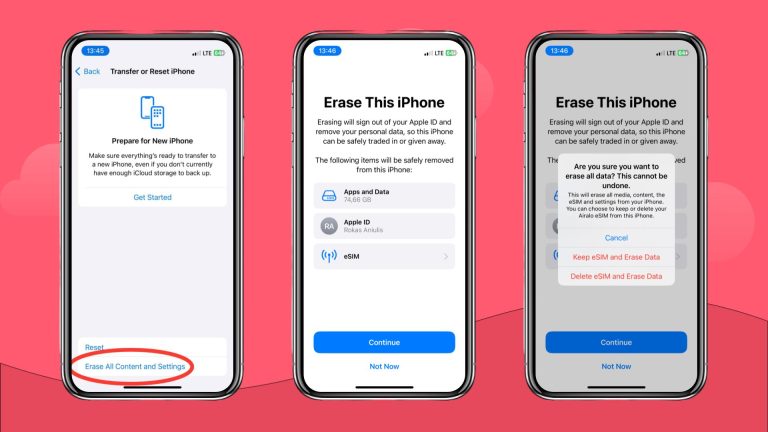
The difference between keeping or deleting your eSIMs on iPhone is as simple as selecting one of the two options in the on-screen instructions whenever you go to perform the factory reset:
- Go to Settings.
- Open the General settings menu.
- Scroll down and select the Transfer or Reset iPhone option.
- Tap on the Erase All Content and Settings option.
- Tap Continue.
- Select Keep eSIM and Erase Data.
If you want to delete your eSIM on an iPhone along with the system files, select the Delete eSIM and Erase Data option on the last step.
How to keep your eSIM and erase data on Android
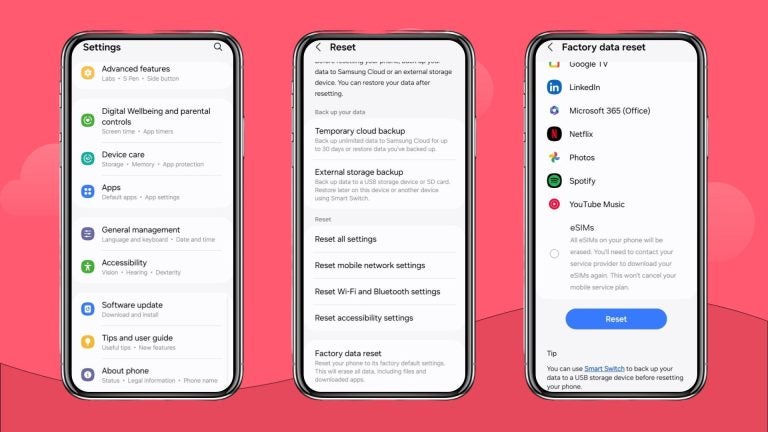
The process isn’t very different on Android eSIM phones, as it all depends on a single toggle switch at the last step. Keeping eSIM on Samsung Galaxy devices upon reset is usually enabled by default, so you don’t have to do anything extra
- Go to Settings.
- Locate General Management, then select Reset settings.
- Choose Erase all data (factory reset), then select Erase all data once more.
- The option to keep your eSIM should be selected by default, so you don’t need to do anything else.
If you want to delete your eSIMs, you should look for a checkbox and toggle the keep eSIM option to off. Keep in mind that the process can differ slightly depending on your Android device and operating system.
When should I delete my eSIM?
Whether you should choose to delete the eSIM or keep it depends on why you’re resetting your phone’s settings in the first place. If you’re doing it to solve connectivity issues or other errors, you should keep your eSIM plan.
However, you may want to wipe your phone completely, including the eSIM, if you’re changing devices and won’t be using your current phone anymore. That way, you can install an eSIM on your new phone as long as it’s eSIM-compatible. Then, return the old one to its original factory settings before selling it or giving it to someone else to use.
What if I accidentally delete my eSIMs during a factory reset?
Whether a short-term travel eSIM or a long-term subscription like Holafly Plans, there’s no need to worry if you have accidentally deleted your eSIM during a factory reset. The reset only deletes your eSIM profiles, not the eSIM functionality itself. If that happens, you’ll have to get in touch with your cellular plan provider to get a new QR code and set up your eSIM again.
Some providers will be able to guide you through the process remotely, while others may require you to visit a customer center. Either way, you’ll only lose your eSIM temporarily and will be able to use it again after setting it up.
Limitless data, endless adventures
Stream, scroll, and share as you please. With Holafly, your data is always unlimited.
Frequently asked questions
No, if you delete your eSIM profile while resetting your phone, it will not delete the eSIM data allowance from your plan. You will need to reinstall your eSIM, after which, you should be able to access your data allowance as before.
Keep eSIM and erase data is an option you can choose when resetting iPhone’s settings. It allows you to reset your personal settings and other information on the phone while keeping the eSIM profile intact.
Plans that may interest you


A senior SEO writer from Lithuania, combining my passion for writing and travel at Holafly. With years of experience in technical fields, I'm here to answer all of your questions about staying connected. I specialize in turning even the most complicated topics into something everyone can understand.