Language

What is AirHelp and how does it work?
AirHelp is a specialized service that helps you claim compensation directly from airlines on your behalf for flight disruptions, cancellations, overbooking, and baggage issues, saving you the time and effort of handling the process yourself.
Normally, AirHelp charges a 30% to 50% success fee when a claim is approved. However, when you add AirHelp to your Holafly purchase (available with Trip eSIMs/daily eSIMs), you keep 100% of any eligible compensation recovered.
Just keep in mind that while you purchase this add-on through Holafly, all support and claims related to your AirHelp service are managed directly by AirHelp. In this guide, you will learn exactly which disruptions are eligible for compensation and how to enable automated tracking for your flight and baggage before you fly.
What does your AirHelp add-on include, and where does it apply?
When you purchase this add-on through Holafly, you are accessing a premium tier with enhanced benefits. Depending on your itinerary and the nature of the incident, here is exactly what is included in this service and what is excluded:
What is included?
This service provides the assistance and benefits listed below. Please note that compensation eligibility and final payout amounts are subject to applicable passenger rights regulations and the airline’s approval.
- You keep 100% of your recovered compensation with zero success fees, a benefit exclusive to Holafly users who add AirHelp to their purchase.
- Compensation of up to €600 per passenger is available for flights departing from European airports (any airline) or arriving in Europe (EU-registered airlines). Eligibility for compensation also applies to other international routes, depending on the passenger rights laws that apply to your trip.
- Claim flight delay compensation if you arrive more than 3 hours late, as well as compensation for cancellations announced less than 14 days before departure and denied boarding due to overbooking, subject to the applicable passenger rights regulations.
- Get help for delayed, lost, or damaged checked bags, including a €150 advance payout for immediate expenses when eligible. You may also qualify for up to €1,900 in total baggage compensation.
- Get compensation for eligible extra expenses, with up to €7,850 for unavoidable costs related to your trip, when applicable.
- Access 24/7 support from AirHelp’s travel experts in 18 languages, who can help with questions about your benefits, claims, and eligible travel disruptions throughout the process.
What is not included?
- Extraordinary circumstances. Airlines are generally not required to pay compensation when disruptions are caused by factors outside their control, such as severe weather, natural disasters, medical emergencies, or air traffic control restrictions.
- This add-on does not include VIP airport lounge access or services, which means the plan doesn’t provide passes or vouchers during flight delays.
How to add AirHelp to your Holafly order
Adding AirHelp to your order only takes a few steps.
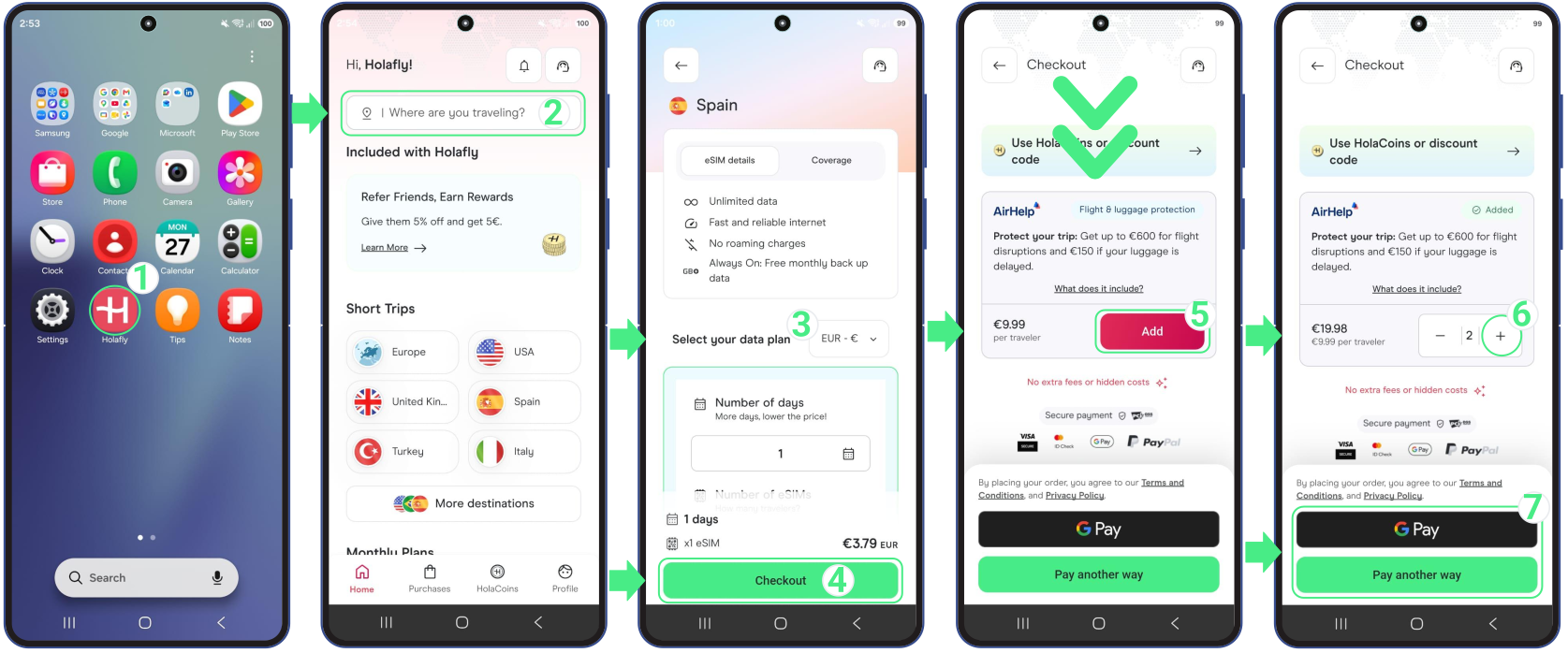
- Open the Holafly app → Type your destination into the search bar labeled “Where are you traveling?” and select it → Choose your data plan and continue to Checkout → Scroll down to the AirHelp section and tap Add → Use the + and − buttons to select how many travelers you want to add → Check that AirHelp appears in your order summary → Select payment method → Complete your purchase.
Note: Flight details aren’t required at checkout.
Don’t forget to register with AirHelp before you fly
You’ll receive an email from AirHelp with instructions to set up your AirHelp service. Register before you fly to activate automated tracking and qualify for instant payouts when eligible disruptions occur.
How to access your AirHelp service details in the Holafly app
You can check your AirHelp add-on validity and contact their support right from your phone by following these steps:
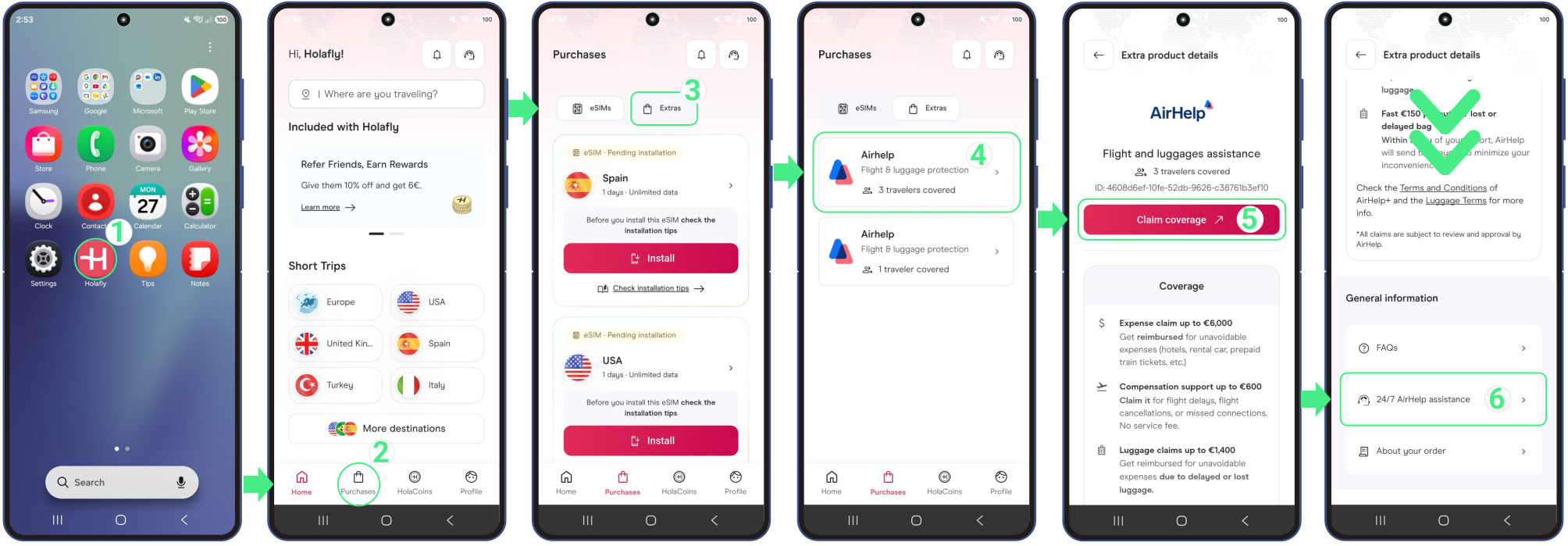
- Open the Holafly app → Tap the Purchases icon at the bottom menu → Switch the top tab from eSIMs to Extras → Select your active AirHelp card to see your coverage validity → Tap Claim a compensation to file for any flight or baggage disruption, or scroll down and tap 24/7 AirHelp assistance to connect directly with support.
Important: Keep in mind that all claims and support requests are handled entirely on AirHelp’s platform. If you need to track the real-time status of an ongoing claim, please check their website directly or contact plus@airhelp.com.
How to register your trip with AirHelp before you fly
Your AirHelp service is available from the moment you purchase with Holafly. However, we recommend registering your trip with AirHelp before departure to activate real-time tracking and qualify for the instant €150 baggage delay payout.
Simply open the welcome email sent by AirHelp and log into their platform using the same email address you used for your Holafly purchase. To activate your live tracking and luggage features, make sure you have the following information ready:
- Your flight number, airline name, and scheduled departure date.
- Your 6-character airline booking code (PNR).
- The names of the passengers for which you have purchased this add-on (including your travel companions, if applicable).
What to do if the airline loses or delays your baggage
If your bags don’t show up on the carousel, these are the steps you need to follow.
1. Go straight to the airline’s customer service desk before leaving the airport and request a Property Irregularity Report (PIR). This is the official proof that your baggage was delayed, lost, or damaged. AirHelp cannot process any claim without it.
2. Keep your boarding pass, luggage tags, and the copy of your PIR and keep the receipts for any essential items (like toiletries or basic clothing) you have to buy while waiting for your bags.
3. File your claim on AirHelp. Log in to your dashboard, upload your PIR, and report the incident as soon as possible.
- If you registered your trip with AirHelp before your flight, AirHelp may be able to provide a €150 advance baggage payout for immediate expenses.
- If you didn’t register your trip in advance, you can still submit a claim directly through AirHelp by providing your flight and baggage details manually. Please note that immediate payout does not apply in this case; instead, the process will be handled as a compensation claim subject to the applicable passenger rights regulations.
4. Don’t wait too long to file your claim! You have up to 3 months from your Holafly purchase date to submit your claim through AirHelp (applies to 1 checked bag per trip). Just make sure to keep these official airline deadlines in mind:
- Within 7 days: Report any damaged luggage directly to the airline to get your official damage report.
- Within 28 days: Send your receipts for essential items (like clothing or toiletries) to the airline to claim reimbursement for a delayed bag.
- After 21 days of delay: Your bag is officially considered lost, which allows AirHelp to claim full compensation for you.
Important: Don’t accept vouchers unless you’re sure the offer is fair. Airlines may offer vouchers or miles at the airport as a quick solution, but accepting them could limit your ability to claim additional compensation later.
Important things to know about your AirHelp add-on
- This travel assistance service applies to your entire itinerary with a single purchase, regardless of whether you fly with different airlines or hold separate booking codes.
- Your AirHelp add-on remains active from the purchase date for one complete trip (including layovers), which includes a single flight claim and a single baggage claim, even if your Holafly eSIM expires before then.
- Prices and maximum compensation payouts are calculated per person. Make sure to add this assistance for each traveler in your group.
- AirHelp is a claim assistance service, not an insurance product. Approval and payouts are not guaranteed, as every claim is subject to the airline’s validation and applicable passenger rights laws.
- For flight delays, cancellations or denied due to overbooking, submit your claim during your validity period to receive the full compensation amount without standard success fees. After this period, the service expires, and you will need to purchase AirHelp again for future trips.
- Check your AirHelp account for claim updates, as processing times vary depending on the airline’s response and whether additional legal action is required. Holafly can’t track, accelerate, or modify claims.
Can I cancel or get a refund for AirHelp?
- You can request a full refund through Holafly Support within 14 days of purchase. However, you must do this before your flight departs, and only if you haven’t used any AirHelp services.
- If you purchased AirHelp add-ons for multiple travelers in a single transaction, individual cancellations are not available. A refund can only be requested for the entire group, provided that none of the travelers have used any AirHelp services.
- The AirHelp service and your eSIM follow separate refund rules. If your eSIM is cancelled or refunded, this add-on isn’t automatically cancelled or refunded as well. Any request related to AirHelp is assessed according to its own refund policy.
- After the 14-day cancellation period, the AirHelp add-on is generally non-refundable, even if your eSIM qualifies for a refund.
- Refunds and compensation are not the same thing. A refund simply returns your payment for this service (AirHelp). Compensation is the cash payout the airline provides if you experience an eligible flight disruption or your baggage is delayed, damaged, or lost.