Language


 No results found

Redmi Note 13 Pro eSIM support: is it compatible?
No, Redmi Note 13 Pro eSIM support is not available on the standard 4G model. In this series, eSIM is available only on the Redmi Note 13 Pro 5G and Redmi Note 13 Pro+ 5G, and only in certain global variants. Since these models look almost identical, it’s important to confirm which version you own before assuming eSIM availability.
The most reliable way to check is directly from your phone settings: if the option to add an eSIM appears, your device supports it. Keep reading to see how to verify your Redmi Note 13 Pro model in just a few seconds.
How to confirm eSIM compatibility on Redmi Note 13 Pro
Because eSIM support varies by model and region, the answer is on your device. In under a minute, you can verify whether your Redmi Note 13 Pro supports eSIM using these two universal methods.
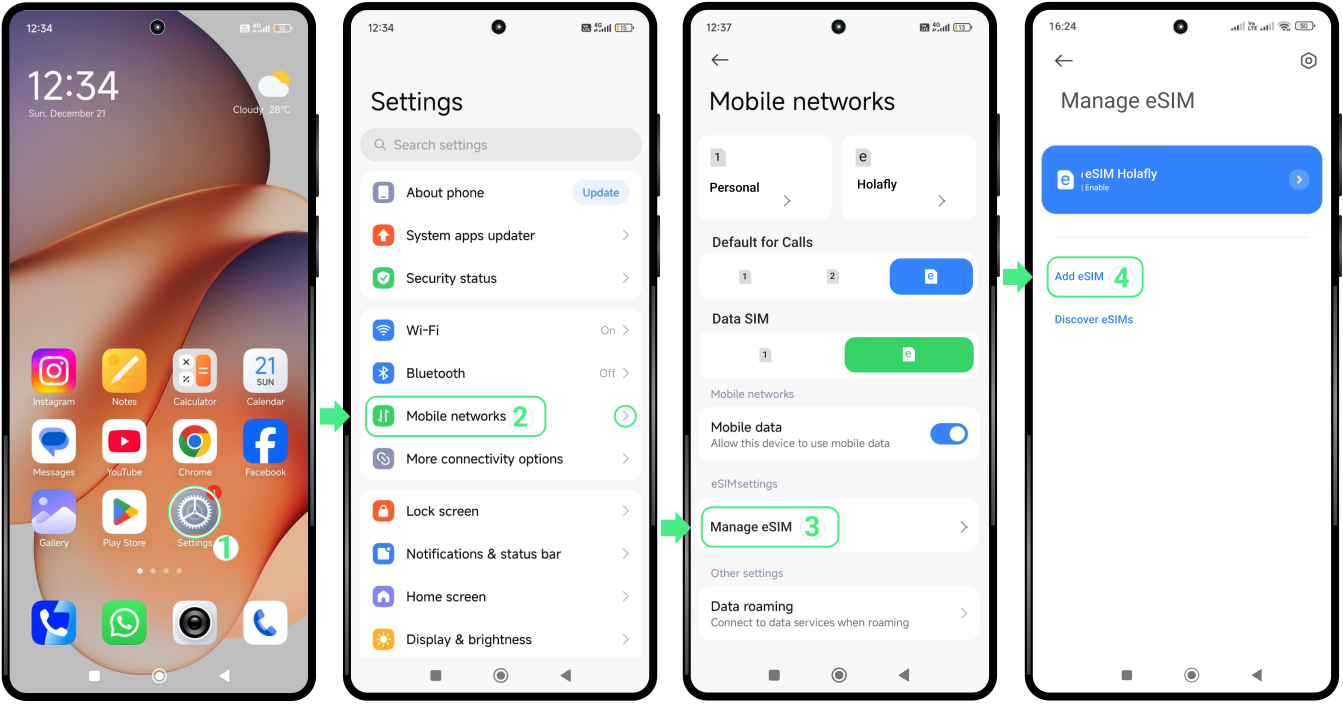
Check eSIM compatibility from your phone settings
- Go to Settings → Tap on Mobile Networks → Select Manage eSIM → If you see the option use eSIM, your Xiaomi is compatible with eSIM. If it doesn’t appear, your device does not support this technology.
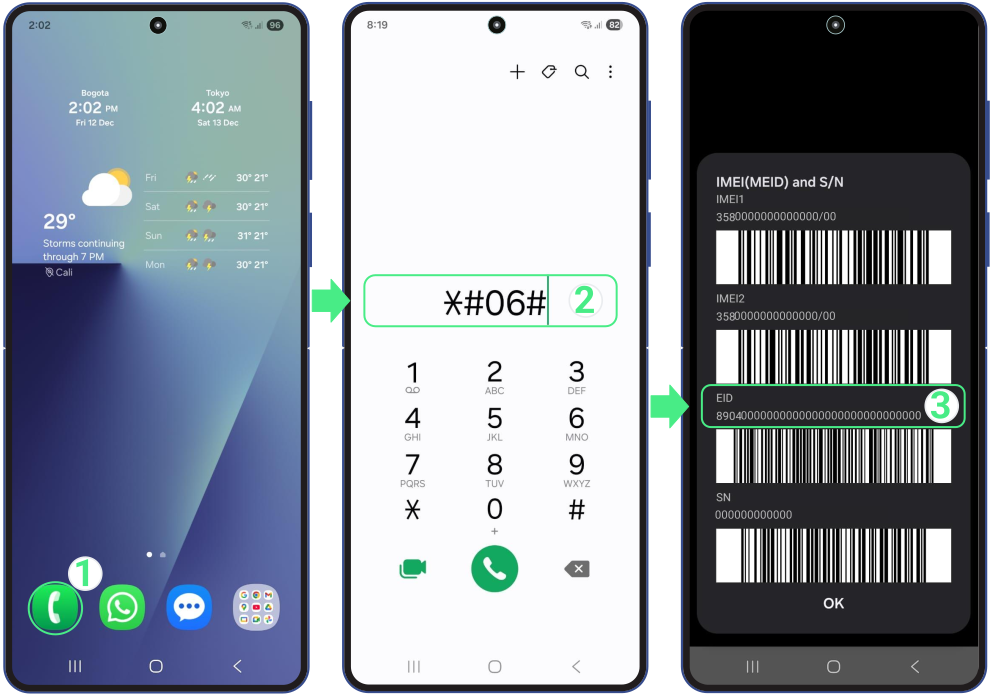
Check eSIM compatibility by dialing *#06#
- Go to the Phone app → Tap on the keypad → Dial *#06# → If you see the EID code, your Xiaomi is compatible with eSIM.
To Keep in Mind
- Check the exact model you own, since not all Redmi Note 13 versions support eSIM, even if they share similar names.
- Verify where the device was sold, as phones from mainland China, Hong Kong, or Macao usually don’t include eSIM support.
- Confirm that your phone is unlocked, since carrier locks affect which eSIMs you can use, not whether the device is technically eSIM compatible.
- Remember that only one eSIM can be active at a time, even though compatible models like the Redmi Note 13 Pro 5G can store several eSIM profiles.
- Use one physical SIM and one eSIM together on supported models, which is especially helpful when traveling.
Troubleshooting tips
When eSIM isn’t available on your Redmi Note 13 Pro
- Save the eSIM for a future trip, as long as it hasn’t been activated.
- Use the eSIM on another compatible device if you have one available.
- Share the eSIM with a friend or family member who has a phone that supports eSIM.
- Confirm the destination before saving the eSIM, since it must match the country it was purchased for.