Language

When to activate your eSIM: Does it start when installed?
Knowing when to activate your eSIM is the key to not wasting a single day of your plan. Your eSIM doesn’t start when you install it. It only activates when you arrive at your destination and connect to a local network with data roaming turned on.
Installation and activation are two different steps. Installing your eSIM early gets everything ready, while activating it at the right moment ensures your plan starts exactly when you need it. Read on to find out the best timing for each, what to do if your eSIM shows as “Active” before your trip, and how to get the most out of your plan.

Should I install my eSIM before travelling?
We recommend installing your eSIM at least one day before your trip. This way, you can do it from home on a stable Wi-Fi connection and arrive at your destination ready to connect.
Remember that this applies to daily eSIM plans, where the countdown only starts once you connect to a local network abroad.If you have a monthly or annual subscription, the plan works differently. Since it renews automatically, your data allowance resets each billing cycle, so you don’t need to worry about timing the installation around your trip.
When to activate your eSIM for travel
The best time to activate your eSIM is once you land at your destination. To activate it, turn on your travel eSIM line, select it as your mobile data line, and enable data roaming. Your plan will start automatically once your device connects to a local network, and you can begin using your data right away.
Troubleshooting Tips
If your device shows your eSIM as “Active” right after installation, here is everything you need to know.
My eSIM says activated, but I’m not traveling yet
Seeing “Active” or “ON” in eSIM right after installation is completely normal. It simply means the eSIM profile is ready on your device, not that your plan has started. For most travel plans, your days won’t start counting until your device connects to a supported network at your destination.
However, if you have a subscription plan, the billing cycle may start as soon as your purchase is completed, even if you haven’t started using data yet. To be sure, you can check your plan status through your provider’s app, rather than relying only on your phone settings.
Check your eSIM status through the provider app
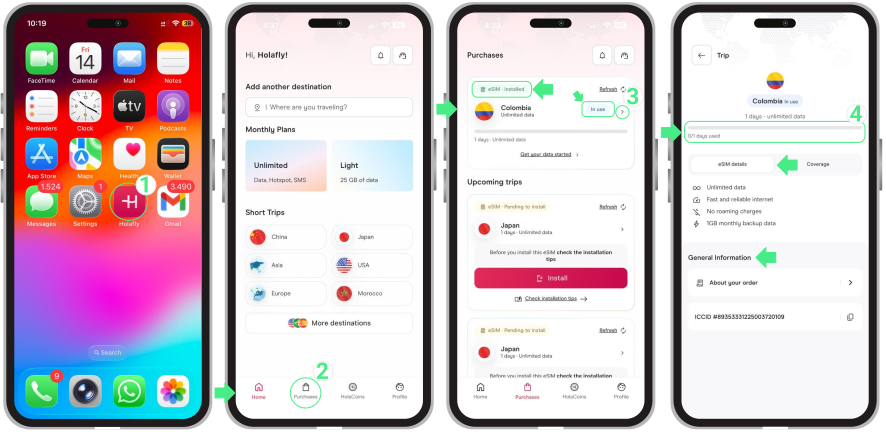
- Open the app → Tap Purchases → Here you can check the status of your eSIM (it may appear as Pending to Install, Installed – Ready to use, or Installed – In use) → If your eSIM says “In use,” your data plan is active. Tap it to view its usage details.
To keep in mind
- If your eSIM shows as “On” before your trip, turn the line off and keep it disabled until you land.
- Once activated, the days count continuously even if you turn the line off or switch to another eSIM.
- For Trip eSIMs, install in advance since they only activate upon connecting to the destination network. For subscription plans, buy them the same day or one day before use.
- Subscription plans start counting down the moment you purchase the eSIM. Always check the plan’s policy before buying to ensure you’re ready to use it.
- If your home country is in the eSIM coverage area (Global and Regional eSIMs), wait until the day of your flight to install it.
- If your eSIM doesn’t connect upon arrival, don’t delete the profile. Most are single-use and cannot be re-downloaded without contacting support.