Language
Motorola eSIM guide: Compatibility, setup, and benefits
Using an eSIM on a Motorola Razr is simple if your model supports it. Here’s how to check compatibility and select an eSIM provider.

Before setting up an eSIM, you must make sure you have a Motorola phone that supports eSIMs, as not all Motorola Razr models do. Plus, some carriers require extra steps, and you’ll need a QR code from your eSIM provider to complete the setup.
This guide will walk you through which Motorola Razr models support eSIMs, how eSIMs work, the benefits of using an eSIM, where to buy one, and how to stay connected abroad using Holafly’s unlimited data travel eSIM.

An eSIM you can rely on
Join over 10 million Holafly customers and get connected with our trusted, global services.
What is eSIM on Motorola?
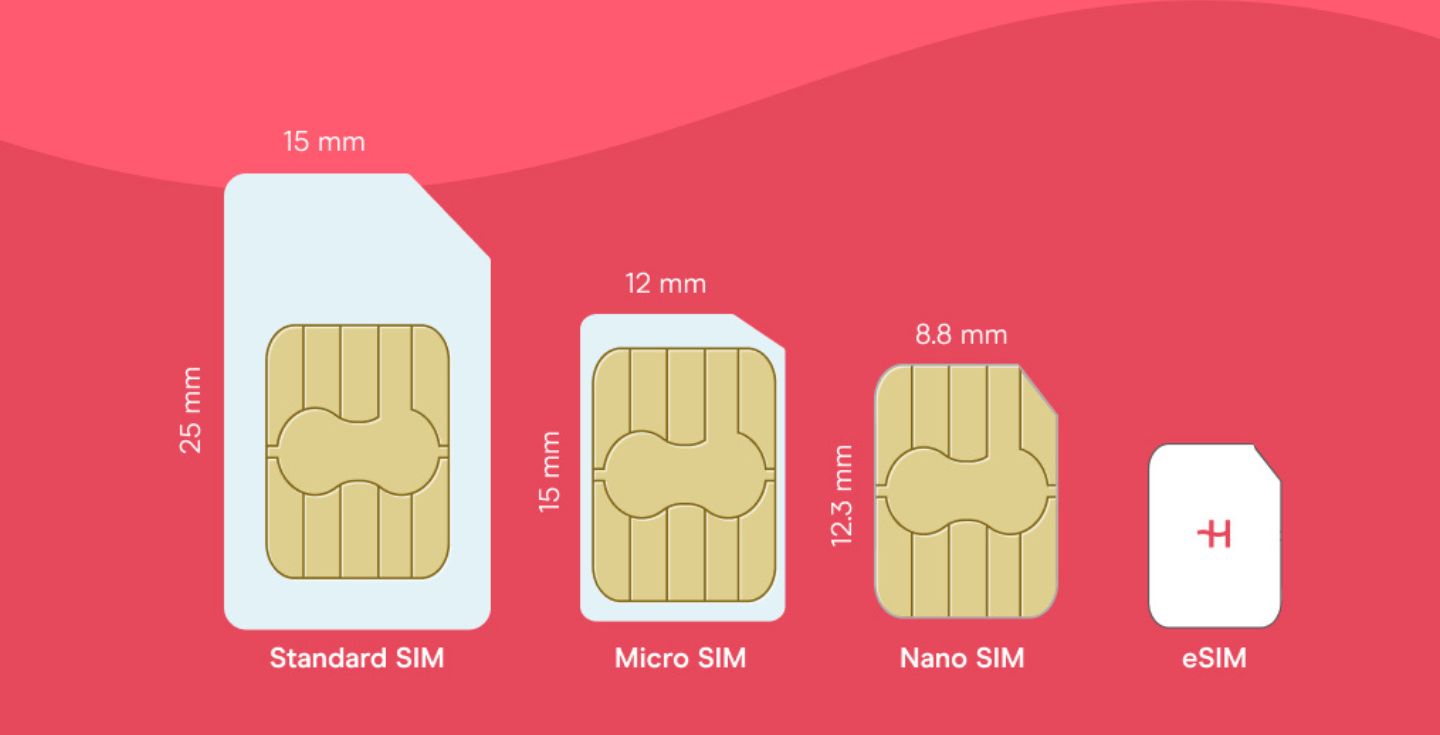
An eSIM, or embedded SIM, is a digital version of the traditional physical SIM card. Instead of inserting a physical SIM, an eSIM-supported Motorola phone lets you download an eSIM profile and mobile plan directly to your device.
How does eSIM work on Motorola?
You’ll have to purchase an eSIM first. Once you’ve downloaded and installed the eSIM profile (usually via QR code), you’ll be able to use your plan’s allowances.
Disclaimer: The data in this article is accurate as of April 20, 2026, and is subject to change.
Which Motorola models are eSIM compatible?
Motorola eSIM support isn’t universal across all devices. It depends on which model you have and its release year. Generally, newer Motorola phones (Razr, Edge, and some Moto G models) are compatible.
Here’s a full list of eSIM-compatible Motorola phones:
- Motorola Razr 2019
- Motorola Razr 2022
- Motorola Razr 5G
- Motorola Razr 40
- Motorola Razr 40 Ultra
- Motorola Razr+
- Motorola Edge 2022
- Motorola Edge 2023
- Motorola Edge+ (2023)
- Motorola Edge 40
- Motorola Edge 40 Pro
- Motorola Edge 40 Neo
- Motorola Edge 50 Pro
- Motorola Edge 50 Ultra
- Motorola Edge 50 Fusion
- Motorola Moto G Power 5G (2024)
- Motorola G52J 5G
- Motorola G52J 5G Ⅱ
- Motorola G53J 5G
- Moto G54 5G
- Motorola G84
- Motorola G34
- Motorola Moto G53
- Motorola Moto G54
- Motorola Razr+ 2024
- Motorola Razr 2024
- Motorola Moto G Stylus 5G 2024
- Motorola Moto G35
- Motorola Edge 60
- Motorola Edge 60 Pro
- Motorola Edge 60 Fusion
- Motorola Edge 60 Stylus
- Motorola Razr 60
- Motorola Razr 60 Ultra
- Motorola Edge 70
- Motorola Edge 70 Ultra
- Motorola Edge 70 Fusion
- Motorola Edge 70 Fusion+
If you’re interested in other eSIM phones, our constantly updated list of eSIM-compatible devices includes all current models.
Can I use both a physical SIM and an eSIM on a Motorola?
Yes, most Motorola Razr models support using both a physical SIM and an eSIM with a phone number, but the specifics depend on the model, region, and carrier.
In dual-SIM mode, both SIMs can receive calls and texts, but only one can use mobile data at a time.
Some carriers may also limit eSIM activation, so it’s best to check directly with your mobile network provider if you don’t see the option in your settings.
Benefits of using an eSIM on Motorola
eSIM support on Motorola phones offers a more flexible way to stay connected. By using eSIM-compatible Motorola phones, you can manage mobile plans digitally and make international travel more convenient.
- No physical SIM required: A Motorola eSIM lets you activate a mobile plan digitally, without inserting or swapping SIM cards.
- Quick and simple setup: Get connected and set up in minutes by adding an eSIM to your phone’s settings.
- Dual-SIM flexibility: Some Motorola devices support both SIMs, a physical SIM and an eSIM, which you can use simultaneously. This makes it easy to manage and switch between plans.
- Ideal for travel: You can opt for international plans to avoid roaming charges and stay connected wherever you go.
Set up an eSIM on a Motorola phone
Setting up an eSIM on a Motorola is easy and a very similar process to most Android phones. Before purchasing and installing your eSIM profile, follow the checklist below to ensure your Motorola eSIM setup goes smoothly:
✅ Check compatibility: Confirm your Motorola model is eSIM-compatible.
✅ Get an eSIM: Purchase an eSIM plan, and keep your QR code/manual code handy.
✅ Ensure stable internet: You must have a strong internet connection before you begin the eSIM installation process.
✅ Install and activate your eSIM: Use a QR code or manual code, and follow the steps in your settings. The entire process takes anywhere from five to ten minutes. Visit our detailed guide on how to activate an eSIM on Motorola for a full walkthrough.
Where to buy an eSIM for Motorola?
You have several choices for buying an eSIM. Here are some of the popular SIM and eSIM carriers:
- Canada: Bell, Rogers, Telus
- USA: AT&T, T-Mobile, Verizon
- Australia: Optus, Telstra, Vodafone AU
- UK: EE, O2, Three, Vodafone UK
- Global: Holafly’s eSIM store
An eSIM is also a great option if you’re a frequent traveler and looking to avoid data roaming charges.
Stay connected worldwide with Holafly
Having an eSIM-compatible Motorola Razr is great, but it only works as well as your eSIM provider. Spotty coverage, a complicated setup, or surprise data limits are the last things you want when you need to stay connected.
With coverage in 200+ destinations (including regional plans like the eSIM for Europe and eSIM for Asia), Holafly lets you set up your eSIM before you travel and activate it the moment you land.
No physical SIM swaps, no last-minute scrambling, and a setup that takes 5 minutes. Just scan the QR code from your email, and you’re online. Manual setup is also available.
Plus, your WhatsApp number stays active, so you can keep chatting without a hitch. Plans range from 1 to 90 days with unlimited data, and Holafly Plans offers monthly eSIM subscriptions for long-term plans (with no contracts or cancellation fees).

Connect to the fastest networks
International eSIMs, local networks. Enjoy the best of both worlds with Holafly.
eSIM guides for other devices
Plans that may interest you


Born and raised in Queens, New York, I'm a Psychology graduate with a passion for writing that I've been nurturing since 2019. Over the years, I've enjoyed creating meaningful content across various niches, including sports, hospitality, and career development. At Holafly, I focus on crafting useful and inspiring pieces to make your adventures more effortless. One of the best perks of this role? Creating travel content always seems to inspire my next vacation destination!