What kind of data? Your location. Your contacts. The things you’ve searched for. The things you’ve bought, or nearly bought. Your browsing history. In some cases, your financial information and health data. Much of it is tied directly to your identity, and a significant portion is used to track you beyond the app itself - across other platforms, other websites, other sessions.
For travelers, this matters more than most of us realize. When you’re abroad, you’re leaning harder on apps than you ever would at home: booking accommodation, navigating unfamiliar streets, hailing rides, finding somewhere to eat.
Public Wi-Fi networks carry their own risks. Connecting to an unfamiliar network in an airport terminal or hotel lobby can expose your data in ways that have nothing to do with an app’s privacy policy. Using a VPN, and having a travel eSIM set up before you land, removes two of the most common points of vulnerability before you’ve even checked in.
To understand where the risks begin, the Holafly research team analyzed the privacy labels of some of the world’s most popular apps - both everyday and travel-specific - to identify which collect the most data, and how much of it is tied directly to you.
Here’s what the data shows.
The Apps That Collect The Most Data
To rank the apps, we looked at three things: how many data types each app collects in total, how many of those are linked directly to your identity, and how many are used to track you across other apps and websites. The results are dominated by social platforms - with one industry in a category of its own.
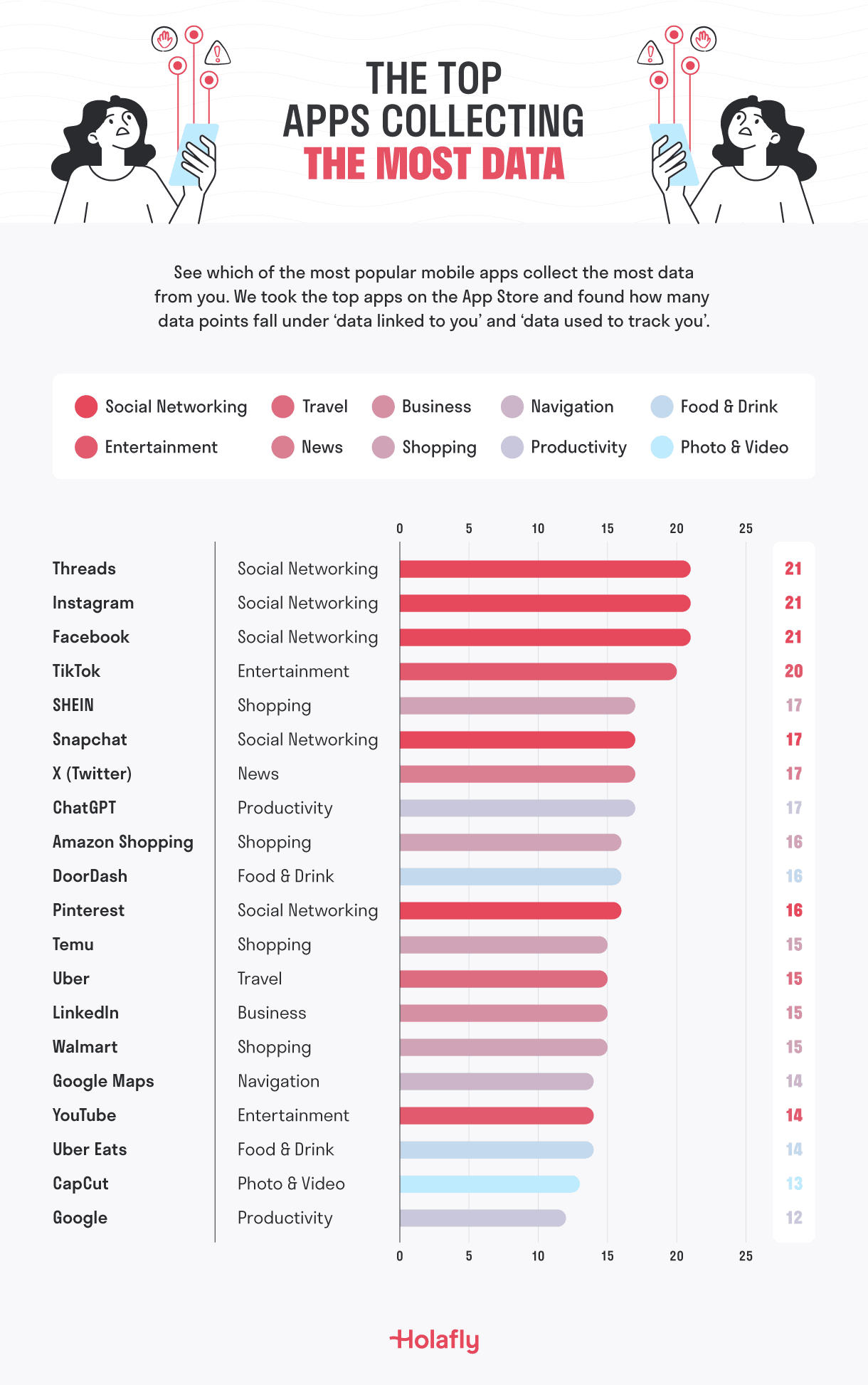
1. Threads, Instagram and Facebook - 21 data points each
Meta’s three platforms share the top spot. Each collects 21 data points in total - 14 of which are linked directly to you as a user. That list covers contact information, location, browsing and search history, financial information, health and fitness data, sensitive information, and more. Seven data types are used to actively track you across other platforms. What makes these apps stand apart from almost everything else in our study: not a single data point falls outside the user-linked category. Every piece of information Meta collects about you is attached to you.
2. TikTok - 20 data points
TikTok collects 20 data points in total, 13 linked to users and 7 used for tracking - a tracking score that matches the Meta apps. The haul includes contact information, financial details, location, browsing and search history, purchases, and sensitive information. The one distinction from Meta’s platforms: a single diagnostics data point isn’t linked to your identity. It’s a marginal difference in a picture that’s otherwise just as extensive.
3. SHEIN - 17 data points
SHEIN is a useful reminder that shopping apps can monitor you just as much as social media ones. The fast-fashion retailer collects 17 data points in total, with 11 linked to users and 6 used for tracking - figures that put it well ahead of most mainstream apps. Financial information, contact details, browsing history, purchases, location, and contacts are all in scope.
4. Snapchat - 17 data points
Snapchat has always positioned itself as the more private alternative to other social platforms - built around disappearing messages and a camera-first interface. The data it collects behind that interface tells a more complicated story. The photo app matches SHEIN at 17 total data points, but edges ahead on user-linked data with 12 types tied directly to identity. Five are used for tracking. The app collects financial information, location, browsing and search history, purchases, and contacts.
5. X (formerly Twitter) - 17 data points
X rounds out the top five, also at 17 total data points, 12 linked to users and 5 used for tracking. Contact information, financial data, location, browsing and search history, purchases, and usage data are all collected. Two data points - diagnostics and other data - sit outside the user-linked category, which separates it very slightly from the Meta apps in raw terms.
The Travel Apps That Collect The Most Data
Travel apps need a variety of data points to help improve your experience. This can be information on your location, where you’ve been before, what you’re searching for and where you’re planning to go to next. But which are seeking the most data from you?
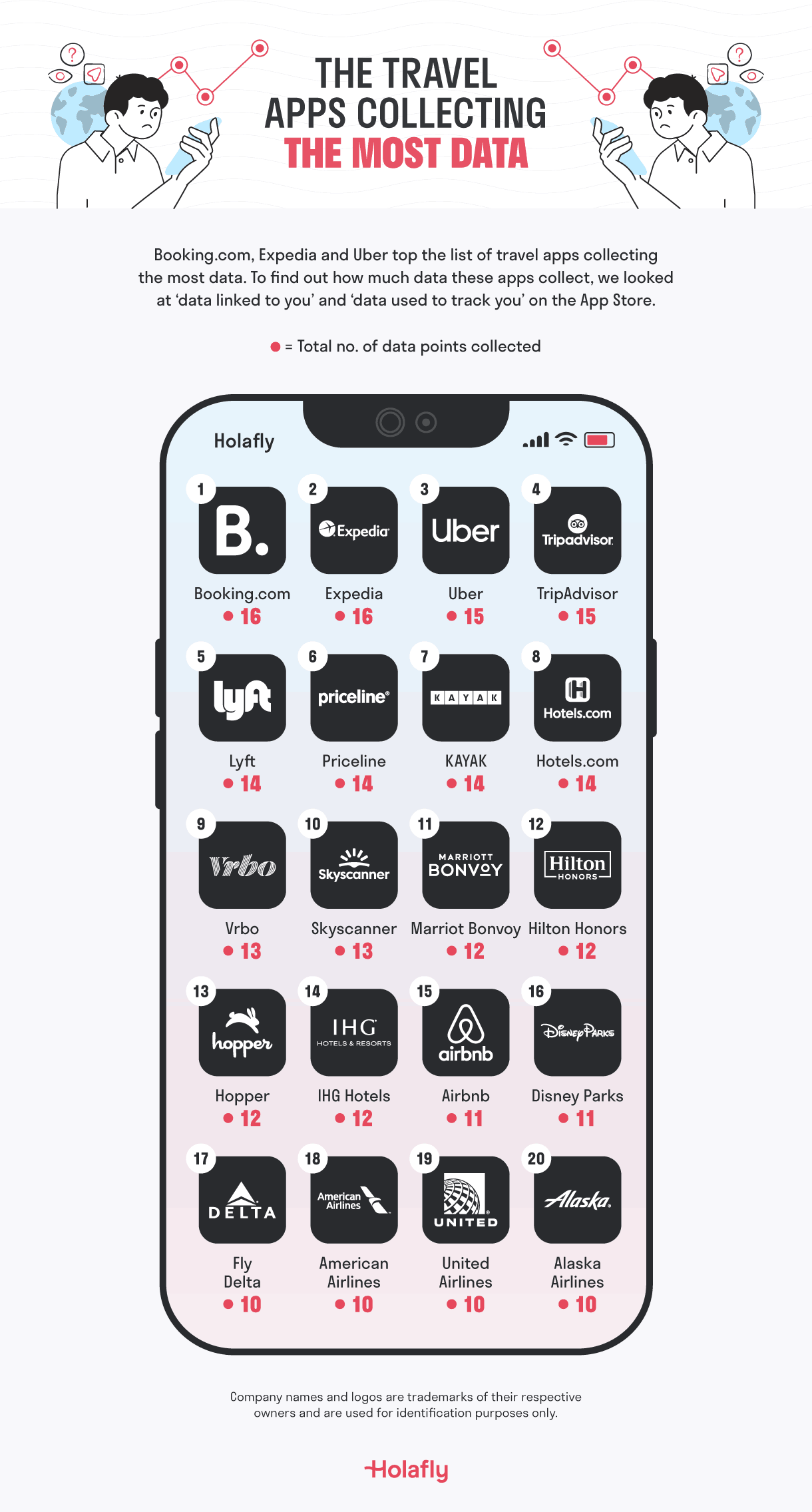
1. Booking.com and Expedia - 16 data points each
With 16 data points in total - 11 linked to your identity and five used to track you across the web, the two biggest travel booking platforms are identical in their data collection - and both sit at the top of our travel app rankings as a result. Every search you run on either platform (destination, dates, price range, property type) is logged, linked to you, and feeds a profile that extends well beyond the booking itself.
2. Uber - 15 data points
Of all the apps in this analysis, Uber arguably has access to the most data of all - not because of the volume, but because of what it actually captures. 15 data points in total, 11 linked to users. The standout isn’t the financial information or the contact details. It’s the location data: precise, real-time, and timestamped. Uber knows where you were, where you went, and when, with all this data combining to provide the best user experience.
3. TripAdvisor - 15 data points
TripAdvisor matches Uber on total data points, but what stands out is the tracking ratio. Five of its 15 data types are used to follow you across other apps and websites - one of the highest proportions in our entire travel app dataset. You use TripAdvisor to research a trip. It uses that research to track your behavior long after the tab is closed.
4. Lyft - 14 data points
The numbers for Lyft are close enough to Uber’s that the more interesting question is what they look like together. Both platforms collect detailed, timestamped location histories. Both know your financial details, your contact information, your travel patterns. Most users have both apps installed. That’s two companies holding near-identical records of where you go and when - built up quietly, one ride at a time.
5. Priceline - 14 data points
Priceline collects 14 data points, 10 linked to users. But the one that catches the eye is search history. Unlike a booking - which records where you went - search history records where you thought about going. The destinations you looked up and didn’t choose. The dates you checked. The price points you hovered over. It’s a window into travel intent that’s commercially useful in ways that go beyond simply showing you an ad.
How AI Assistants Are Collecting Your Data
AI assistants have quietly become one of the most common starting points for travel planning. Where to go, what to pack, how to get from the airport to the hotel - questions that once went into a search bar are now being asked conversationally, in detail, to apps that learn from every exchange.
That shift matters from a privacy standpoint. AI assistants don’t just log a search term. They receive context: your travel dates, your budget, your preferences, the fact that you’re travelling with children or on a tight schedule. The question is what happens to that information once you’ve got your answer.
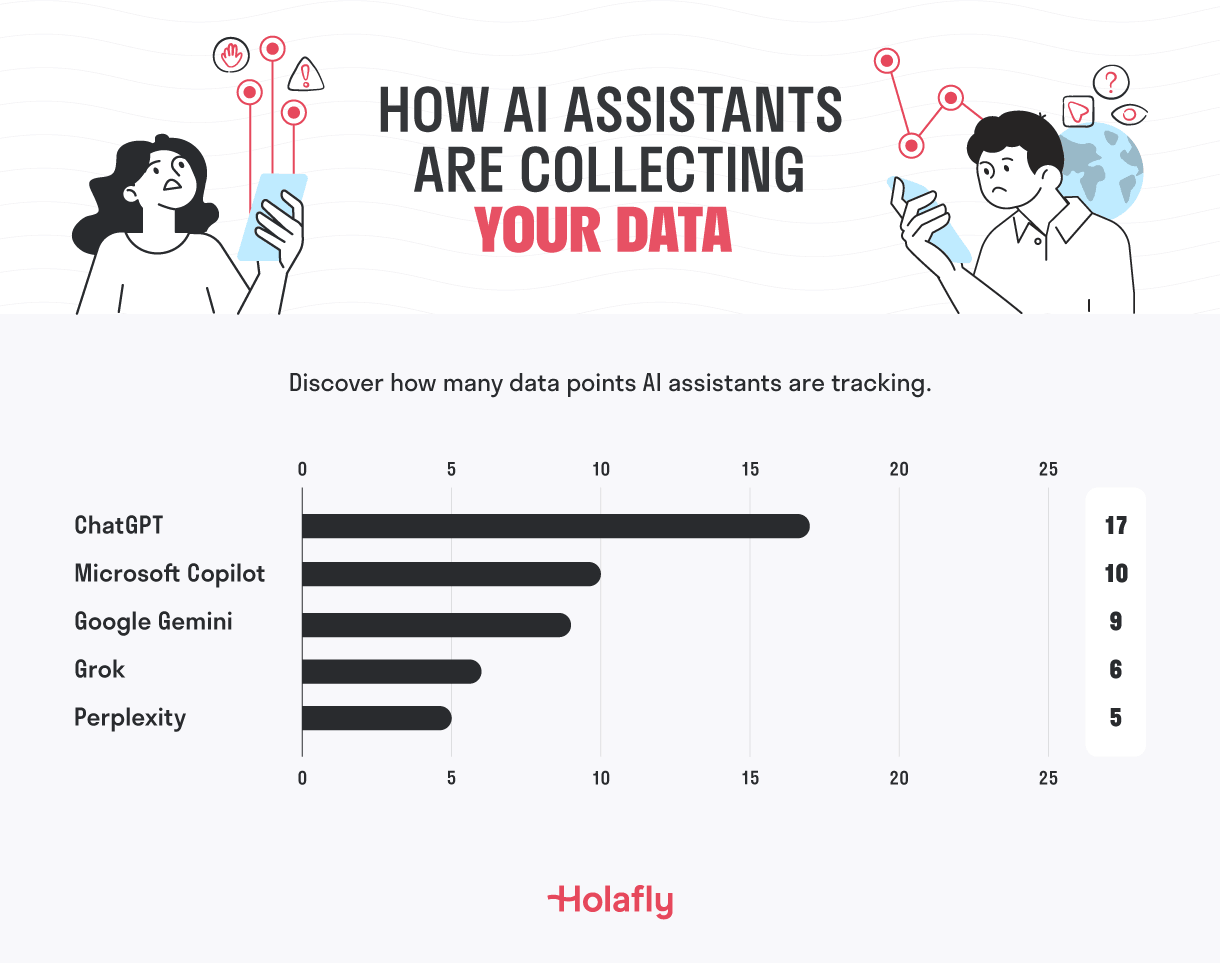
1. ChatGPT - 17 data points
ChatGPT collects 17 data points in total, 14 of which are linked to your identity. That’s a significant haul - and a higher user-linked count than many social media apps in our wider study. The data includes contact information, location, health and fitness data, browsing and search history, purchases, and audio data. Two data types are used for tracking. Given that many people now use ChatGPT as a first port of call for travel research, the volume of intent data being collected - the destinations considered, the questions asked - is worth keeping in mind.
2. Microsoft Copilot - 10 data points
Copilot collects 10 data points in total, 7 linked to users, and uses one data type - identifiers - for tracking. Contact information, location, search history, and usage data are all in scope. It’s a noticeably lighter footprint than the two apps above it, but it still sits in the same bracket as well-established platforms like Zoom and PayPal. For an AI tool that many people use through workplace accounts, the presence of location and search history in the user-linked category is worth noting.
3. Google Gemini - 9 data points
Gemini sits just below Copilot in total volume, collecting 9 data points across its privacy label. Seven are linked directly to your identity - contact information, location, search history, and usage data among them - and two are used for tracking. What makes Gemini worth a closer look is who’s behind it. Google’s core business is built on understanding what people search for and why. When you use Gemini to plan a trip, those conversations feed into an ecosystem that already holds your search history, your maps data, your email, and your calendar. The data points collected by the app itself are only part of the picture.
How To Limit Your Exposure When Traveling
Knowing which apps are collecting your data is one thing. Doing something about it is another, and the steps don’t have to be dramatic. A few targeted habits make a real difference:
-
Treat public Wi-Fi as a last resort. If you do connect, find out what you can about the provider and the network’s security first. A travel eSIM sidesteps the problem entirely - you’re on your own data connection, not a shared network in an airport terminal or hotel lobby that anyone else can potentially intercept.
-
When you have no choice but to use a public network, a VPN encrypts your connection and makes it considerably harder for third parties to read your traffic. Check that the provider has a clear no-logs policy before you download one - a VPN that records your activity doesn’t solve much.
-
Be cautious about apps you download mid-trip. Local transit apps, city guides, event ticketing tools - they all come with privacy policies you haven’t read, from developers you know nothing about. Install what you need, but delete travel-specific apps once you’re home. A dormant app with background permissions is still collecting.
-
Check your location settings. Most apps request permanent access because it’s useful for them, not because they need it to work. Switching ride-hailing and mapping apps from “always on” to “while using” cuts the amount of passive location data collected throughout the day, without affecting how the apps actually function.
Apps and Data-Collection - It’s Your Choice
The apps that collect the most aren’t the ones you’d think to be suspicious of - they’re the ones you rely on most. The more useful an app is, the more access it tends to demand. That’s not a coincidence.
However, none of this means you need to delete your apps. Knowing which ones are taking the most - and what they’re doing with it - gives you better knowledge of how your data is being handled and therefore allows you a choice on whether you’re happy with being tracked or not.
Methodology
To identify which apps collect the most data, the Holafly research team analyzed Apple App Store privacy labels for a selection of widely used everyday apps and a separate set of popular travel apps.
Each app was assessed across three metrics:
- Data linked to you: data types collected and associated with your identity
- Data used to track you: data types used to track your activity across other companies’ apps and websites
- Data not linked to you: data types collected but not tied to your identity
Apps were ranked by total data points collected. Where apps tied on total points, secondary ranking was applied on data linked to users, then data used for tracking.
Data was collected in May 2026. Privacy labels are self-reported by app developers and subject to change. This study reflects information available at the time of research.