







 Language
Saily eSIM not working: Causes and how to fix it
Saily eSIM not working? The issue may lie within your software, hardware, or an error on the provider's end. Here’s how you can fix it or get a new eSIM.

Got yourself an eSIM from Saily but struggling to get it to work? There are a number of causes for potential issues, and they can come either from your end or Saily itself. Some common issues are easy to fix, while others can take a little longer.
Follow along for a detailed guide on why your Saily eSIM is not working, how you can solve it, and what to do when you’ve tried every option.
If you can’t get your Saily eSIM to work, there are reliable Saily alternatives on the market. Consider Holafly, a global eSIM provider with years in the business that offers unlimited data and 24/7 customer support with every plan.

An eSIM you can rely on
Join over 15 million customers and get connected with our trusted, global services.
Can’t activate Saily eSIM
If you’re new to using eSIMs or if it’s simply your first time using Saily, you might have missed a step in the activation process. This is one of the main reasons why users can’t get their eSIM to work. Here are the steps you should follow to ensure a successful activation of your Saily eSIM:
Check device compatibility
Not all devices support eSIM technology. Before buying any eSIM plan, make sure you have an eSIM-compatible phone. Most newer devices are, but some older or cheaper models may not work with eSIMs.
Activate eSIM on iPhone and Android
If you’ve purchased your eSIM on the Saily app, then the activation process is pretty much identical for both iOS and Android phones:
- Buy your eSIM and tap the Check your eSIM plan button.
- Tap Install eSIM.
- Tap Allow on the eSIM activation pop-up.
- Follow the prompts to set up your eSIM. Make sure to choose the eSIM as the primary line for mobile data.
- Go back to the Saily app. You should find a notification saying that your activation was successful.
Error message when activating eSIM
You may get an error message when trying to activate your Saily eSIM. Thankfully, there aren’t that many possible reasons for this error. Check for the following, then try again:
- Make sure you’re connected to WiFi or mobile internet.
- Check if you have free eSIM slots. Delete any slots you don’t use if full.
- If the same eSIM has been installed before, you don’t need to install it again. If you try, you’ll get an error message.
If neither of the above applies to you, yet you’re still receiving the error message, contact Saily’s customer support team for help.
Saily eSIM not working after activation
Managed to successfully activate your plan, but the eSIM is not working? The issue lies either within your settings or the Saily service itself. There are several things you can do to try to solve the issues on your end.
If none of these help, the issue might be on Saily’s end. To resolve the problem, you can reach out to the customer support team. Keep in mind that Saily doesn’t have a WhatsApp number, so you will need to use the live chat in the app or submit an email form.
Still no resolution? You’ll need to request a refund. After activation, each refund is evaluated on a case-by-case basis. You can get a partial or full refund depending on how much data you’ve used, or not get a refund at all if your case doesn’t meet the criteria.
Disconnect from WiFi
WiFi may clash with mobile internet from your eSIM, with phones typically prioritizing WiFi connections. Disable WiFi to make sure your phone uses your eSIM to connect to the internet.
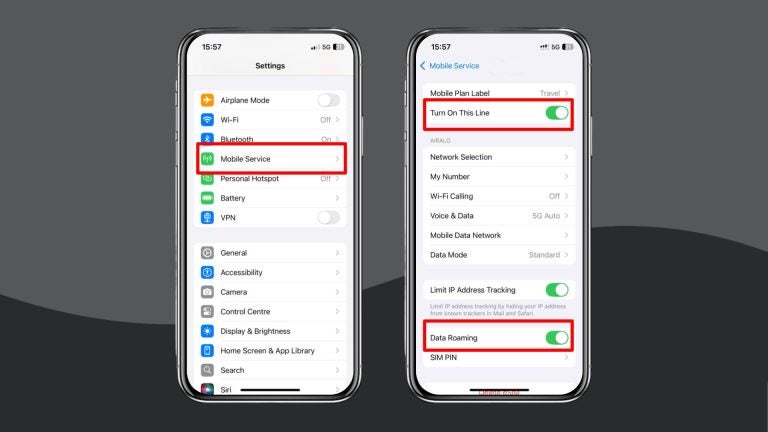
Check if your eSIM and data roaming are enabled
Both your eSIM profile and data roaming need to be enabled in order for the eSIM to work.
- On iPhone, go to Settings -> Mobile Service (or Cellular) -> tap on the eSIM line -> make sure that the line is turned on and the data roaming toggle is switched on.
- On Android, go to Settings -> tap Network & Internet settings -> select your eSIM line -> make sure that both the eSIM line and data roaming are turned on.
Restart your device
If you haven’t restarted your phone in a while, there may be some bugs or glitches in the system that need to be reset in order for it to work again. You can try turning airplane mode on and off, which restarts just the network settings. If that doesn’t work, turn off your device completely and turn it back on again.
Check your data usage
If you were able to use Saily’s eSIM for a while and it stopped working, you may have simply run out of data on your plan. Open your Saily app and check if you have any data remaining. If not, you’ll have to get a top-up or a new eSIM plan altogether.
Reset your network settings
If nothing else works, you might need to perform a hard reset of your network settings. This wipes all previous network connections clean and leaves you with an empty set of settings, ready to be used again.
- On iOS, select Settings > General > Reset > Reset Network Settings.
- On Android, select Settings > System > Reset Options > Reset WiFi, Mobile, and Bluetooth.

What if I accidentally deleted my Saily eSIM?
If you accidentally delete your Saily eSIM, it doesn’t mean that it’s gone forever. To get it back, you need to reinstall and reactivate your eSIM once again. The old activation code won’t work, though. To get a new activation code, you’ll need to get in touch with Saily’s customer support team, explain the situation, and wait for a new eSIM code to arrive.
What to do when you’ve already tried everything
Talking to Saily’s customer agents on live chat or trying quick fixes in your phone’s settings isn’t how anyone wants to spend their time away from home.
If you’ve tried all the fixes and your Saily eSIM still won’t work, or you simply want a different solution, here’s what you can do:
- Request a Saily refund via the app or Saily Refund Center
- Delete your Saily eSIM to free up space in your settings for a new profile*
- Run a quick comparison against other eSIM providers. Here is our Holafly vs. Saily match-up.
- Choose the eSIM that makes your next trip stress-free.
*You may need your Saily eSIM during the refund process. So it is best to wait until your case is closed before deleting the eSIM profile.
For stress-free travel, Holafly has your back
After all that troubleshooting, the last thing you need is connection issues while you travel. Get any Holafly eSIM and enjoy unlimited data, 5G speeds, and 24/7 customer support across 200+ destinations, with plans to match any trip length.
That’s not all. At Holafly, we make travel easy by including 1 GB of Always On backup data with every eSIM purchase. No hidden fees, just a ‘thank you’ for staying with us.
From long layovers to unexpected stops in a country your plan doesn’t cover, simply keep your Holafly eSIM installed and stay connected across 150+ global destinations. Journey with peace of mind, knowing Holafly has your back.
Get an unlimited data eSIM
Use code MYESIMNOW5 for 5% off at checkout
Disclaimer: The data in this comparison is accurate as of October 14, 2026 and is subject to change.
Got a Saily Ultra subscription? Your process may look a little different. See here what to do when Saily Ultra isn’t working for you.
Plans that may interest you

A senior SEO writer from Lithuania, combining my passion for writing and travel at Holafly. With years of experience in technical fields, I'm here to answer all of your questions about staying connected. I specialize in turning even the most complicated topics into something everyone can understand.

