Language

Can I use WhatsApp with an eSIM?
Absolutely! You can use WhatsApp with an eSIM to stay connected no matter where you are. Whether you’re sending messages, making calls, or sharing photos and videos, WhatsApp will work as long as you have access to reliable data during your travels. In this article, you’ll discover the benefits of using WhatsApp with an eSIM, and some helpful advice to keep in mind.

Benefits of using WhatsApp with an eSIM
You can use WhatsApp with your Holafly eSIM to stay connected while traveling, without worrying about high roaming fees. Here are some key benefits:
- With a Holafly eSIM, you can use WhatsApp to make international calls and send messages without extra fees, as it works over data.
- Keep the same WhatsApp number, ensuring all your chats and contacts remain intact wherever you are.
- With an eSIM, you can use WhatsApp without a physical SIM card in your phone, staying connected via mobile data or Wi-Fi while traveling.

To keep in mind
- Make sure that WhatsApp is set up to use mobile data on your phone. If it’s not configured for data, it won’t work even with an eSIM.
- To make or receive calls on WhatsApp, the other person must have the app installed and be connected to the internet.
- To avoid roaming charges from your main carrier, make sure to turn off your primary SIM while using your Holafly eSIM.
- If you’re traveling to countries like China, WhatsApp may be blocked due to local internet restrictions, even if you’re using a VPN.
Troubleshooting tips
If you can’t use WhatsApp with your eSIM, follow these steps to ensure the app is set up to use with mobile data on your iPhone or Android:
To use WhatsApp with mobile data on iPhone:
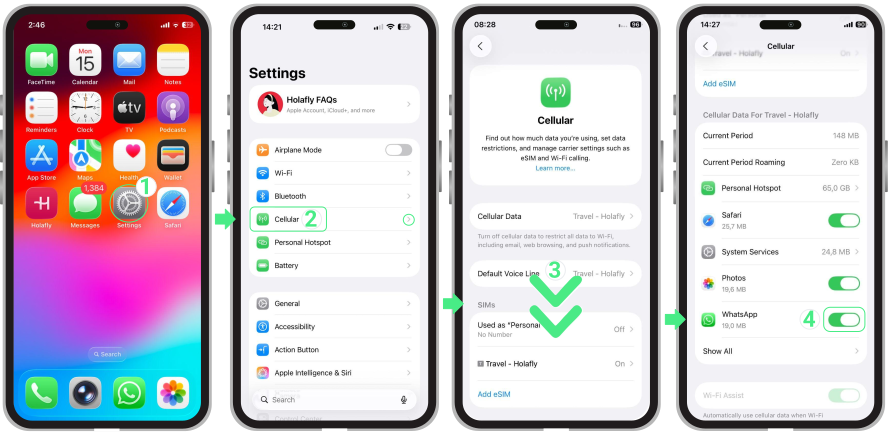
- Go to Settings → Select Cellular → Scroll down to find the Show All option → Then scroll down to find the WhatsApp app → Check if the WhatsApp button is green, to make sure that mobile data for this app is enabled; if not, enable it.
To use WhatsApp with mobile data on Android:
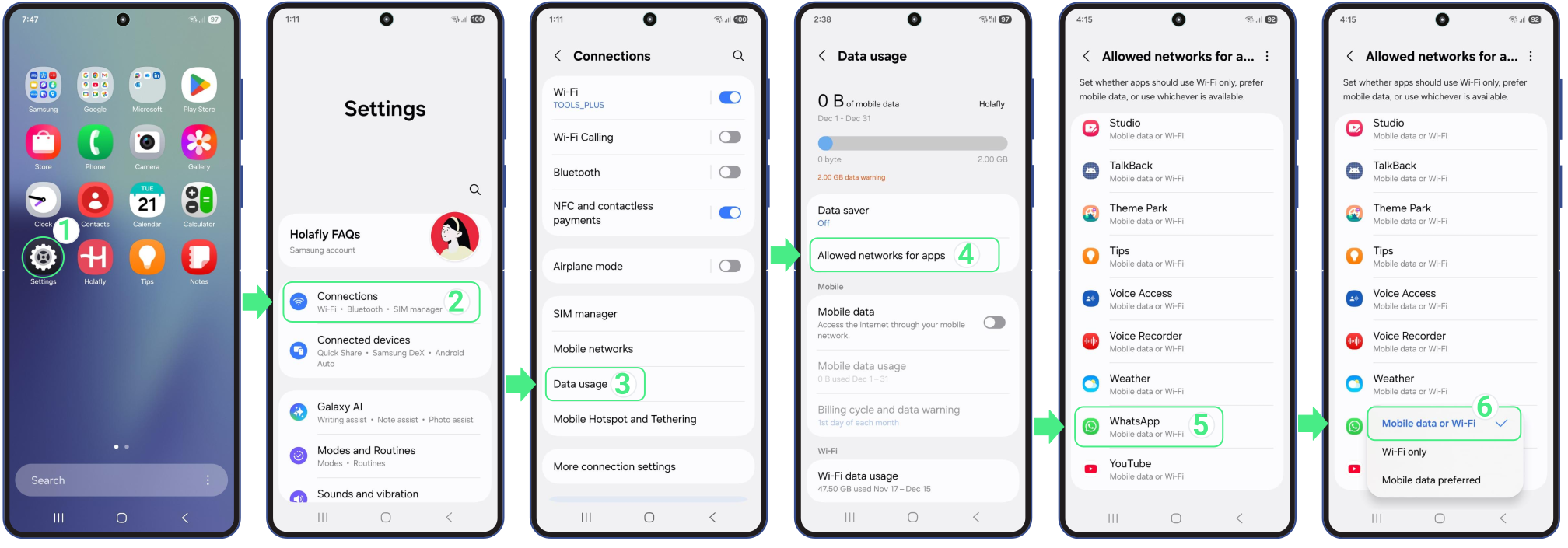
- Go to Settings → Select Connections → Tap on Data usage → Then on Allowed Networks for Apps → Scroll down until you find the WhatsApp app → Tap on WhatsApp app → Check that the Mobile data or Wi-Fi option is selected.