Language
Singtel eSIM not working? Here’s how to fix it
Singtel eSIM not working? Find out what’s causing the issue and how to fix it with troubleshooting tips for both iPhone and Android users.

Is your Singtel eSIM not working? Whether it’s not activating, showing no signal, or failing to connect to mobile data, you can fix most issues directly through your phone’s settings.
This guide covers the most frequent reasons Singtel eSIMs fail to activate or connect, along with straightforward steps to get yours working again on both Android and iPhone.
And if things still don’t go smoothly, we’ll also introduce Holafly’s unlimited travel eSIM, a reliable Singtel alternative to help you stay connected during your trips.

Unlimited data. Peace of mind.
Make sure you have travel data that's there when you need it most.
Why is your Singtel eSIM not working?
If your Singtel eSIM isn’t working, the issue is likely due to one of a few common setup or compatibility problems. In most cases, the eSIM itself isn’t the problem, you can quickly fix it by adjusting the right settings.
Singtel offers reliable eSIM support across a wide range of devices. But like any digital SIM, setup can sometimes go wrong, especially when roaming or switching phones.
Here are some typical reasons:
- Your device isn’t eSIM-compatible or is locked to another carrier: Singtel eSIMs only work on devices that supporteSIM technology. If your phone is locked to another carrier, the eSIM won’t activate.
- The eSIM wasn’t installed correctly: An incomplete or failed installation can prevent your device from registering the eSIM profile.
- Your eSIM hasn’t finished activating: Activation may not be immediate. For Singtel prepaid eSIMs, service activation can take up to one hour after installation. If you’ve recently switched to an eSIM or transferred your number, check your activation status before changing your phone settings.
- You haven’t restarted your phone: Restarting after installation helps your device recognise and activate the new eSIM.
- Mobile data is turned off: Your eSIM may have a cellular signal but still be unable to access the internet if mobile data is disabled or another SIM is selected for data.
- Airplane Mode is still enabled: If Airplane Mode is active, your phone won’t be able to establish a mobile signal.
- The eSIM hasn’t connected to a network: Sometimes the eSIM fails to connect to a network automatically, especially when switching countries.
- APN settings are missing or incorrect: If your phone has a signal but no internet, incorrect APN settings could be the cause.
Most of these problems can be resolved in just a few minutes. In the next section, we’ll go through step-by-step solutions for your Singtel eSIM not working.
Singtel eSIM activation not working? Try this
If your Singtel eSIM won’t activate or connect, a few quick adjustments can usually fix the issue. These steps cover the most common fixes and are grouped by device to make things easier.
For iPhone users, try these steps:
- Make sure your Singtel eSIM is enabled and selected: If you have multiple SIMs installed, your phone may be using the wrong line. Go to Settings > Mobile Service > Mobile Data and select your Singtel eSIM.
- Turn on mobile data: Go to Settings > Mobile Data > open your eSIM profile > Mobile Data and make sure it’s enabled.
- Check your network selection: Keep network selection set to Automatic first. If you’re in Singapore and your phone isn’t connecting, try selecting Singtel manually. Navigate to Settings > Mobile Data > Network Selection, turn off “Automatic,” and choose Singtel from the list. If you’re overseas, check that roaming is enabled and that your plan supports the destination before choosing an available roaming partner.
- Reset your APN settings: Go to Settings > Mobile Data > Mobile Data Network and tap Reset Settings at the bottom.
- Toggle Airplane Mode: Turn airplane mode on for 10 seconds, then off again to refresh your signal.
- Avoid deleting your eSIM: If your Singtel eSIM isn’t working, don’t remove the existing profile as your first troubleshooting step. Singtel eSIM installation links may not be reusable. If you need to reinstall or transfer your eSIM, contact Singtel support to confirm the correct procedure and whether a replacement eSIM is required.
- Restart or reset network settings: Restart your phone, or go to Settings > General > Transfer or Reset iPhone > Reset > Reset Network Settings.
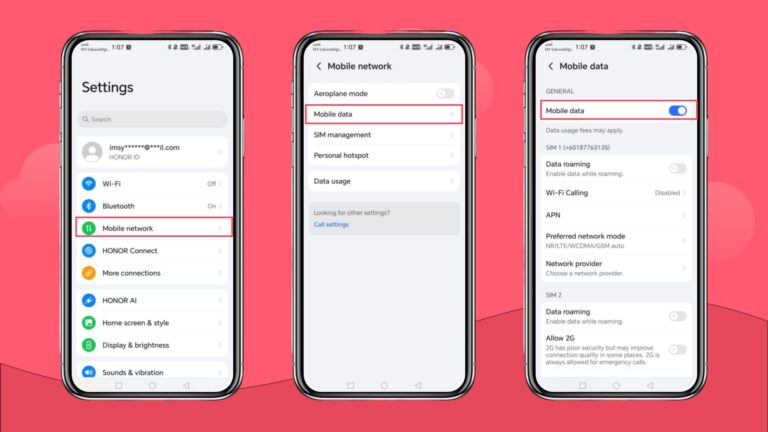
If you’re using an Android device, here’s what you can do to fix your eSIM issues:
- Make sure your Singtel eSIM is enabled and selected: If you have multiple SIMs installed, your phone may be using the wrong line. For Samsung Galaxy, go to Settings > Connections > SIM Manager > Select your Singtel eSIM and enable it. For Google Pixel, go to Settings > Network & Internet > SIMs > Select your Singtel eSIM > Use SIM. Restart your device afterward.
- Enable mobile data: Go to Settings > Mobile Network > Mobile Data > then toggle Mobile Data on.
- Check your network selection: Keep network selection set to Automatic first. If you’re in Singapore and your phone isn’t connecting, try selecting Singtel manually. Visit Settings > Connections > Mobile Networks > Network Operators, turn off automatic, and select Singtel. If you’re overseas, check that roaming is enabled and that your plan supports the destination before choosing an available roaming partner.
- Reset APN settings: Head to Settings > Connections > Mobile Networks > Access Point Names, then tap the menu and choose Reset to default.
- Switch Airplane Mode on and off: Use Quick Settings to toggle airplane mode on, wait 10 seconds, then switch it off.
- Avoid deleting your eSIM: If your Singtel eSIM isn’t working, don’t remove the existing profile as your first troubleshooting step. Singtel eSIM installation links may not be reusable. If you need to reinstall or transfer your eSIM, contact Singtel support to confirm the correct procedure and whether a replacement eSIM is required.
- Restart or reset network settings: Restart your phone, or go to Settings > System > Reset Options > Reset Wi-Fi, mobile & Bluetooth.
If your eSIM is still not working after trying these steps, it’s best to contact Singtel support or explore a different eSIM provider with simpler setup options.
Still facing issues? Stay connected wherever you are with Holafly eSIM
If your Singtel eSIM still isn’t working after troubleshooting, it might be time to consider an alternative provider to stay connected. Holafly offers a travel-focused eSIM solution designed for simplicity, reliability, and global coverage.
You can choose between a daily eSIM plan, which ranges from USD $1.55 to USD $7.90 per day, or a monthly Holafly Plans subscription starting from USD $49.90. Both options include:
- Unlimited mobile data with 5G speeds where available
- Transparent pricing with no hidden fees
- Coverage across multiple destinations, including Singapore
- Easy activation without swapping your physical SIM
- 24/7 customer support
- Hotspot sharing, subject to plan limits
- Always On, providing 1 GB of backup data every 30 days at no extra cost after your main data allowance is exhausted
- A reusable eSIM, which you can keep installed and use for future trips to supported destinations without installing a new eSIM each time
With a Holafly eSIM, you can enjoy greater peace of mind while travelling, with convenient connectivity and support when you need it.

Get connected from anywhere
Buy your eSIM no matter where you are. All you need is an internet connection.
Disclaimer: The data in this article is accurate as of October 13th, 2026, and is subject to change.
Plans that may interest you


Formerly a travel journalist turned marketing copywriter, I found my way back to the travel world with Holafly—my dream company that made remote work possible. My motto? “Dream big and make it happen.” I’m passionate about writing, exploring the world, and staying active through walking, running, swimming, and hiking. I also love learning, reflecting, and connecting with inspiring minds.