Language
How to delete a Ubigi eSIM: Step-by-step guide
Deleting a Ubigi eSIM takes just a few taps in your phone settings. Here's how to do it on iPhone and Android.

To delete a Ubigi eSIM, go to your phone’s settings and remove the profile from there – no need to open the Ubigi app or website. This guide covers how to do it on iPhone and Android, and the main reasons you might want to.
If you can’t get your Ubigi eSIM to work, consider a Holafly eSIM that offers unlimited data, 24/7 customer support, and hotspot sharing in 200+ destinations worldwide.

An eSIM you can rely on
Join over 10 million Holafly customers and get connected with our trusted, global services.
How to delete a Ubigi eSIM from your phone
Deleting a Ubigi eSIM only takes a few taps and works the same way as removing any other eSIM profile from your device. The exact steps differ slightly between iPhone and Android, so follow the relevant section below.
Keep in mind that if you run out of data, you can top up your Ubigi eSIM — there’s no need to delete the profile. For a full breakdown of the provider, see our Ubigi eSIM review.
Unlike many eSIM providers, Ubigi does allow you to reinstall a deleted eSIM profile by going to Account > MySIMs > Install in the Ubigi app, or by contacting Ubigi customer support.
Here’s how to remove a Ubigi eSIM, depending on the type of phone you have:
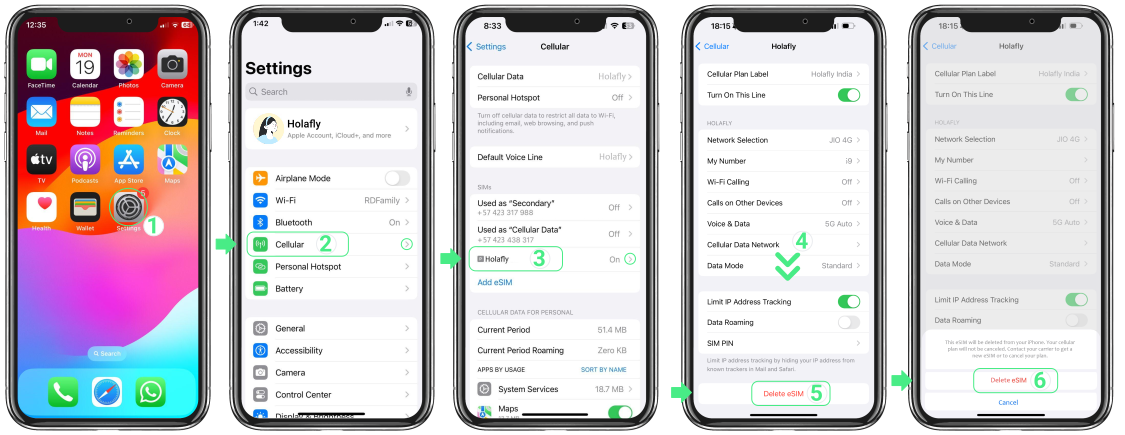
How to delete a Ubigi eSIM on iOS
- Go to Settings.
- Open the Cellular/Mobile Service settings menu.
- Choose the eSIM you want to delete.
- Tap on the Delete eSIM option at the bottom of the menu.
How to delete a Ubigi eSIM on Android
- Go to Settings.
- Tap Connections
- Open the SIM Manager settings menu.
- Choose the eSIM you want to remove.
- Tap the Remove button at the bottom of the menu.
The steps can vary slightly depending on the make of your Android device and the version of your operating system.
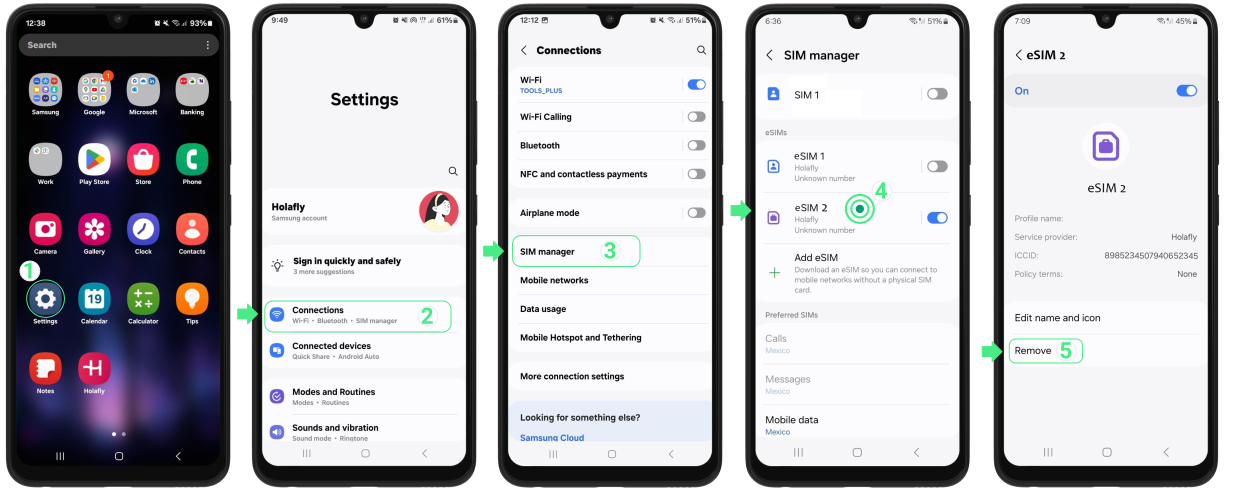
As you can see, the process is simple and does not require you to reset your network settings or perform a factory reset on your phone.
Disclaimer: All data in this article is accurate as of May 5, 2026, and is subject to change.
When to delete a Ubigi eSIM
We’ve already clarified that deleting an eSIM is super simple, but why do it at all? Let’s take a look at some of the main reasons why you might want to.
- Issues with your eSIM — If your Ubigi eSIM is not working, you might want to remove it from your device. Before deleting, contact customer support and request a refund from Ubigi first, as deleting the profile may affect your eligibility.
- You won’t be using the eSIM — Ubigi eSIMs don’t have a validity period, but if you’re sure you won’t need it again, delete the profile to free up space for new eSIMs on your phone.
- You’re selling or giving away your phone — Passing your device on to someone else? Delete all eSIM profiles first, or perform a factory reset, which removes them automatically.
Note: If you don’t need the eSIM right now but might use it again later, consider deactivating it instead of deleting it. Deactivating pauses the profile on your device without removing it, and you can reactivate it at any time.
Get a Holafly eSIM for your next trip
With your Ubigi profile removed, your device is ready for your next eSIM. Holafly offers travel eSIMs in 200+ destinations with unlimited data, 5G speeds, and 24/7 customer support included in every plan — so staying connected abroad is one less thing to think about.
For long-term coverage, Holafly Plans is a pay-monthly eSIM with coverage in 170+ destinations on a single eSIM. Pick your plan, use it to stay connected anywhere for as long as you need, and cancel anytime.
Every Holafly eSIM also comes with Always On, a built-in 1GB monthly backup at no extra cost. You can enjoy instant internet access for emergencies, like calling an Uber or booking a last-minute flight. Simply keep the Holafly eSIM installed on your device to stay connected whenever travel gets difficult.
For a full side-by-side breakdown, see our Holafly vs Ubigi comparison.
An eSIM you can rely on
Join over 10 million Holafly customers and get connected with our trusted, global services.
Frequently asked questions
Yes. Ubigi allows you to reinstall a deleted eSIM profile. Open the Ubigi app, go to Account > MySIMs, and tap Install. You can also contact Ubigi customer support for help.
No. Deleting the eSIM profile removes it from your device settings only. Your Ubigi account and any active data plans remain untouched.
No. Deactivating turns the eSIM off temporarily but keeps the profile on your phone – you can reactivate it at any time. Deleting removes the profile from your device entirely. If you’re not planning to use Ubigi for a while, deactivating is the safer option.
Plans that may interest you

A senior SEO writer from Lithuania, combining my passion for writing and travel at Holafly. With years of experience in technical fields, I'm here to answer all of your questions about staying connected. I specialize in turning even the most complicated topics into something everyone can understand.