Language
How to delete an Airalo eSIM
Here's how to delete Airalo eSIM, but there are a few things to know first. Step-by-step guide for iPhone and Android.

Have an Airalo eSIM that you’re no longer using or simply want to free up space for a new eSIM profile on your phone? You can easily delete any eSIM with a few simple steps through your phone’s settings. Follow along to learn how to delete Airalo eSIM profiles from your phone and the main reasons why you might want to do so.
If you can’t get your Airalo eSIM to work, consider Holafly – a global eSIM service that offers unlimited data, 24/7 customer support, and hotspot sharing in 200+ destinations worldwide.

Holafly - an eSIM you can rely on
Join over 1 million customers and get connected with our trusted, global services.
How to delete an Airalo eSIM on your phone
Deleting an Airalo eSIM is done through your phone settings rather than the eSIM app or website, making it no different from other eSIM service providers. Keep in mind that once you delete an eSIM profile on your iPhone or Android, you won’t be able to use the eSIM again and will have to install a new one for the next use.
Here’s how to delete an Airalo eSIM, depending on the type of phone you have:
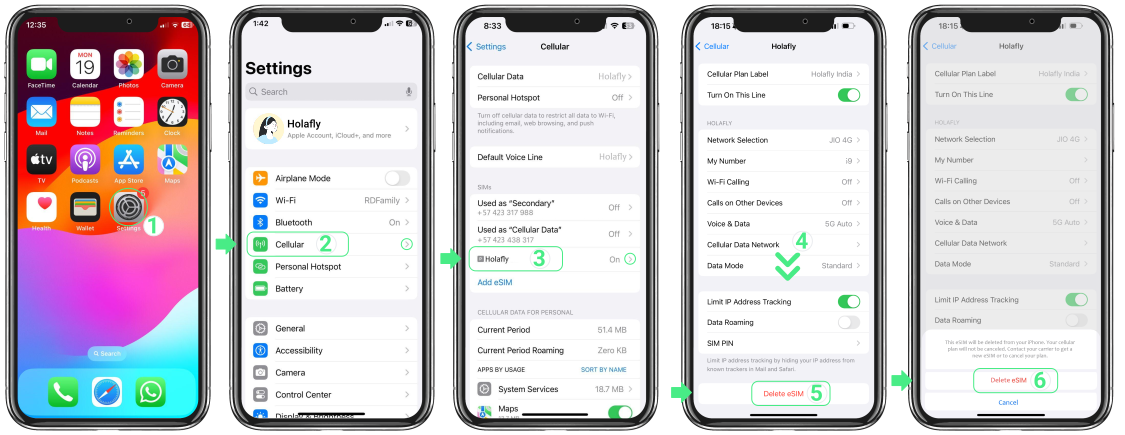
How to delete an Airalo eSIM from iPhone
- Go to Settings.
- Open the Cellular/Mobile Service settings menu.
- Choose the eSIM you want to delete.
- Tap on the Delete eSIM option at the bottom of the menu.
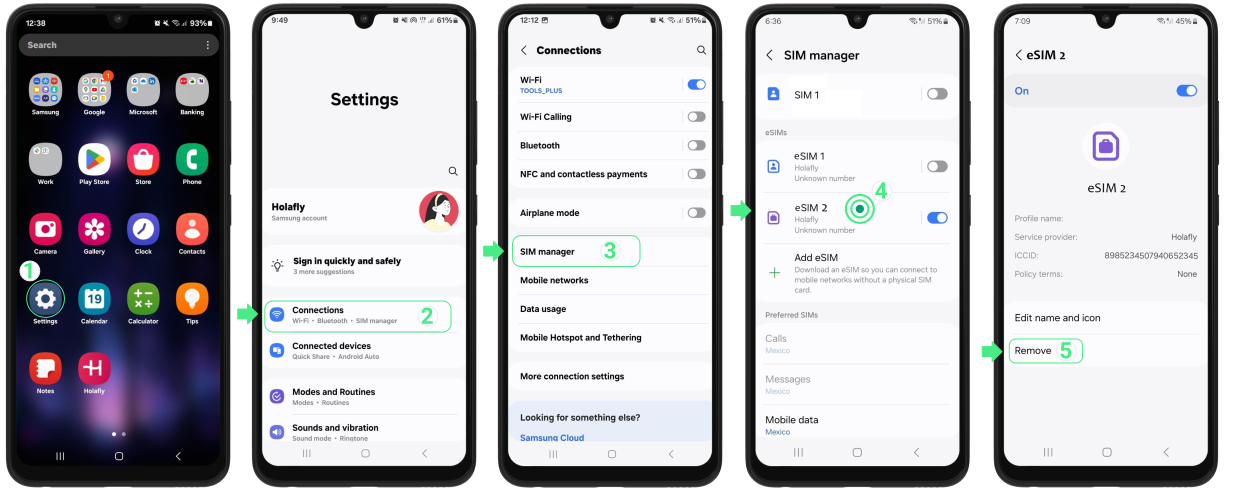
How to delete an Airalo eSIM from Android
- Go to Settings.
- Open the SIM Manager settings menu.
- Choose the eSIM you want to remove.
- Tap the Remove button at the bottom of the menu.
Keep in mind that this process can change slightly depending on the Android device you have and the version of your operating system.
As you can see, the process is really simple and doesn’t require you to reset network settings or perform a factory reset on your phone.
Disclaimer: The data in this article is accurate as of October 13, 2026, and is subject to change.
When to delete an eSIM
Why would you delete an eSIM in the first place? There are, in fact, a few reasons. Let’s take a look at some of the most common:
- Issues with the eSIM: If your Airalo eSIM is not working, you might not want to keep it on your device. Before deleting the eSIM, file a refund request with Airalo, wait for the response, and delete the eSIM once it’s all settled. Don’t delete before settling the refund claim, as you might not get a refund.
- You no longer use the eSIM: All phones have a limited number of eSIM profiles they can hold at one time. So, if you’re no longer using Airalo, delete the eSIM after use to free up eSIM slots.
- The eSIM is no longer active: if your Airalo eSIM doesn’t have a top-up option, you’ll need a new eSIM profile once the data or validity runs out, even for the same destination. If the option is available, you can top-up Airalo.
- Selling/giving away your phone: Passing your phone over to someone else? You’ll want to clean up any personal information that can be found there. This includes deleting all of your eSIMs.
Note: Don’t try to delete and reinstall eSIM from Airalo without checking if it’s possible first. Airalo eSIMs are single-use so you might not be able to reinstall it once it’s removed from your phone.
Install a new travel eSIM from Holafly
Deleting one eSIM doesn’t mean you can’t get a new one. Holafly offers coverage in 200+ destinations, with unlimited mobile data included in all plans. Enjoy having a non-stop connection, hotspot sharing, and 24/7 customer support, ensuring a quality eSIM experience at all times.
If you want to learn more about how Holafly compares with Airalo, check out our detailed Holafly vs. Airalo review.
Holafly - an eSIM you can rely on
Join over 1 million customers and get connected with our trusted, global services.
FAQs: How to delete eSIM from Airalo
Not typically. Once you delete an Airalo eSIM, it can’t be reinstalled. Airalo eSIMs are single-use, so you’ll need to purchase a new one for your next trip, even if it’s to the same destination.
No. Deactivating an eSIM turns it off temporarily but keeps the profile on your phone, You can reactivate it later. Deleting removes it permanently and can’t be undone.
Deleting through your phone’s settings is the only step needed. There’s nothing to remove from the Airalo app separately. Once deleted from your device, the eSIM is gone permanently.
Plans that may interest you

A senior SEO writer from Lithuania, combining my passion for writing and travel at Holafly. With years of experience in technical fields, I'm here to answer all of your questions about staying connected. I specialize in turning even the most complicated topics into something everyone can understand.