Language

How to Find eSIM QR Code If It’s Lost or Deleted?
If you’ve misplaced your eSIM QR code, don’t worry! There are several easy ways to recover it. You can find your eSIM QR code by checking your email, looking through a WhatsApp message, or logging into your Holafly account on the app. Keep reading to discover how to find eSIM QR code quickly and effortlessly!
Where Can You Find the eSIM QR Code?
If you need to install your eSIM or reinstall it, but have deleted the message with the installation code, don’t worry! There are three easy ways to recover it:

- Checking your deleted emails folder and the spam folder.
- Review your WhatsApp messages, as the QR code may have been sent to the number you add in the purchase information.
- Download the app to see your eSIMs and installation codes, which are available there.
Troubleshooting tips
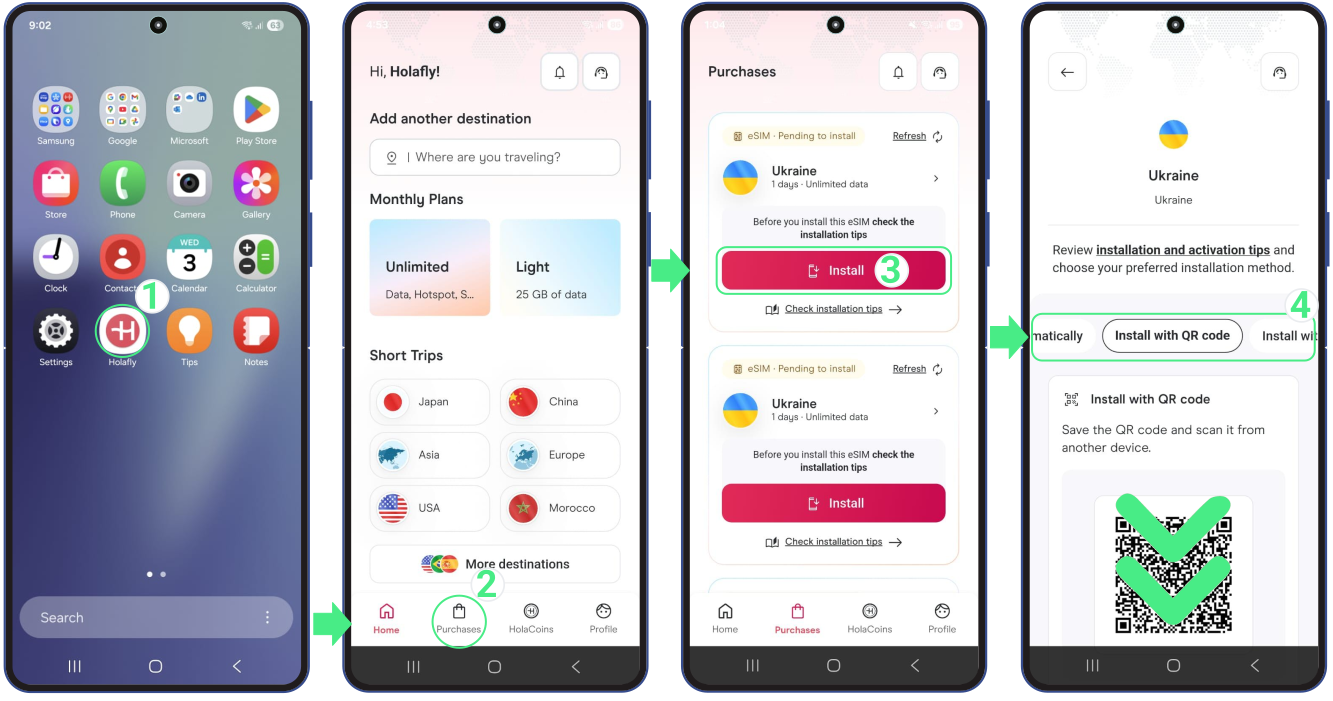
If you haven’t found your Holafly eSIM on your email, don’t worry! You can get your eSIM from the App just following these steps:
- Open the Holafly App and sign in using the same email you used when purchasing → Tap on Purchase → Select the option Install of the eSIM you need to view the installation codes → In that section, you’ll see the Install automatically button for immediate installation on your device, plus the QR code and Manual codes, so you can choose the method that works best for you.
To Keep in Mind
- If you’re using the eSIM for the first time, install it at home or a location with strong Wi-Fi before your trip, and avoid unstable networks like those at airports or public places.
- Whenever you need to reinstall the eSIM, use the manual codes to install it on your iOS or Android device.
- If you have an iPhone with iOS 17 or later, you can quickly install the eSIM directly from the Holafly app with a single tap.