Language

How to download the Holafly invoice?
If you’re wondering how to see your Holafly invoice, the process is easy and quick. Simply fill out the form with your details, and you’ll receive your Holafly invoice right away at the email you provided. Just a heads-up, the invoice is a formal payment request, while the receipt confirms your payment. If you need to download your Holafly invoice or check the receipt, we’ll guide you through the process easily.
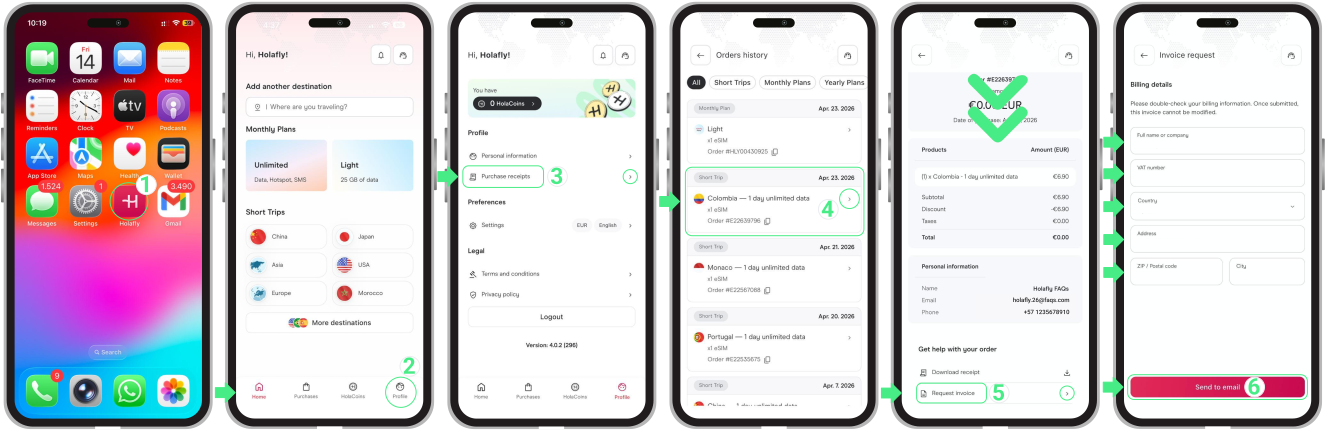
To download your Holafly invoice:
- Go to the Holafly App → Tap on Profile → Tap on Purchase receipts → Select the order for which you need the invoice → Scroll down to the Get help with your order section and choose Request Invoice → Review your information before submitting the request (you can modify it if needed) → Finally, tap Send to email.
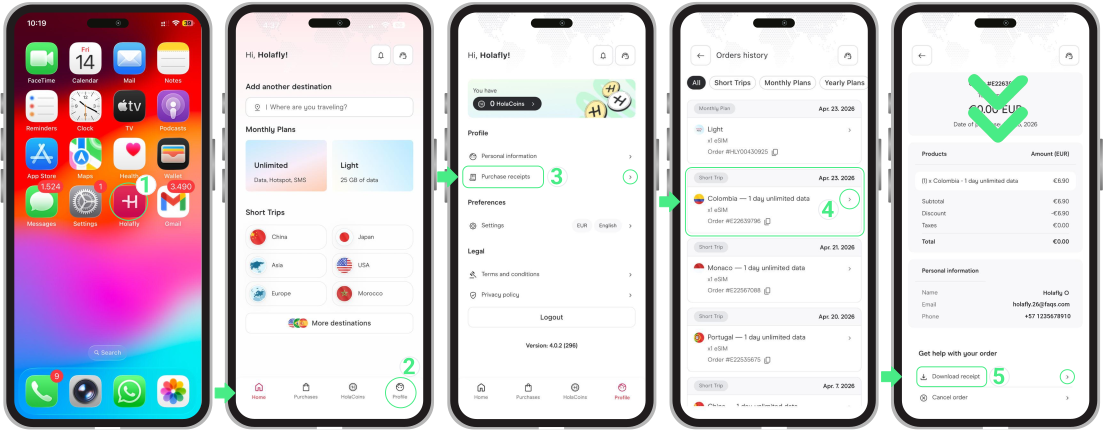
To access your Holafly purchase receipts:
- Go to the Holafly App → Tap on Profile → Tap on Purchase receipts → Select the order for which you need the receipt → Scroll down to the Get help with your order section and choose Download receipt → Choose a location to save the file.
To keep in mind
- If you need to make any changes to your Holafly invoice, please contact us with the necessary details at help@holafly.com.
- If you’re no longer a Holafly customer but need an invoice or receipt, you can still access your account using the same purchase email.
- Make sure to fill in your personal information accurately to avoid delays in receiving your invoice.
- Your invoice will be sent to the provided email in PDF format.