Language
Does FaceTime use data? How much and how to save it
FaceTime uses anywhere from 0.5 MB to 4 MB of data per minute and up to 240 MB per hour. Learn how to save, check, and optimize FaceTime data usage

Yes is the short answer to the question, does FaceTime use data? It doesn’t use the minutes from your package. If you are connected to a WiFi network, it will not use your data. However, if you are traveling, keep in mind that data roaming charges are usually higher than your usual data plan rates. OK, but does FaceTime use a lot of data? That depends on what a lot means to you. But here’s how to avoid that dilemma.
If you want to have peace of mind on your travels, or you simply don’t want to think about how much data FaceTime uses, consider using a Holafly eSIM. In this article, we’ll break down how to stay on top of your FaceTime data usage, both at home and abroad.
An app that gives back


How much data does FaceTime use?
FaceTime video calls use 3 to 4 MB per minute, totaling 180 to 240 MB per hour, while audio calls use 0.5 to 1 MB per minute, totaling 30 to 60 MB per hour. If you are keeping track of your consumption, remember that FaceTime is not the only app you’ll use. Apps like Spotify, Google Maps, or Discord also consume data.
Note for International travelers: On pay-as-you-go roaming plans, FaceTime data usage cost can amount to over $400 USD. In combination with other apps, it’s not that hard to spend 1 GB. That could cost over $2,000 with carriers like AT&T and Verizon.
You have two options to avoid this: rely on a WiFi connection or use an eSIM plan with unlimited data, which will cost you $29.90 a week, and provide 5G connections when available.
FaceTime data usage: Video calls vs. audio calls
FaceTime video calls can use 3 to 4 MB of data per minute. However, here are some things that can affect the total consumption rate.
- Resolution: By default, FaceTime’s resolution is 1080p HD, and there’s no option to change this manually. The resolution only drops when the internet connection is poor.
- Video effects: Playing with video effects on FaceTime will use more data. Try to use these only when connected to WiFi or with an unlimited data plan.
- Network speed: If your network speed is lower, such as on 3G, FaceTime data usage decreases because video quality is lower. But when connected to a 5G network, expect higher data consumption as video quality is better.
On the other hand, audio calls consume a lot less data than video calls. Their data usage is around 0.5-1 MB per minute, and you don’t need to consider resolution, effects, or other video-related factors.
- Audio quality: When you have a poor internet connection, the FaceTime audio quality will change, but even on 5G connections, your data usage will remain low.
Note: Although new iPhone cameras and microphones are of higher quality, their data usage rates remain the same as with previous models.
How to check if FaceTime is consuming mobile data on iPhone settings?
If you have doubts about how much data video and audio calls used, here’s how you can check the FaceTime data usage on your iPhone:
- Go to “Settings.”
- Tap “Cellular.”
- Go to “Mobile Service.”
- Scroll down and look for “FaceTime” and check the data usage for the current period.
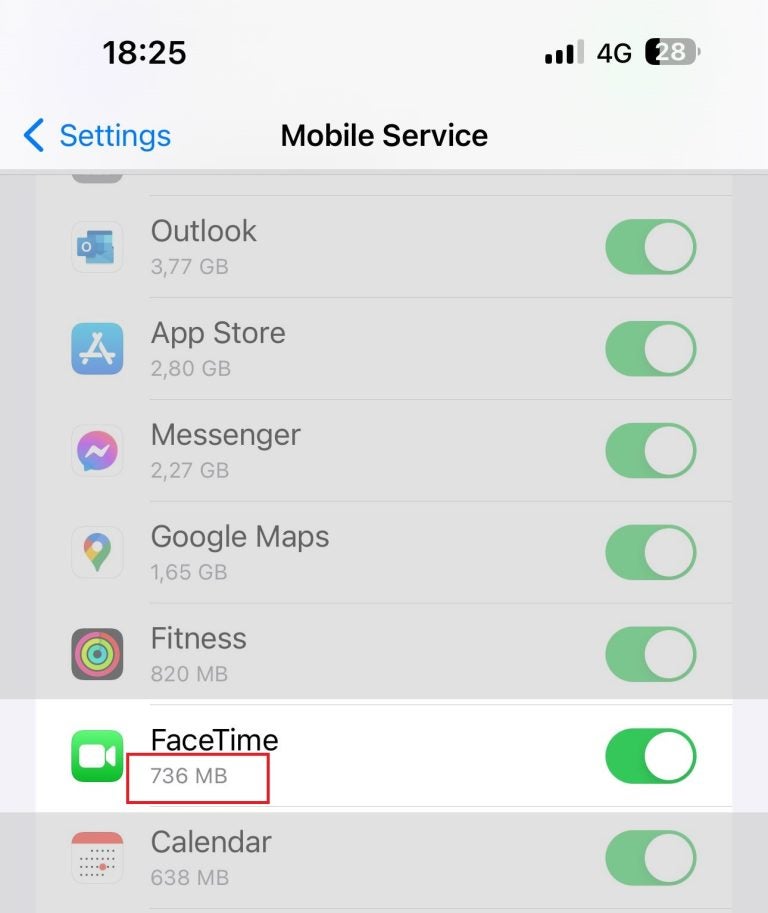
Also, you can check how much data FaceTime uses on a single call by doing the following:
- Go to the FaceTime app and press “Recents.”
- Find the last contact you made FaceTime calls with, then tap the “i” icon.
- If you’re not connected to a WiFi network, the amount of mobile data used will appear next to the call duration.
How to reduce FaceTime data usage
Here are some practical tips you can use to reduce your FaceTime data usage.
- Use FaceTime audio instead of video: FaceTime audio calls consume much less mobile data than video calls, up to 60 MB/hour, which translates to a $120 roaming fee with pay-as-you-go rates from Verizon and AT&T.
- Reduce video quality: The quality of your FaceTime video can make all the difference. The lower the quality, the less data you’ll use.
- Get an eSIM for international travel: Get an international eSIM with unlimited data. You can use it alongside your primary SIM card and set it to use only data. That way, you only use it for the internet, while calls and SMS use your usual number.
With Holafly, you can get a prepaid travel eSIM for a single trip that covers one or more destinations, or you can get a monthly postpaid Holafly Plans that gives you unlimited internet at all times and is valid across 170 countries. There’s also the Always On perk for both of these eSIM options. You get 1 GB of backup data on top of your plan, in case you need it.

Connectivity made easy
Never worry about your FaceTime data usage again.
FAQs about FaceTime data usage
FaceTime uses internet data instead of traditional phone lines to make audio and video calls. It works over Wi-Fi or mobile data on Apple devices like iPhones, iPads, and Macs.
FaceTime is free to use. Apple does not charge for FaceTime calls, but your mobile carrier may charge for the data used if you’re not connected to Wi-Fi.
FaceTime does not have a per-minute fee. Costs depend on your mobile data plan and the amount of data the call uses. FaceTime audio uses much less data than video calls.
Plans that may interest you

I first started my content creation journey as a freelancer in 2019, before connecting with Holafly in 2021. At Holafly, my travel and tech interests come together in one place as I craft high-quality articles about the eSIM and related markets. My content aims to help travelers stay connected, wherever they are.