Language
Woolworths Mobile eSIM not working? Reasons and how to fix it
Woolworths Mobile eSIM not working? Learn why and how to fix it with simple steps for iPhone and Samsung, plus QR code and APN tips.
If your Woolworths Mobile eSIM is not working, it usually comes down to setup issues, device compatibility, or network settings. Thankfully, you can fix most common issues yourself. This guide explains the most common causes and how to fix them step by step.
Everyday Mobile is the rebranded mobile service previously known as Woolworths Mobile. While the setup process is designed to be straightforward, some users may run into connection problems after activating an eSIM or moving it to a new phone. For a fuller overview of plans, setup, and limitations, check out Woolworths Mobile eSIM review.
If your connection still doesn’t work after troubleshooting, you may want to consider alternatives like Holafly eSIM for reliable connectivity and near-worldwide coverage.

An eSIM you can rely on
Join over 10 million Holafly customers and get connected with our trusted, global services.
Why is my Woolworths Mobile eSIM not working?
If your Woolworths Mobile eSIM is not working, it is usually caused by one of a few common setup or network problems. These problems can look slightly different depending on your device.
For example, Woolworths Mobile eSIM not working on iPhone often comes down to the wrong line being selected for mobile data, or data roaming being switched off. With Android devices, Woolworths Mobile eSIM not working on Samsung can be linked to SIM manager settings or APN details.
Here are the most common reasons, and we will walk through how to fix each one step by step in the next section:
- Your device does not support eSIM: Some phones and older models do not have eSIM capability, so the eSIM cannot be activated.
- Mobile data or data roaming is turned off: If mobile data is off, or your device won’t be able to use data on the eSIM line, you may see a signal but no internet.
- The local network is not connecting automatically: Your phone may fail to select the best network automatically, especially after installation or when switching devices, and may need manual network selection.
- Incorrect or outdated APN settings: If the APN is missing or wrong, your eSIM can connect to a mobile network but still fail to load data.
- The eSIM QR code has already been used: Woolworths Mobile eSIM QR codes are single-use. If you have already scanned it once, you will usually need to request a replacement through the Everyday Mobile app or support.
How to fix a Woolworths Mobile eSIM
Work through the steps below in order. After each change, wait a minute or two to see if your eSIM connects and mobile data starts working.
Check if your device supports eSIMs
- iPhone: Settings > General > About. Look for EID or Available SIM.
- Samsung/Android: Settings > Connections > SIM manager. Look for Add eSIM.
Alternatively, check out our list of eSIM-compatible phones to help you confirm whether or not your device supports eSIM technology.
Restart your phone after eSIM installation
Restart your phone, then wait 1 to 2 minutes for the network to reconnect. This fixes many no service or stuck connecting issues after installation or transfer.
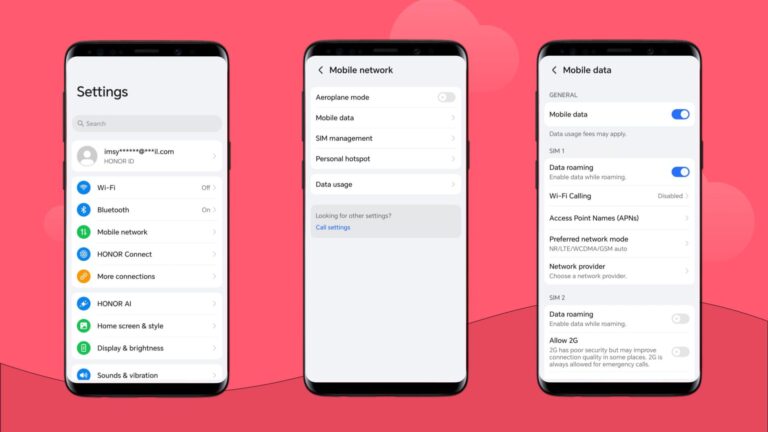
Turn on data roaming
Data roaming must be turned on for your eSIM to work with Woolworths Mobile international roaming when traveling abroad. Here’s how you can do it depending on your device.
- iPhone: Settings > Mobile > Mobile Data Options > Data Roaming.
- Samsung/Android: Settings > Connections > Mobile networks > Data roaming.
Then check your eSIM is set as the line for mobile data:
- iPhone: Settings > Mobile > Mobile Data.
- Samsung/Android: Settings > Connections > SIM manager (Preferred SIM for data).
Enable and disable Airplane Mode
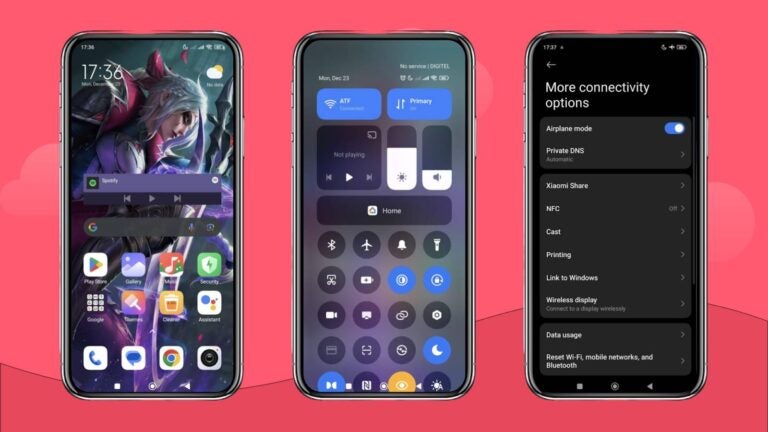
Turn Airplane Mode on for 30 seconds, then turn it off. This forces a fresh connection to the network.
Manually select a local network in settings
If the phone is not connecting automatically or the connection is poor, you can manually select a different network to connect to:
- iPhone: Settings > Mobile > Network Selection > turn off Automatic, then choose a network.
- Samsung/Android: Settings > Connections > Mobile networks > Network operators > turn off Automatic, then choose a network.
Update or reset your APN settings
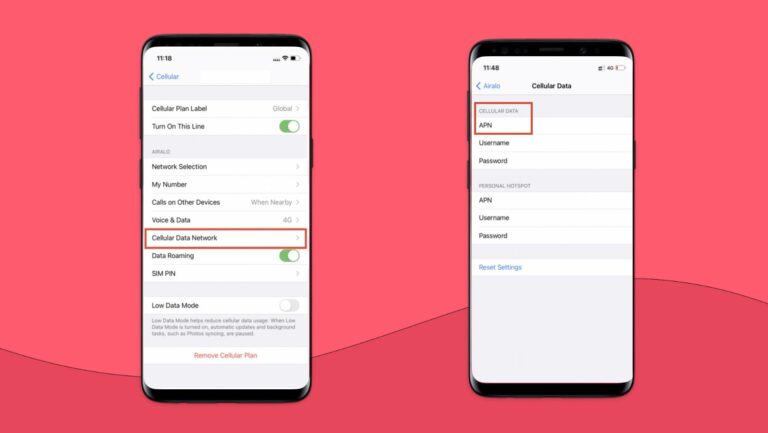
If you have a signal but no data, check your APN settings:
- iPhone: Settings > Mobile > Mobile Data Network
- Samsung/Android: Settings > Connections > Mobile networks > Access Point Names
If you are unsure, try resetting to the default first. If it still fails, use the APN details provided by Everyday Mobile support.
Reset your network settings
If nothing else works, reset network settings:
- iPhone: Settings > General > Transfer or Reset iPhone > Reset > Reset Network Settings
- Samsung/Android: Settings > General management > Reset > Reset network settings
Keep in mind that doing so refreshes all network settings, including WiFi, Bluetooth, and mobile data. This means you’ll have to reconnect any WiFi networks and Bluetooth devices manually after refreshing the settings.
If your Woolworths Mobile eSIM is still not working, contact Everyday Mobile from Woolworths support through the app, especially if you need a replacement eSIM because your QR code has already been used.
Choose Holafly for peace of mind as you travel
If you need data quickly for travel, switching to a more travel-focused option can save time and frustration. A travel eSIM from Holafly offers a simple setup, unlimited data, and reliable coverage for international trips, so you can connect soon after you arrive without manual configuration.
Holafly provides coverage in over 200 destinations with unlimited data, including Australia. You can browse plans in the Holafly eSIM shop or choose a dedicated eSIM for Australia for local connectivity.
Get an unlimited data eSIM
Use code MYESIMNOW5 for 5% off at checkout
Disclaimer: The data in this article is accurate as of October 14, 2026, and is subject to change.
Plans that may interest you

哈囉我是來自台灣的 Wen,平常最喜歡旅遊,也喜歡將旅遊的種種化成文字跟大家分享,希望大家能在我的文章中找到有用的資訊,加上 Holafly 的 eSIM,讓你的旅程更美好!✈️✈️✈️ Hi! I'm Wen, a passionate content writer and travel enthusiast from Taiwan. I transform my wanderlust adventures into engaging stories and practical guides, helping fellow travelers make the most of their journeys.Through my articles, I strive to provide travel tips while introducing how our eSIM technology can enhance your travel experience - keeping you connected wherever your adventures take you!