Language

Business travel expense form (Free template and guide)
A free template, what to include, how to fill it out, and IRS receipt rules.

A business travel expense form (also called a travel expense report) is an itemized record of the costs an employee incurs on a work trip, such as airfare, lodging, meals, and ground transportation, which they submit with receipts for reimbursement.
It also gives your finance team the records it needs to reimburse employees tax-free (provided you follow IRS accountable plan rules).
This guide contains:
- Free business travel expense form template
- What to include in a business travel expense form
- How to fill out a business travel expense form
- What expenses you can claim on a travel expense form
If your team travels internationally, Holafly for Business keeps employees online with secure mobile data.

Business travel made easy
Free business travel expense form template
For your convenience, we’ve put together a ready-to-use business travel expense form template in Google Sheets.
Feel free to adapt its categories, cost centers, and approvers to your travel policy.
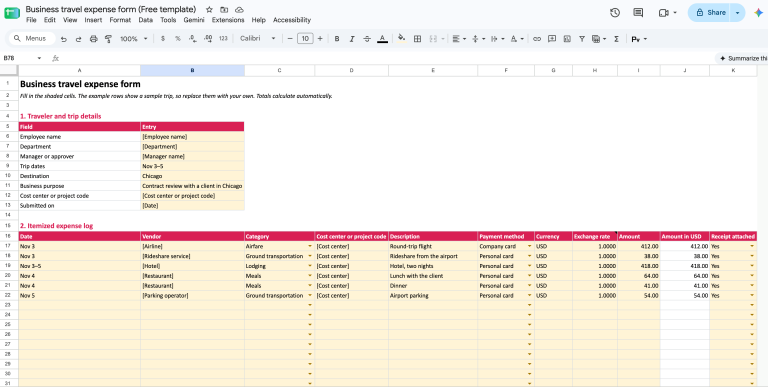
(Screenshot: Google Sheets version of the business travel expense form template)
The template covers trip details, an expense log, a mileage log, a summary, notes, a pre-submission checklist, and an approval block.
Totals update as the employee enters each expense.
What to include in a business travel expense form
Whatever format you use, the form needs enough detail to prove the amount, date, place, and business purpose of each cost, as these are the elements the IRS lists for travel records.
1. Traveler and trip details
The header identifies who traveled and why:
- Employee name and department
- Manager or approver
- Trip dates and destination
- Business purpose
- Cost center or project code
Keep the business purpose specific (e.g., “Contract review with a client in Chicago”), as a vague purpose such as “Meetings” doesn’t show why the trip was needed.
2. Itemized expense log
The log gives each expense its own row, in date order.
Here’s what each column should capture:
| Field | What to enter |
|---|---|
| Date | Enter the day the expense was incurred |
| Vendor | Write the merchant’s name as it appears on the receipt |
| Category | Pick airfare, lodging, meals, ground transportation, mileage, or other |
| Cost center | Enter the cost center or project code the expense should be billed to |
| Description | Note what was bought and why, if the trip purpose doesn’t already explain it |
| Payment method | Mark whether the employee paid by personal card, company card, or cash |
| Amount and currency | Enter the amount paid, along with the exchange rate for trips abroad |
| Receipt attached | Mark yes or no for each line |
The payment method column matters most at the end because separating personal and company card charges prevents you from paying for the same expense twice.
3. Mileage log
When an employee drives their own car, a mileage log records the date, route, business purpose, and miles for each drive.
Multiply the miles by your company’s rate or the IRS standard mileage rate to get the amount owed, and carry that total into the summary.
4. Expense summary
The summary adds up each category and the whole trip.
It then subtracts any amounts the company has already paid (e.g., company-card charges or a cash advance) to show the net amount owed to the employee, or the amount the employee must repay if the advance exceeded the costs.
5. Certification and approval
The form should end with the employee’s signature and date, confirming the expenses are accurate, and a manager or finance sign-off before payment.
It’s also a good idea to leave space for notes, so employees can explain an out-of-policy expense before the approver has to ask.
Check our guide to travel and expense reporting to learn more.
How to fill out a business travel expense form
The traveler fills out the form, and a manager or the finance team approves it, so you can share these steps with your team:
- Check the travel policy before the trip, and get approval in advance for anything outside it (e.g., a business-class seat).
- Photograph each receipt the day you get it.
- Note the business purpose of each expense.
- Log each expense in date order, keeping personal and company-card charges separate.
- Code each line to the correct category and cost center.
- Total the form and subtract company card charges and any cash advances.
- Submit the form with its receipts before your company’s deadline.
On your side, it’s best to set a submission deadline in your policy and give every traveler the same form, so your finance team reviews reports in one format.
See our guide to a company travel expense policy (includes a free template) to learn more.
What expenses can you claim on a travel expense form?
Your travel policy decides what you reimburse, and a good starting point is the IRS definition of travel expenses: the ordinary and necessary expenses of traveling away from home for your business, as set out in Topic 511.
Here’s how the common categories compare:
| Category | Claimable | Not claimable |
|---|---|---|
| Transportation | Airfare, train tickets, rental cars, rideshares, tolls, parking, and mileage | Upgrades outside your policy, along with traffic and parking fines |
| Lodging | The room rate, mandatory fees, and taxes | Minibar charges, in-room movies, spa treatments, and extra nights for personal reasons |
| Meals | Meals while traveling and business meals with clients | Alcohol, if your policy excludes it |
| Other | Conference fees, business calls, internet for work, and shipping work materials | Personal extras (e.g., excess baggage for non-work items) |
Entertainment (e.g., concert or golf tickets for a client) is a policy call, although it’s generally not tax-deductible for your business.
For mileage, the IRS standard rate is 72.5 cents a mile from Jan 1 to Jun 30, 2026, and 76 cents a mile from Jul 1 to Dec 31, 2026.
Pro tip: If an employee adds personal days to a work trip, it’s best to reimburse travel to and from the destination, and only lodging and meals for the business days (provided the trip is primarily for business).
Per diem or actual expenses
A per diem replaces itemized receipts with a fixed daily allowance for lodging, meals, and incidentals, so employees don’t need receipts for the covered categories (up to federal per diem rates). However, they still record the time, place, and business purpose of each trip.
According to IRS Notice 2026-60, the high-low rate for travel on or after Oct 1, 2026, is $329 a day for high-cost areas and $230 a day for other areas in the continental US. The General Services Administration (GSA), on the other hand, sets a standard rate of $113 a night for lodging and $68 a day for meals and incidentals.
Actual expenses, by comparison, reimburse what the employee spent, with a receipt for each cost.
Generally, a per diem suits routine trips, whereas actual expenses suit client-facing travel with meals that exceed the daily rate.
Receipt and IRS rules for travel expense forms
To keep reimbursements tax-free, you must pay them under an accountable plan, which means each expense has a business connection, employees account for it within a reasonable period, and they return any excess advance. Under IRS Publication 15, these payments aren’t wages and aren’t subject to income, Social Security, Medicare, or FUTA taxes (check our guide to expense reimbursement for more details).
The IRS treats the following periods as reasonable:
- An advance paid within 30 days of the expense
- Expenses accounted for within 60 days after they were paid or incurred
- Excess reimbursement returned within 120 days after the expense
Employees also need documentary evidence (e.g., receipts, canceled checks, or bills) for lodging and for any other expense of $75 or more. The exceptions are transportation costs without a readily available receipt, and meals or lodging covered by a per diem under an accountable plan.
Your policy can still require receipts below that threshold (e.g., for any expense over $25).
A hotel receipt supports the stay on its own if it shows:
- The hotel’s name and location
- The dates of the stay
- Separate amounts for lodging, meals, and phone calls
A card statement, by contrast, shows the charge but not what was bought, so it’s best to ask for an itemized receipt as well.
If an employee loses a receipt, you can ask for a signed statement backed by secondary evidence (e.g., a card statement or vendor invoice).
Template or software for business travel expenses?
A template works well when a few employees travel a few times a year, whereas software makes sense as the number of reports grows.
Here’s how the two compare:
- An expense report template is free and easy to adapt, but every entry is manual, receipts are sent as separate files, and travelers may end up using different versions. Manual entry can also cause errors (e.g., a wrong amount or a missing receipt).
- Expense software reads data from receipt photos via optical character recognition (OCR), flags out-of-policy claims before approval, routes reports to approvers, and syncs with your accounting system (see our guide to travel and expense management software).
If you switch, it’s best to pilot the tool with your most frequent travelers before you roll it out to the whole company.
Give traveling employees secure data with Holafly for Business
When your team is on the road, roaming charges are one less line on the expense form.
Holafly for Business is a business eSIM provider available in 160+ destinations that activates on your team’s devices, so they don’t have to worry about local SIM cards or roaming charges. You also get access to our centralized management platform, the Holafly Business Center, where you can manage individual eSIMs, invoices, and data usage.
Holafly Plans for Business come in four tiers, all featuring hotspot, 4G/5G, and 24/7 multilingual support:
- Daily: Unlimited data with pay-per-day flexibility, built for short business trips under 16 days a month.
- Monthly: Unlimited data for teams traveling more than 16 days a month, a fit for frequent travelers and long-term remote staff.
- Annual: Unlimited data for ultra-frequent travelers, suited to long-term global operations and predictable annual budgets.
- Enterprise: Bespoke plans for companies managing travel for 20+ employees a year, with volume discounts, a dedicated account manager, priority support, and custom integrations, built to optimize costs, streamline operations, and ensure seamless global connectivity across teams.
Not sure which plan is right for your team? Book a demo.
Business travel made easy
FAQ
You can write off business travel expenses if you’re self-employed and the costs are ordinary and necessary, although meals are generally limited to 50% and entertainment isn’t deductible. Most employees can’t deduct unreimbursed travel expenses, so they rely on employer reimbursement instead (check our guide to business travel expenses to learn more).
Travel expense records are generally kept for three years from the date you file the tax return they support, and longer in some situations set out by the IRS.

I’m a writer with over eight years of experience in digital content. My work has appeared in publications such as The New York Times, Forbes, Business Insider, and the BBC. At Holafly, I write clear, practical guides to help travelers stay connected with eSIM technology. In my spare time, I enjoy car detailing, biking around Warsaw, and capturing portraits.