Language
iiNet eSIM guide: Plans and activation
iiNet eSIM review. Does iiNet support eSIM? Check out the eligible plans, activation steps, and alternatives, including Holafly with unlimited data.
An increasing number of Australian telecommunications providers offer eSIMs as an alternative to traditional SIM cards. iiNet is one of them. It allows users to activate mobile services without waiting for physical delivery.
This guide covers all you need to know about iiNet eSIM, including its available plans, price, and activation steps.
We will also introduce alternatives to iiNet, including Holafly eSIM, offering unlimited data, reliable coverage in 200+ destinations, and flexible plan durations.

Match your eSIM to your vacation
Choose a plan lasting between 1 and 90 days so you never pay for days or data you don't use.
Does iiNet support eSIM?
Yes, iiNet supports eSIM on eligible mobile plans. iiNet Mobile operates as a Mobile Virtual Network Operator (MVNO) on the Vodafone / TPG Telecom network across Australia. So, iiNet customers can access the same 4G and 5G network coverage as Vodafone users, depending on local signal strength and device compatibility.
New customers can select eSIM during signup. Existing customers can switch from a physical SIM to an eSIM via their Toolbox account. Online activation uses a QR code.
iiNet eSIM plans explained
iiNet offers eSIMs on eligible plans if your device supports them.
- Postpaid SIM-only exclusivity: iiNet eSIMs are available exclusively on their eligible, ongoing postpaid SIM-only mobile plans. These are month-to-month contracts that auto-renew until cancelled.
- No prepaid availability: Unlike some competitors, iiNet does not offer separate, standalone prepaid mobile plans with eSIMs.
- Hardware requirement: An eSIM-compatible device is required for all eSIM plans.
Available Postpaid SIM-Only Plans
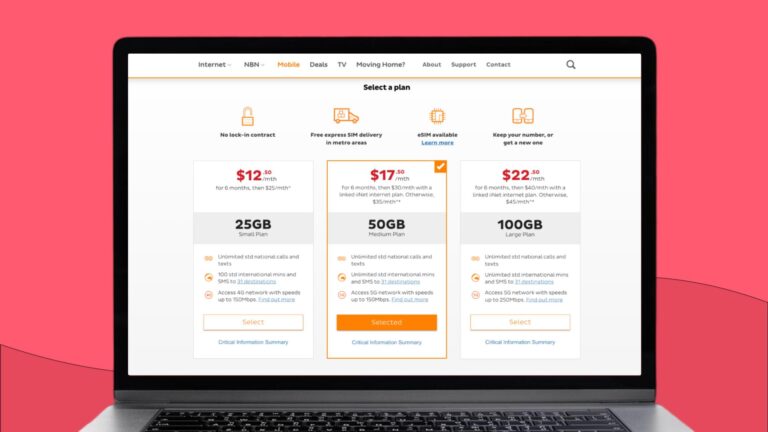
The table below details the core monthly tiers available for iiNet eSIM activation:
| Plan Tier | Monthly Base Data | National Calls & SMS | International Inclusions (to 31 selected destinations) | Network Cap / Max Speed |
|---|---|---|---|---|
| 25 GB Small Plan | 25 GB | Unlimited | 100 standard minutes and SMS | 4G network (Up to 150Mbps) |
| 50 GB Medium Plan | 50 GB | Unlimited | Unlimited standard minutes and SMS | 5G network (Up to 150Mbps) |
| 100 GB Large Plan | 100 GB | Unlimited | Unlimited standard minutes and SMS | 5G network (Up to 250Mbps) |
International roaming note: iiNet international roaming functions as a separate, optional add-on service. You must manually activate roaming via your iiNet Toolbox before departing. Usage charges are billed separately and vary significantly depending on your specific destination, local network partners, and data/call consumption while abroad.
iiNet eSIM-compatible devices
To use an iiNet eSIM, your device must be network-unlocked and feature an embedded internal chip. Because iiNet runs on the Vodafone network, the device must also support local 4G (850/1800/2100MHz) and 5G (700/3600MHz) frequencies.
Supported hardware configurations include:
- Apple: iPhone XR, XS, SE (2020) and all newer models, alongside cellular-capable iPads (7th Gen or newer).
- Samsung: Galaxy S20 series, Note20, Z Fold/Flip models, and mid-range devices like the Galaxy A35/A55.
- Google: Pixel 3 series up through the latest Pixel iterations.
- Others: Select premium OPPO and Motorola handsets.
Note: iiNet eSIMs do not support smartwatches or wearable number-sharing.
iiNet eSIM activation guide
Activating an iiNet eSIM lets you download your network profile digitally over Wi-Fi without needing a physical card.
Before you begin
- Compatible device: An unlocked phone with native eSIM support.
- Secondary screen: A computer or tablet to display the QR code.
- Wi-Fi connection: Stable internet access on the phone you are activating.
- iiNet Toolbox access: Your account login credentials.
Step-by-step activation
- Get the QR code: Log into iiNet Toolbox on another device, go to mobile settings, and find your eSIM QR code.
- Connect to Wi-Fi: Ensure the phone receiving the eSIM is actively connected to Wi-Fi.
- Open network settings:
- iPhone: Go to Settings > Mobile > Add eSIM.
- Android: Go to Settings > Connections > SIM manager > Add eSIM.
- Scan the code: Scan the QR code displayed on your computer screen using your phone’s camera.
- Finalize: Follow the on-screen prompts to complete the download.
Note: Activation typically takes from 15 minutes up to a few hours. Restart your phone if your cellular bars do not appear within an hour.
How to transfer an iiNet eSIM to a new phone
An iiNet eSIM profile can only be active on one device at a time. Moving your service requires generating a new profile.
- Log in: Keep your old phone turned on to receive any security verification codes. Using a computer or tablet, log in to your iiNet Toolbox.
- Request swap: Navigate to your mobile service settings and select eSIM Swaps. Choose eSIM as your replacement type.
- Get new code: Complete the identity verification steps to generate a brand-new eSIM QR code on your computer screen.
- Scan with new phone: Connect your new phone to Wi-Fi, open its network settings (Add eSIM), and scan the new QR code.
- Finalize: Restart your new phone if needed. Your old phone will lose service, and your new phone will connect to the network.
Which Australian providers offer eSIM?
Here is a concise overview of the major network operators and virtual providers offering eSIM support in Australia:
- Telstra: Offers premium full-service eSIMs on Australia’s widest network, complete with smartwatch cellular sharing.
- Optus: Provides versatile prepaid and postpaid eSIM options featuring strong metro coverage and simple in-app activation.
- Vodafone: Focuses on instant digital flexibility with rapid QR-code delivery and seamless physical-to-eSIM conversions.
- ALDI Mobile: Combines budget-friendly prepaid pricing with extensive coverage on the Telstra Wholesale Network.
- Amaysim: Delivers contract-free prepaid eSIMs on the Optus network, packed with generous data-banking inclusions.
- Boost Mobile: Stands out by giving value-focused prepaid users full, uncapped access to the complete primary Telstra network.
- Dodo: Offers contract-free postpaid eSIMs on the Vodafone network that can be conveniently bundled with home utilities.
- Superloop: Provides straightforward prepaid 4G and 5G data tiers on the Telstra wholesale footprint via fast digital delivery.
Get Holafly to enjoy unlimited data
The iiNet eSIM is a highly efficient, budget-friendly solution for everyday use within Australia. However, international travel can be costly, as overseas use isn’t included in monthly plans. Instead, it relies on a pay-as-you-go credit system, which can be expensive, especially if you frequently use data-heavy apps on your trips.
For unlimited data without roaming charges, consider Holafly eSIM. It also offers 5G speeds, flexible plans, and 24/7 customer support. The Always-on feature gives you 1 GB of backup data to help you stay connected in case you exceed your plan for any reason.

Unlimited data. Peace of mind.
Make sure you have travel data that's there when you need it most.
Disclaimer: The data in this article is accurate as of June 13, 2026, and is subject to change.
Plans that may interest you

Formerly a travel journalist turned marketing copywriter, I found my way back to the travel world with Holafly—my dream company that made remote work possible. My motto? “Dream big and make it happen.” I’m passionate about writing, exploring the world, and staying active through walking, running, swimming, and hiking. I also love learning, reflecting, and connecting with inspiring minds.