





 Language
Felix eSIM not working? Reasons and how to fix it
Felix eSIM not working? Try quick fixes for iPhone and Android, including data roaming, network selection, APN settings, and a network reset.
If your Felix Mobile eSIM has stopped connecting, has no data, or will not activate after a transfer, it is usually a settings or activation issue you can fix in a few minutes. This guide lists the most common causes and walks you through the quickest fixes step by step.
If it still will not work after troubleshooting, you can contact Felix support or consider an alternative eSIM option such as Holafly.

An eSIM you can rely on
Join over 10 million Holafly customers and get connected with our trusted, global services.
Why is my Felix Mobile eSIM not working?
Felix eSIM issues usually come down to one of a few repeat causes. Below, you will find fixes for both Felix eSIM not working on iPhone and Felix eSIM not working on Samsung, plus the checks that apply to any Android device.
Common reasons include:
- Your device does not support eSIM. Some models do not have eSIM hardware, or eSIM is disabled on certain regional variants.
- Mobile data or data roaming is turned off. You may see connection bars, but not be able to access mobile internet if data roaming or mobile data is turned off.
- The network is not connecting automatically. Your phone may not automatically connect to the best available network, causing connection issues.
- Incorrect or outdated APN settings. Having incorrect APN settings can lead to mobile data issues.
- The eSIM QR code has already been used. Most eSIM QR codes are one-time use, so re-scanning the same code often fails.
How to fix your Felix eSIM
When troubleshooting your Felix eSIM, start with the quick fixes first, then move to the more specific network and APN steps. If a step differs between iPhone and Android, follow the notes for your device.
Check if your device supports eSIMs
Before troubleshooting, confirm your phone can actually use eSIM.
- iPhone: Most newer iPhones support eSIM, but check Settings > General > About and look for Available SIM or eSIM details.
- Samsung/Android: Look for Settings > Connections > SIM manager (or Mobile network > SIMs).
If you are unsure, you can cross-check your model on our eSIM-compatible phones list.
Restart your phone after eSIM installation
This is the simplest fix and often works right away after installation or transfer. Felix also recommends restarting as an early troubleshooting step when an eSIM is not working.
Power your phone off, wait 10 seconds, then power it back on.
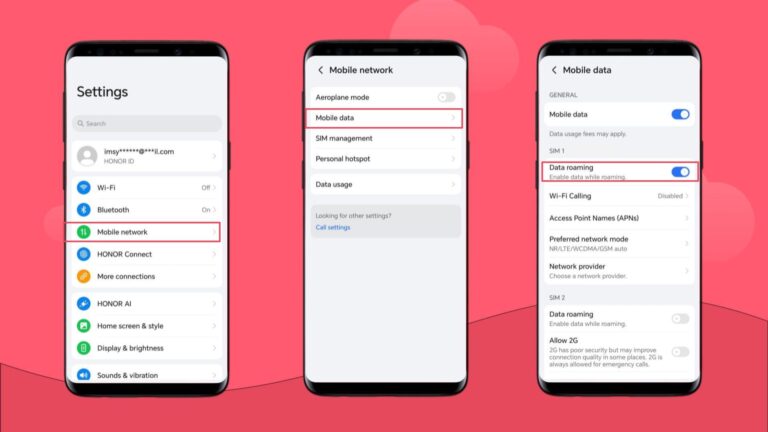
Turn on data roaming
This sounds counterintuitive, but many eSIM profiles need data roaming enabled even when you are in Australia.
- iPhone: Settings > Mobile > Mobile Data Options > Data Roaming
- Samsung: Settings > Connections > Mobile networks > Data roaming
If you purchased a Felix Mobile international roaming plan instead of an eSIM for Australia, there will be different approaches to fix your data. Reach out to Felix customer support for more assistance.
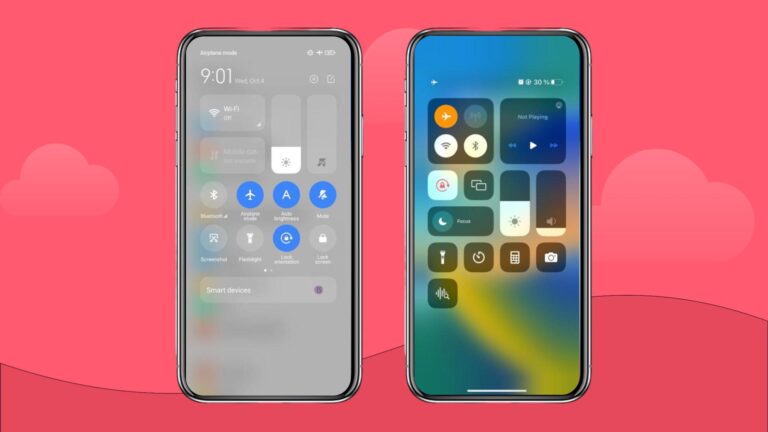
Toggle Airplane Mode on and off
Airplane Mode forces your phone to reconnect to the network, which often fixes minor network connection errors.
Turn Airplane Mode on for 10 to 15 seconds, then turn it off. Wait up to one minute for signal and data to return.
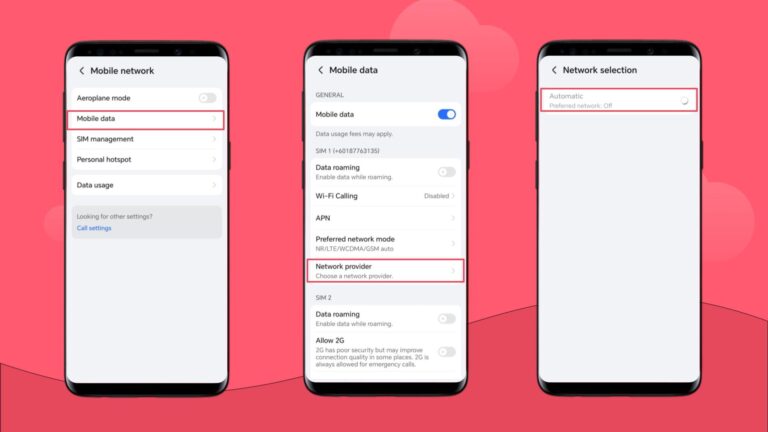
Manually select a local network in settings
If Felix is not connecting automatically, try selecting the network manually.
- iPhone: Settings > Mobile > Network Selection > turn off Automatic, then choose a network
- Samsung: Settings > Connections > Mobile networks > Network operators > turn off Select automatically, then choose a network
If this doesn’t solve the issue, switch back to automatic network selection.
Update or reset your APN settings
If you have a signal but no internet, APN is a common cause. Felix lists its APN as live.vodafone.com (VF WEB). Make sure it is set as such. Otherwise, mobile data won’t work.
- iPhone: Settings > Mobile/Cellular Service > Mobile Data Network (if visible)
- Samsung: Settings > Connections > Mobile networks > Access Point Names
Reset your network settings
Use this method last, because it wipes saved Wi-Fi networks, Bluetooth pairings, and other network settings.
- iPhone: Settings > General > Transfer or Reset iPhone > Reset > Reset Network Settings
- Samsung: Settings > General management > Reset > Reset network settings
After the reset, restart your phone again and re-check Mobile Data and Data Roaming.
If none of the above fixes your issue, contact Felix support and request an eSIM replacement.
Choose Holafly for peace of mind as you travel
If your Felix eSIM still is not working and you need a reliable backup, a travel eSIM can be a simple way to get data running again without waiting on a replacement profile. With Holafly, you can set up your eSIM before you leave, then use unlimited data for maps, messages, and bookings as soon as you land, with no need to swap a physical SIM.
To choose the right option, you can compare destinations and trip lengths in the Holafly eSIM shop, or use Holafly Plans subscription service if you travel frequently and want ongoing coverage in 170+ destinations with a single eSIM.
Get an unlimited data eSIM
Use code MYESIMNOW5 for 5% off at checkout
Plans that may interest you

哈囉我是來自台灣的 Wen,平常最喜歡旅遊,也喜歡將旅遊的種種化成文字跟大家分享,希望大家能在我的文章中找到有用的資訊,加上 Holafly 的 eSIM,讓你的旅程更美好!✈️✈️✈️ Hi! I'm Wen, a passionate content writer and travel enthusiast from Taiwan. I transform my wanderlust adventures into engaging stories and practical guides, helping fellow travelers make the most of their journeys.Through my articles, I strive to provide travel tips while introducing how our eSIM technology can enhance your travel experience - keeping you connected wherever your adventures take you!

