Language

MATE international roaming: Packs, prices, and how to activate
Explore MATE international roaming packs and prices, covered countries, how to activate in the myMATE app, and travel eSIM alternatives.
If you are an existing MATE mobile customer preparing to travel abroad, you can keep using your regular Australian SIM through MATE’s prepaid roaming system. MATE international roaming offers 7-day packs through five fixed-price options, starting at $6, providing a fixed weekly allowance instead of pay-as-you-go rates.
This guide covers everything you need to know about MATE roaming, including packs, prices, activation steps, and pros and cons.
As an alternative to MATE mobile roaming, consider the Holafly eSIM, which offers unlimited data, 5G speeds, and flexible plan durations.

Unlimited data. Peace of mind.
Make sure you have travel data that's there when you need it most.
TL;DR: MATE international roaming
Before diving into the details, here’s a quick overview of MATE’s international roaming options.
- Prepaid packs, no bill shock: International roaming is available on all active MATE mobile plans via prepaid add-on packs, eliminating pay-as-you-go excess data charges.
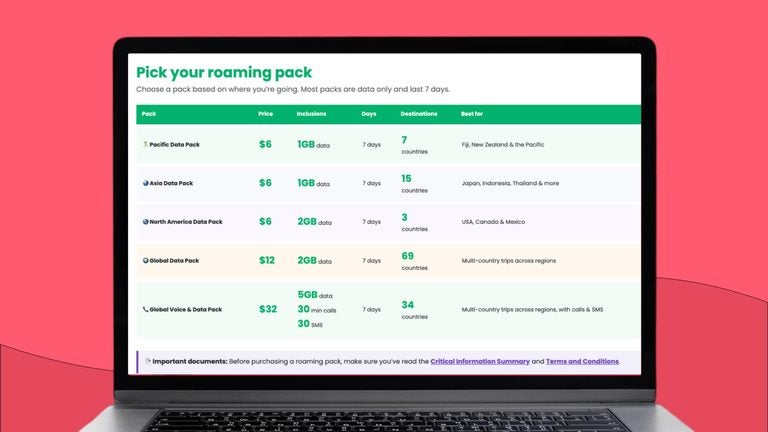
- Five packs from AUD $6: Four data-only packs ($6-$12 for 1GB–2GB) plus a $32 Global Voice & Data Pack (5GB, 30 minutes call, 30 SMS).
- 7-day validity: Each pack is valid for 7 days from activation (Sydney time) with no auto-renewal or rollover.
- Broad coverage: Covers up to 69 destinations across the Pacific, Asia, North America, and Europe, depending on the pack.
- Quick app activation: Buy or schedule a pack in the myMATE app, then turn on Data Roaming in your phone settings when you land.
Does MATE offer international roaming?
Yes, MATE offers international roaming on all active postpaid mobile plans through dedicated, fixed-price 7-day roaming packs starting at $6.
Your regular domestic inclusions (monthly data, data bank, and unlimited Australian calls/texts) only work in Australia and don’t carry over overseas. Without an active roaming pack, your MATE SIM or MATE eSIM cannot use data, calls, or texts abroad.
It is easy to confuse international calling inclusions with roaming, as MATE offers both, but they serve completely different purposes:
- International calls (from Australia): MATE plans include unlimited standard calls and SMS from Australia to 15 selected countries at no extra cost. This only applies while you are in Australia.
- International roaming (while overseas): Roaming applies whenever you use your MATE SIM or eSIM outside Australia on a foreign network. Domestic inclusions stop working, and you must purchase a 7-day roaming pack to stay connected.
MATE international roaming countries
Coverage varies by pack:
- The three regional packs only work in their specific zones.
- The Global Data Pack covers 68–69 destinations worldwide.
- The Global Voice & Data Pack covers a smaller subset of 34 destinations.
So, always check your specific destination in the myMATE app before buying.
| Roaming pack | Region | Supported destinations |
|---|---|---|
| Pacific Data Pack | Oceania and Pacific (7) | Fiji, Nauru, New Zealand, Papua New Guinea, Samoa, Tonga, Vanuatu |
| Asia Data Pack | Asia (15) | Cambodia, China, Hong Kong, India*, Indonesia, Japan, Macao, Malaysia, Philippines, South Korea, Singapore, Sri Lanka, Taiwan, Thailand, Vietnam |
| North America Data Pack | North America (3) | Canada, Mexico, United States |
| Global Data Pack | Global Multi-Region (68–69) | Includes all Pacific, Asia, and North America destinations above, plus major European, Middle Eastern, and South American hubs (e.g., UK, France, Germany, Italy, Spain, Greece, UAE, Brazil). |
| Global Voice & Data Pack | Global Selected Hubs (34) | Covers 34 selected destinations across Oceania, Asia, North America, and Europe (including NZ, USA, UK, Japan, Singapore), but excludes several countries on the $12 Global Data list. |
MATE international roaming packs and prices
MATE offers five prepaid international roaming add-on packs priced between $6 and $32. All packs are valid for 7 days from activation (reckoned on Sydney time) and do not auto-renew.
Most options are data-only; only the Global Voice & Data Pack includes traditional mobile calls and SMS.
| Pack name | Price | Data allowance | Calls and SMS | Validity |
|---|---|---|---|---|
| Pacific Data Pack | $6 | 1GB | None (data-only) | 7 days |
| Asia Data Pack | $6 | 1GB | None (data-only) | 7 days |
| North America Data Pack | $6 | 2GB | None (data-only) | 7 days |
| Global Data Pack | $12 | 2GB | None (data-only) | 7 days |
| Global Voice & Data Pack | $32 | 5GB | 30 minutes + 30 SMS | 7 days |
- No stacking identical packs: Buying the same pack while one is already active immediately replaces the current pack and forfeits any remaining data. You can, however, have two different packs active simultaneously (up to 2 packs per 24-hour period).
- No refunds or pauses: Once a pack activates, it cannot be paused, cancelled, or refunded.
- Calls and voicemail on data-only packs: Standard mobile calls, SMS, and voicemail do not work on the $6 and $12 data-only packs (even over Wi-Fi Calling for voicemail). Use internet-based apps (WhatsApp, FaceTime, Messenger) or purchase the $32 Global Voice & Data Pack if you need traditional calls and texts.
- 1GB of data might not be enough for a week if you frequently use data-heavy apps, like Instagram. To ensure you have sufficient data for your trip, use our data usage calculator or review the data requirements for travel.
How to activate and deactivate MATE international roaming
Purchasing a roaming pack automatically enables roaming at the network level; you only need to buy the add-on and switch on roaming in your phone settings.
1. Purchase or schedule a pack in the myMATE app
Open the myMATE app (or self-care portal), select your mobile service, and tap Add-ons. Choose your destination pack, optionally set a future arrival date, and tap Purchase add-on.
(If buying after you arrive overseas, connect to airport or hotel Wi-Fi first.)
2. Enable Data Roaming on your phone
Once you receive confirmation that your pack is active, open your device settings and turn on both Mobile Data and Data Roaming:
- iPhone: Settings – Mobile – Mobile Data Options – toggle on Data Roaming.
- Android: Settings – Connections – Mobile Networks – toggle on Data Roaming.
3. Connect to a local network
Wait for your phone to connect to a local carrier that supports international roaming.
Important notes:
- You can buy a pack before leaving Australia or buy it overseas via airport/hotel Wi-Fi.
- MATE automatically enables roaming on your account once a pack is activated
- , but you must manually turn on Data Roaming in your phone’s settings.
- You will receive a standard regulatory welcome SMS upon connecting to an overseas network, plus automated SMS, email, and myMATE push alerts when your pack activates and at 50%, 85%, and 100% usage.
How to avoid unexpected MATE international roaming charges
Because MATE uses fixed-price prepaid roaming packs rather than pay-as-you-go rates, you will never face surprise excess per-megabyte charges. But to avoid extra roaming charges on your trip, follow these tips:
- Check the myMATE app: Open the myMATE app and select your mobile service to view your remaining data and exact expiry time.
- Watch for usage alerts: MATE sends automated notifications via SMS, email, and app push alerts at 50%, 85%, and 100% of your allowance.
- Turn off Data Roaming when not needed: Switch Data Roaming off overnight or while on hotel Wi-Fi to prevent background data drain if your Wi-Fi signal drops.
- Disable background data: Enable Low Data Mode (iPhone) or Data Saver (Android), and pause automatic app updates and cloud photo backups over mobile data.
- Download essentials before flying: Save offline Google/Apple Maps, playlists, and travel documents over home Wi-Fi before leaving Australia.
- Use Wi-Fi for heavy tasks: Save video calls, streaming, and photo uploads for trusted Wi-Fi networks.
- Wait before repurchasing: Buying the same pack while one is active overwrites it and forfeits leftover data. Wait until your pack hits 100% or expires before topping up.
Stay connected overseas without worrying about roaming data limits
While MATE international roaming packs work well for short trips and light browsing, for longer trips or heavy data use, a travel eSIM often offers better value.
Holafly eSIM is a more convenient option, offering:
- Unlimited data options in supported destinations.
- 5G speeds where available.
- 24/7 customer support.
- Flexible usage periods from 1 day to 90 days.
- Always On backup data to use for up to 30 days after the plan expiration.
- Reusable eSIM, eliminating the need to reinstall an eSIM in every new location.
Holafly Plans is also a monthly subscription for frequent travellers, supported in 180+ destinations. For those who need more than just unlimited data, Ultra Plan provides additional travel services like travel protection and health support.
FAQs about MATE international roaming
1. Which Australian SIM card is best for international roaming?
It depends on your trip length and data needs. For a short, light-data trip, AUD $6- AUD $12 7-day packs offer great value for 1GB–2GB of basic browsing and maps. For longer trips, international roaming can be expensive. Pairing a low-cost Australian SIM with a dedicated travel eSIM beats daily roaming fees.
2. What is the cheapest way to use my phone abroad?
The cheapest strategy combines free Wi-Fi with local-rate data rather than relying solely on an Australian SIM card. Using a travel eSIM with unlimited data, like Holafly’s, is also the cheapest way to stay connected while abroad.
3. Can I use my MATE SIM and a travel eSIM at the same time?
Yes. Set your travel eSIM as your Mobile Data line and keep your MATE SIM active for Calls and SMS, so you can still receive bank 2FA codes. Make sure Data Roaming is switched OFF on your MATE line to prevent unwanted charges.
Disclaimer: The data in this article is accurate as of November 18, 2026, and is subject to change.

Avoid excessive roaming fees
Don't get caught out by data roaming charges when travelling overseas. Use local networks at local rates.
Plans that may interest you

Formerly a travel journalist turned marketing copywriter, I found my way back to the travel world with Holafly—my dream company that made remote work possible. My motto? “Dream big and make it happen.” I’m passionate about writing, exploring the world, and staying active through walking, running, swimming, and hiking. I also love learning, reflecting, and connecting with inspiring minds.