Language
How much data does Disney Plus use?
Disney Plus data usage can range from 600 MB to 2.5 GB on mobile devices. Find out how to stream abroad without the roaming bill.

Disney Plus data usage ranges from 0.7 GB to 2.5 GB per hour on mobile, and up to 7.7 GB per hour on TV.
Discover all you need to know about Disney Plus data usage, including the facts, figures, and ways to reduce it. Additionally, learn how to switch all your Disney streaming to an unlimited data eSIM, so you don’t have to worry about how much data Disney Plus uses. Holafly has different eSIM options that can definitely help you make that happen.

Unlimited data. Peace of mind.
Stream all you like, without a roaming bill to show for it.
Disney Plus data usage: A breakdown by quality
According to the Holafly data usage research, Disney Plus uses up to 2 GB per hour when streaming at HD. Your hourly data usage will vary depending on your preferred quality, ranging from 0.7 GB on SD to 2.5 GB on 1080 HD.
Disney Plus data usage by streaming quality
Disney Plus offers four different video options, which you can change from the app. 4K is not available on mobile devices.
Here’s the data usage for each one:
| Video quality | Audio quality | Data usage per hour |
|---|---|---|
| SD with stereo sound | Stereo sound | 700 MB |
| HD | 5.1 surround sound | 2 GB |
| 1080 HD | 5.1 surround sound | 2.5 GB |
| 4K | Dolby Atmos | 7.7 GB |
Note: Due to the pop-up ads, data usage is likely a bit higher on the Disney Plus basic plan.
Data usage for downloading content on Disney Plus
When downloading content, you can choose from Standard to High download quality. However, downloads aren’t available on PCs and TVs, meaning you can’t download at the highest quality (4K) in Disney Plus.
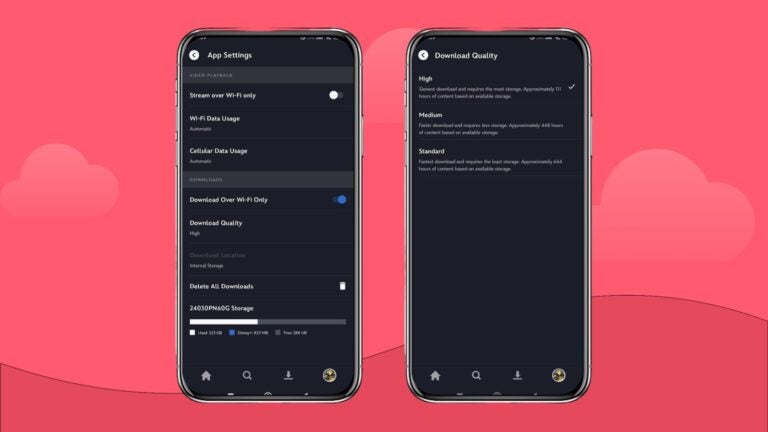
Here’s the data usage for each when downloading a 40-minute episode.
| Video quality | Audio quality | Download data usage |
|---|---|---|
| SD | Stereo sound | 273 MB |
| HD | 5.1 surround sound | 426 MB |
| 1080 HD | 5.1 surround sound | 826 MB |
How much data do you need to use Disney Plus?
Disney Plus data usage will vary based on how much content you stream, especially if you download series to watch before your flight. Using our data calculator, you can double-check how much data you’ll need to stream your favorite shows and movies and use social media and other apps while abroad.
And how much data does Disney Plus use per movie? Disney Plus consumes a lot of data, meaning you’ll need around 15 GB to watch Agatha All Along. If you have a limited data home contract or are relying on data roaming while traveling, this will quickly rack up a hefty bill.
Check your Disney Plus data usage
Here’s how to check your mobile data usage on different devices.
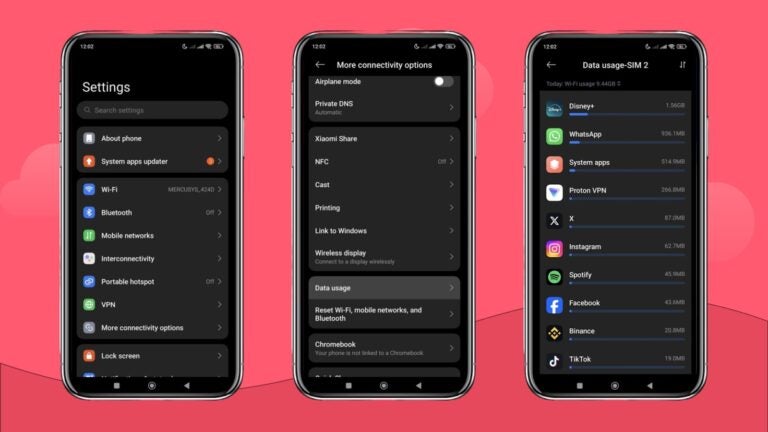
- Android: Go to “Settings,” select “More connectivity options,” and then “Data Usage.”
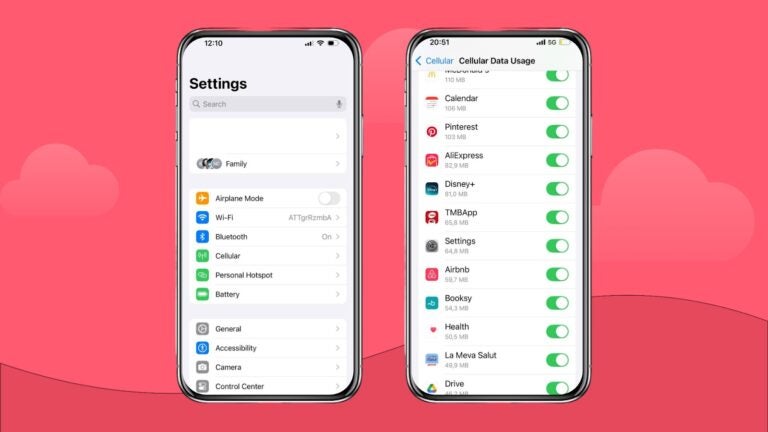
iPhone: Go to “Settings,” select “Cellular/Mobile Data,” scroll down, and look for the Disney Plus data usage.
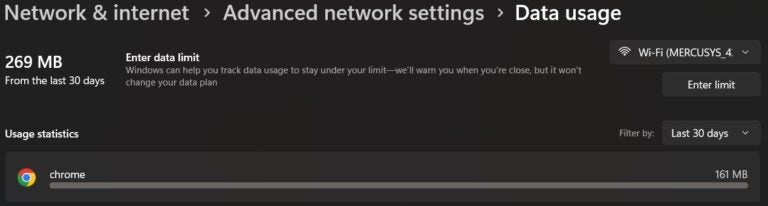
PC: Open “Settings,” go to “Network & Internet,” and select “Advanced network settings.” Choose “Data usage” and check for Google Chrome or your preferred web browser data usage.
How to reduce Disney Plus data usage
Disney+ uses more data than most streaming apps, but knowing precisely how much data streaming uses can help you make smarter choices. Here are the ways to reduce it.
If you’re planning to use mobile data to stream movies or series on Disney Plus, you can change the video quality to start saving data.
Adjust video streaming quality
If you’re planning to use mobile data to stream movies or series on Disney Plus, you can change the video quality to start saving data.
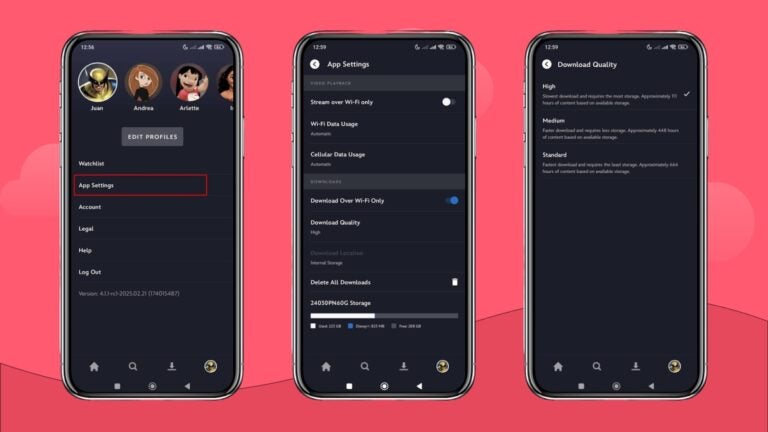
Here’s how you can change it:
- Click on your profile picture
- Click on “App Settings”
- Click on “Cellular Data Usage”
- Change the option to “Save Data” to start streaming at a lower quality (SD Quality)
Stream using WiFi
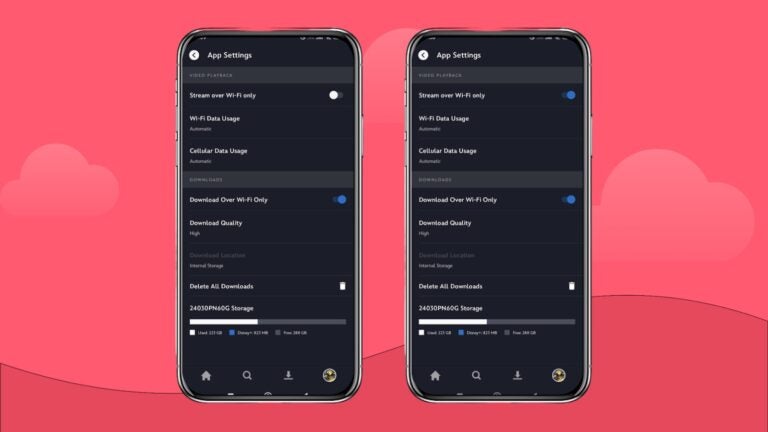
In case you don’t want to sacrifice the HD quality of Deadpool & Wolverine, here’s how you can stream over WiFi only:
- Click on your profile picture
- Click on “App Settings”
- Toggle on the “Stream over Wi-Fi only” option
Download content using WiFi
Downloading content is a great way to save that Star Wars season to watch it later, but it can also deplete your data plan in less than one hour if you don’t do it over WiFi.
Here’s how to make sure your content downloads only work over WiFi:
- Click on your profile picture
- Click on “App Settings”
- Toggle on the “Download over Wi-Fi Only” option
Tip: If downloading content using mobile data, lower the quality to “Standard.”
How to keep streaming Disney Plus when abroad
Streaming while abroad using data roaming service from companies like Verizon or AT&T can add up to your travel costs. Their pay-as-you-go rates can cost up to $738 for a 10-minute stream.
A Holafly eSIM gives you unlimited data, 5G speeds, and 24/7 support for a single trip. For longer stays, Holafly Plans covers 170+ destinations on a pay-monthly basis: no contracts, no data limits. You get to keep streaming Disney Plus without worrying about your data usage.
And every Holafly eSIM includes Always On: 1 GB of monthly backup data at no extra cost, for when you need a quick connection between plans.

An eSIM you can rely on
Join over 1 million customers and enjoy your favorite Disney shows from anywhere.
FAQs on Disney Plus data usage
It depends on the streaming quality. SD uses around 600 MB per hour, HD uses 1.8 GB, 1080 HD uses 2.5 GB, and 4K uses up to 7.7 GB per hour.
At SD quality, a 2-hour movie uses around 1.2 GB. At HD, expect roughly 3.6 GB, and at 1080 HD, around 5 GB. 4K can use up to 15 GB for a full-length film.
Lower the video quality to SD in the app settings under Cellular Data Usage, or toggle on “Stream over Wi-Fi Only” to avoid using mobile data altogether. Downloading content over WiFi before you travel is another good option.
At HD quality (2 GB/hour), a 2-hour movie uses around 4 GB. At 1080p, expect closer to 5 GB.
Plans that may interest you

I first started my content creation journey as a freelancer in 2019, before connecting with Holafly in 2021. At Holafly, my travel and tech interests come together in one place as I craft high-quality articles about the eSIM and related markets. My content aims to help travelers stay connected, wherever they are.