Language
Does Waze work in Canada?
Does Waze work in Canada for road trips and navigation? Holafly (6Does Waze work in Canada? Learn about coverage, traffic alerts, speed cameras, internet requirements, and how it compares with Google Maps.

Yes, Waze works throughout Canada and remains one of the most popular navigation apps for drivers traveling within the country. Whether you’re driving through downtown Toronto, crossing the Rocky Mountains in Alberta, exploring the coastal roads of British Columbia, or taking a road trip through Quebec and the Atlantic provinces, Waze provides turn-by-turn navigation, live traffic information, hazard alerts, and route suggestions designed to help drivers reach their destinations more efficiently.
The app is available for both Android and iPhone devices, and there are no special settings required to use it in Canada. Once installed, Waze automatically detects your location and begins providing navigation services as long as your device has access to GPS and an internet connection.
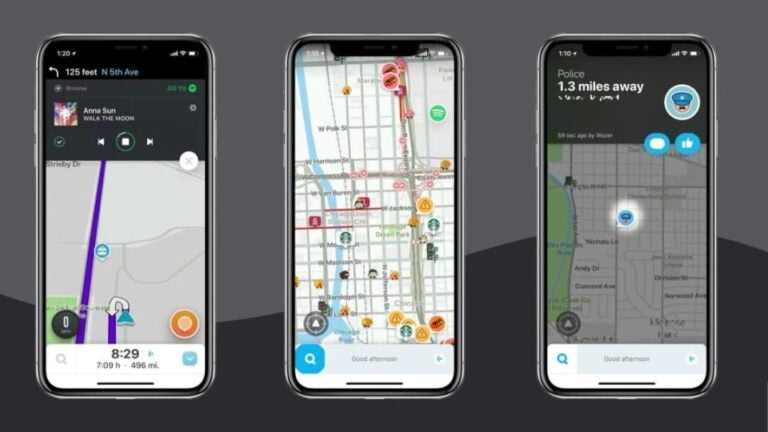
One reason Waze has become so popular among Canadian drivers is its community-based approach. Unlike traditional navigation systems that rely primarily on map data, Waze allows users to report traffic jams, road closures, accidents, police presence, construction zones, and other hazards in real time. These reports help other drivers avoid delays and make more informed decisions while on the road.
In this guide, we’ll explain how Waze works across Canada, whether it performs well in remote regions, how much internet connectivity it requires, and how it compares with Google Maps for everyday navigation and road trips.

Can you use Waze when driving all around Canada?
Waze works across all Canadian provinces and territories, making it a practical navigation tool for both daily commuting and long-distance travel. Drivers can use the app in major cities such as Toronto, Vancouver, Montreal, Calgary, Ottawa, Edmonton, Winnipeg, Halifax, and Quebec City, as well as on highways connecting different regions of the country.
One of the biggest advantages of Waze is that it does not require drivers to switch maps or download separate navigation packages when moving between provinces. The app automatically follows your route regardless of whether you’re crossing from Ontario into Quebec, driving from Alberta into British Columbia, or traveling across multiple provinces during a longer road trip.
As you drive, Waze continuously analyzes traffic conditions and road reports submitted by other users. If an accident causes a major delay ahead, the app automatically recalculates your route and proposes alternatives. This dynamic routing system helps drivers avoid unnecessary congestion and often saves significant travel time, particularly in busy urban areas.
Waze focuses primarily on finding the fastest route available based on current traffic conditions. While it occasionally suggests routes that help reduce toll costs when alternative roads are available, its main objective is reducing travel time rather than minimizing expenses.
For commuters navigating large metropolitan areas such as Toronto or Vancouver, this real-time traffic management is one of the app’s most valuable features. Instead of remaining stuck in heavy traffic, drivers receive alternative routes that reflect current road conditions as they develop.
Does Waze work in remote areas?
Waze performs exceptionally well throughout Canada’s more populated southern regions, where most Canadians live and where mobile network coverage is strong. Cities, suburbs, major highways, tourist destinations, and most provincial road networks provide enough connectivity for the app to function normally.
As drivers move into more remote areas, however, the experience can become less consistent. Northern regions of Canada contain vast stretches of wilderness where cellular coverage is limited or disappears entirely. Areas in northern Ontario, northern Manitoba, northern Saskatchewan, northern Quebec, Yukon, Nunavut, and parts of the Northwest Territories do experience connectivity gaps that affect real-time navigation features.
Unlike some navigation apps that emphasize offline functionality, Waze relies heavily on internet connectivity because its core strengths depend on live information. Traffic updates, road closures, hazard reports, construction alerts, and route recalculations all require access to current data.
Canada’s remote regions differ significantly from highly populated areas in the south. While Waze can continue following a route temporarily after losing connectivity, drivers should not expect the same level of performance in isolated locations as they would experience in cities such as Toronto or Montreal.
It’s worth noting that Canada’s geography differs greatly from destinations such as the Dolomites in northern Italy. The Dolomites are mountainous but generally maintain strong tourism infrastructure and mobile coverage throughout most driving routes. Canada’s northern wilderness areas are often far more remote, with larger distances between towns and fewer mobile network towers.
Beach destinations generally present fewer issues. Popular coastal areas in British Columbia, Prince Edward Island, Nova Scotia, New Brunswick, and southern Ontario actually maintain strong mobile coverage, allowing Waze to operate normally.
Does Waze show checked speed limits and the location of speed cameras in [destination]?
Waze provides a wide range of driving alerts across Canada, including speed limit information in many areas, traffic incidents, accidents, construction zones, road hazards, and police reports submitted by the community.
The availability of speed camera alerts depends on local regulations and the quality of community reporting in specific regions. In many Canadian cities and provinces, users report photo radar locations, red-light cameras, and speed enforcement zones, allowing other drivers to receive notifications while approaching those areas.
Speed limit displays are available on many roads and highways, although drivers should always pay attention to posted road signs because speed limits can change due to construction zones, temporary restrictions, or local regulations.
Because laws regarding speed camera notifications differ around the world and occasionally evolve, drivers should remain familiar with local traffic regulations and avoid relying exclusively on app-generated alerts.
Does Waze need internet in Canada: Roaming vs eSIM for navigation
Yes, Waze requires an internet connection to deliver its most important features.
The app constantly exchanges data with its servers to provide:
- Real-time traffic updates.
- Accident reports.
- Road closure information.
- Construction alerts.
- Police reports.
- Hazard notifications.
- Dynamic route recalculations.
Without internet access, Waze loses many of the features that make it different from traditional GPS systems. If connectivity is interrupted during a trip, navigation may continue temporarily because the current route remains stored on the device. However, the app stops receiving live updates, traffic information, and route changes until connectivity is restored.
For travelers visiting Canada from abroad, this creates an important consideration. International roaming charges can become expensive, especially during longer road trips where navigation remains active for several hours each day.
An eSIM often provides a simpler and more cost-effective solution. With a dedicated Canada data plan, travelers can maintain continuous access to navigation services without worrying about unexpected roaming fees. This allows Waze to function as intended, delivering real-time traffic information, hazard reports, and route optimization throughout the journey.
For road trips covering multiple provinces or longer stays in Canada, reliable mobile data becomes just as important as having a full fuel tank. Navigation apps perform best when they remain connected throughout the trip.

Is Waze better than Google Maps in Canada?
The answer depends largely on how you plan to use the app.
Waze excels at real-time driving navigation. Its community-driven reporting system often provides faster notifications about accidents, traffic jams, police presence, road hazards, and construction delays. Drivers who spend significant time on highways or commuting through major cities frequently prefer Waze because of its aggressive route optimization and constant traffic monitoring.
Google Maps takes a broader approach. In addition to driving directions, it provides comprehensive information about restaurants, hotels, public transportation, businesses, attractions, walking routes, cycling directions, and offline maps. This makes it particularly useful for travelers who need more than just navigation.
For road trips in Canada, both apps perform well and have received many reviews, but they serve slightly different purposes.
Waze generally offers advantages for:
- Real-time traffic avoidance.
- Community-reported road hazards.
- Live driving alerts.
- Fast route recalculations.
- Daily commuting.
Google Maps performs better for:
- Offline navigation.
- Finding businesses and attractions.
- Public transportation directions.
- Trip planning.
- Exploring unfamiliar destinations.
Some travelers use both apps together. Google Maps helps with trip planning, restaurant searches, accommodation research, and offline map downloads, while Waze handles active driving navigation once they are on the road.
Other navigation apps worth considering in Canada include Maps.me for offline navigation and HERE WeGo, which also provides strong offline mapping capabilities. However, for drivers who prioritize live traffic intelligence and community-driven updates, Waze remains one of the strongest navigation tools available.
Plans that may interest you

English Copywriter at Holafly, I'm committed to sharing tips that will make your travel experiences memorable. Over the years as a writer and strategist, I've managed teams across multiple industries - SaaS, tech, real estate, and personal brands. I wrote my first book as a child and have been writing ever since, cooking and reading are a few ways I explore my world.